
MCP server · Developer tools
Docker MCP server
Lets your AI check, start, restart and watch your Docker containers and Compose stacks for you.
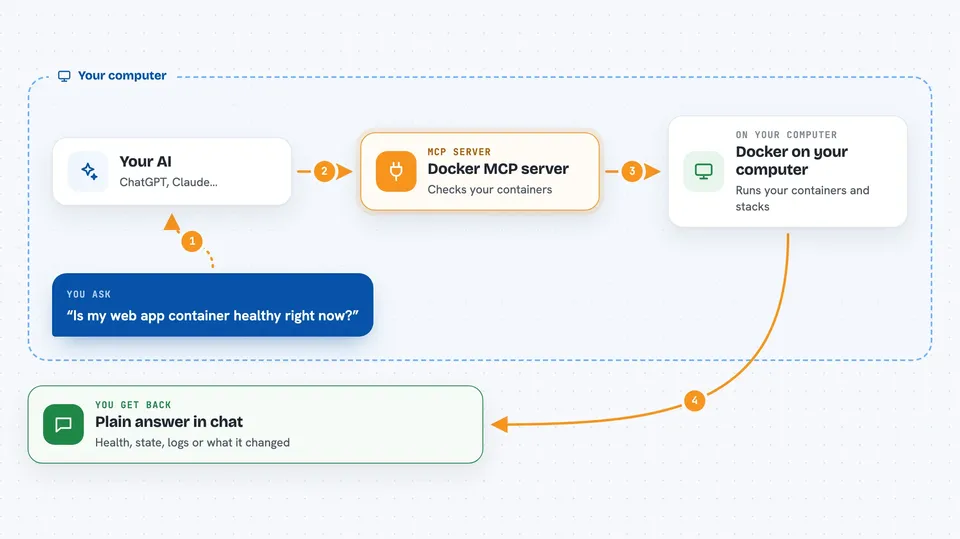
This is a small helper that connects your AI assistant to Docker, the tool many teams use to run apps inside containers. Once it is set up, you can ask your AI in plain words to check whether a container is healthy, restart one that crashed, or bring a whole stack up and down. It is handy for anyone who runs apps on a server but does not want to type Docker commands all day.
What is an MCP server? The 30-second version
On its own, your AI can only chat. It cannot see or touch anything on your computer or your servers. An MCP server is a small helper program that gives your AI one new skill, and here that skill is talking to Docker on your machine. So when you ask your AI to check a container, the AI passes the request to this helper, the helper talks to Docker, and the answer comes back to you in the chat.
What this MCP server does
You ask your AI something like "is my web app container healthy?" The AI sends that request to this helper, which talks to Docker running on your machine. Docker replies with the container state, and the helper hands that back to your AI. Your AI then tells you in normal words what it found, or does the action you asked for, like restarting a crashed container or bringing a Compose stack up. It can also follow logs and watch for crashes over a short window of time.
 Click to zoom
What you can do with it
- Check whether a container is healthy using an HTTP, TCP or command check
- Restart a container that has crashed or set it to restart automatically
- Start, stop, restart or tear down a whole Docker Compose stack
- Follow a container's logs and search them for errors
- See a fleet view of all your containers, their health and uptime
- Watch recent Docker events to spot crashes and restarts
- Run a command inside a container to debug it
Try asking your AI
- “Is my web app container healthy right now?”
- “Restart the api container and set it to always restart if it crashes”
- “Bring up my docker-compose stack and tell me if every service is running”
- “Search the logs of my app container for the word ERROR in the last few minutes”
What it gives back to you
You get answers in plain words in the chat: whether a container is healthy, what state it is in, how long it has been running, or a short list of containers and their status. When you ask for logs, you get the matching lines back. When you ask it to restart or bring a stack up or down, it tells you what it did.
Before you start
What you need
- Docker installed and running on the same computer as your AI app
- Your user account allowed to talk to the Docker socket (usually means being in the docker group on Linux)
- An AI app that supports MCP servers, like the Claude desktop app
Good to know
This helper can start, stop, restart and replace your containers, so a wrong request can take a running app offline or delete a container.
Install it with your AI
Add Docker MCP server to your AI, no technical skills needed
You don't install anything by hand. You copy one prompt, paste it into an AI that can work on your computer, and it checks, installs and connects the server for you, asking you when it needs something.
Sign in to get the install prompt
Members get a ready-made prompt that lets the Claude desktop app check Docker MCP server, install it and connect it for them, step by step. You don't need any technical skills: you copy, paste and answer a few questions. Your connected AI can also find and install any of the 4,609 MCP servers here for you.
Who it's for
Developers, ops people and small teams who run apps in Docker and want their AI to help keep those containers alive.



