MCP server · Research
Bhoonidhi MCP server
by geovicco-dev
Search and download satellite images from ISRO's Bhoonidhi portal just by asking your AI in plain words.
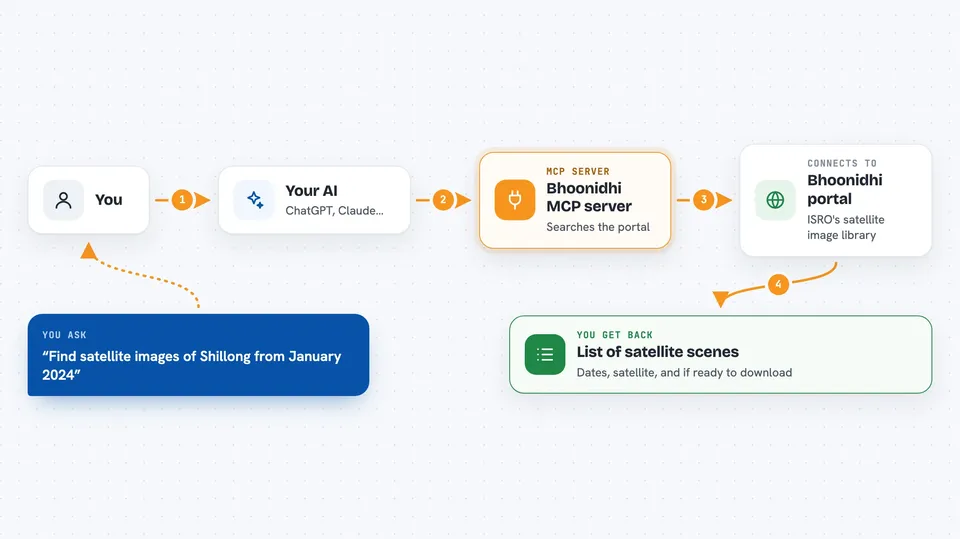
This is a small helper that connects your AI to Bhoonidhi, the Indian Space Research Organisation's public portal for satellite images of Earth. You describe what you want in normal words, like a place and a month, and your AI goes and looks it up for you. It is handy for anyone who needs satellite pictures but does not want to learn the portal's search screens.
What is an MCP server? The 30-second version
On its own, your AI can only chat. It cannot look things up on a website or download a file for you. An MCP server is a small helper program that gives your AI a new skill or a connection to an app or service. This one connects your AI to Bhoonidhi, so when you ask about satellite images over a place, the AI can actually search the portal and fetch what you asked for.
What this MCP server does
You ask your AI something like what satellite images exist over a certain lake last January. The AI passes that to this helper. The helper turns your place name into a map location, then asks the live Bhoonidhi portal what scenes match. It comes back with a list, and tells you honestly which ones you can download right now and which ones need a request first. If you want, it can then download the open ones or add others to your cart.
 Click to zoom
What you can do with it
- Look up which satellites and sensors Bhoonidhi has
- Find satellite scenes over a place and date range
- Check which scenes you can download right now
- Preview what a download would fetch before starting it
- Save a search so you can reuse it later
- Download open-access scenes in the background
- Add scenes to your Bhoonidhi cart
Try asking your AI
- “Find Sentinel-2 scenes over Shillong in January 2024”
- “Show me Cartosat imagery within 20 km of Bengaluru in the first half of 2024”
- “Of those scenes, how many can I actually download right now?”
- “Save that search so I can download it later”
What it gives back to you
You get back a plain list of scenes with their dates, the satellite and sensor, and whether each one is ready to download or just archived. For downloads, it reports how many bytes came through, the speed, and a percent when the size is known. Everything shows up right in your chat as text you can read and act on.
Before you start
What you need
- A Bhoonidhi account (free to create on the NRSC portal)
- The uv tool installed (a small program that runs Python helpers)
- For downloads and cart actions, a login done once with the bhd command
Good to know
Downloading and cart actions use your own Bhoonidhi login, and priced or on-order scenes still need you to complete any order and payment on the portal yourself.
Install it with your AI
Add Bhoonidhi MCP server to your AI, no technical skills needed
You don't install anything by hand. You copy one prompt, paste it into an AI that can work on your computer, and it checks, installs and connects the server for you, asking you when it needs something.
Sign in to get the install prompt
Members get a ready-made prompt that lets the Claude desktop app check Bhoonidhi MCP server, install it and connect it for them, step by step. You don't need any technical skills: you copy, paste and answer a few questions. Your connected AI can also find and install any of the 4,361 MCP servers here for you.
Who it's for
People who work with maps, land, or the environment and want satellite images without learning a portal's search screens.