
MCP server · Security
GridinSoft Inspector MCP server
by gridinsoft
Lets your AI check whether a website or link is safe, suspicious, or a phishing trap.
This is a small helper that connects your AI to GridinSoft Inspector, a service that checks how trustworthy a website or link is. You ask your AI about a domain or a link, and it comes back with a safety verdict. It is handy for anyone who clicks links from emails, chats, or search results and wants a second opinion before trusting them.
What is an MCP server? The 30-second version
On its own, your AI can only chat with you using what it already knows. An MCP server is a small helper program that gives your AI a new skill or a connection to an outside service. This one connects your AI to GridinSoft Inspector, a website reputation service. Once it is set up, your AI can look up a domain or scan a link for you and tell you what it found.
What this MCP server does
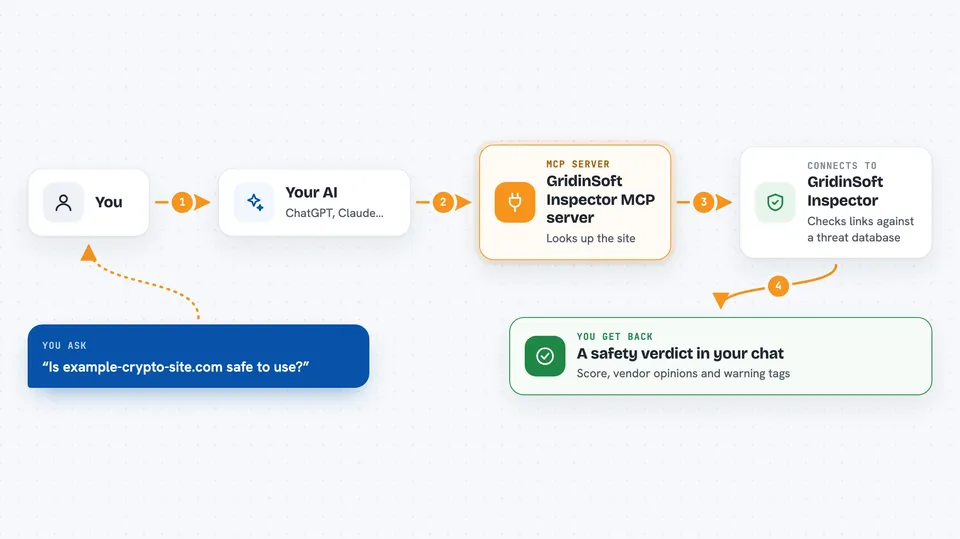
You ask your AI something like whether a certain site is safe. Your AI passes that domain or link to this helper. The helper talks to GridinSoft Inspector, which checks its threat database and returns a verdict. Your AI then tells you the reputation score, what other security vendors say, and any warning tags. You get a plain answer in the chat instead of having to visit the site yourself.
 Click to zoom
What you can do with it
- Check the reputation score of any domain
- Scan a shortened or suspicious link before opening it
- See whether a page looks like a phishing trap
- Look up hosting and registrar details for a site
- Check how many credits you have left
- Get vendor verdicts from multiple security engines
- Verify a shop or platform before trusting its prices
Try asking your AI
- “Is the domain example-crypto-site.com safe to use?”
- “Scan this link for phishing before I open it: http://bit.ly/xxxx”
- “What is the reputation of gridinsoft.com?”
- “Should I trust this website? It looks like a login page but the URL is strange.”
What it gives back to you
You get back a reputation score from 0 to 100, verdicts from several security vendors, and tags that flag things like phishing or malware. For a full link scan you also get redirect details, DNS and SSL info, and metadata about the page. It all shows up as a short summary in your chat, so you can decide whether to trust the site.
Before you start
What you need
- A GridinSoft Inspector account (free signup, 100 credits per month included)
- An API key from your GridinSoft Inspector profile page (a kind of password for apps)
- The Claude desktop app or an editor like Cursor or Windsurf
- Node.js installed on your computer so npx can run
Good to know
Each check uses up credits from your GridinSoft account, so heavy use can use up your free monthly allowance or cost money on a paid plan.
Install it with your AI
Add GridinSoft Inspector MCP server to your AI, no technical skills needed
You don't install anything by hand. You copy one prompt, paste it into an AI that can work on your computer, and it checks, installs and connects the server for you, asking you when it needs something.
Sign in to get the install prompt
Members get a ready-made prompt that lets the Claude desktop app check GridinSoft Inspector MCP server, install it and connect it for them, step by step. You don't need any technical skills: you copy, paste and answer a few questions. Your connected AI can also find and install any of the 4,609 MCP servers here for you.
Who it's for
Anyone who clicks links from emails or chats and wants a quick safety check, plus people doing security reviews or research.



