MCP server · Design tools
SaglitzDesign MCP server
by HalidSaglam
Gives your AI real design rules and generators for web, iOS, Android and macOS, plus SEO and marketing help.
SaglitzDesign is a helper for your AI that turns vague design advice into concrete rules. Instead of saying "make it clean and modern", it hands your AI real numbers, checklists and ready-to-use design files. It is handy if you build websites or apps and want a second pair of expert eyes, even if you are not a designer yourself.
What is an MCP server? The 30-second version
On its own, your AI can only chat with you using what it already learned. An MCP server is a small helper program that gives your AI a new skill or a connection to something useful. This one connects your AI to a big library of design, UX, marketing and SEO knowledge that lives on your own computer. When you ask for design help, your AI quietly asks this helper for the right rules and examples, then answers you with them.
What this MCP server does
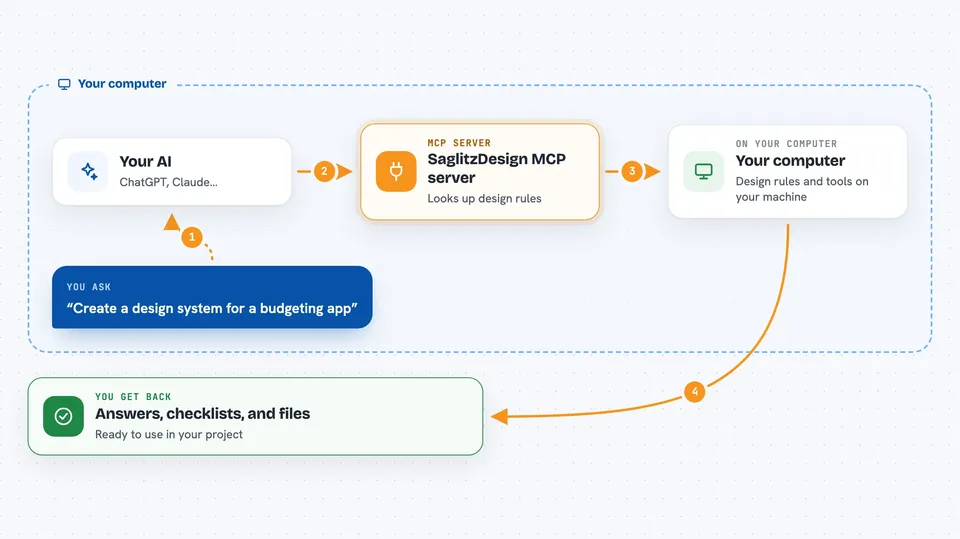
You ask your AI something like "help me design a paywall" or "check my landing page". Your AI sends that request to this helper program running on your computer. The helper looks through its library of design documents and tools, and pulls out the parts that match. It can also generate real things for you, like color sets, design tokens and example code. Your AI then turns all of that into an answer, a checklist or files you can use.
 Click to zoom
What you can do with it
- Get a full design system from one brand color and a platform
- Check color contrast and tap target sizes against WCAG rules
- Get production-ready code for buttons, forms, modals and more
- Compare how iOS, Android, macOS and web handle the same screen
- Audit a website or app for UX, accessibility, SEO and conversion issues
- Get a phased roadmap for building a website, landing page or mobile app
- Turn existing CSS or theme files into tokens for other platforms
Try asking your AI
- “Create a design system for a budgeting app, brand color teal, calm and trustworthy vibe”
- “Review my landing page copy and tell me what hurts conversions”
- “Give me a button component in SwiftUI with all states and accessibility”
- “What are the touch target size rules for iOS and Android”
What it gives back to you
You get answers in plain chat: rules, checklists, step-by-step roadmaps and comparisons between platforms. Some tools return real files or code you can copy, like CSS variables, Tailwind config, SwiftUI or Compose snippets, and design tokens. Audits come back with measured numbers, such as contrast ratios and a score out of 40. Everything shows up right in your conversation, ready to paste into your project.
Before you start
What you need
- An MCP client like Claude Desktop, Claude Code or Cursor
- Node.js installed on your computer (the README uses npx to run it)
Good to know
It runs fully offline and only reads local files, so your prompts and code stay on your machine, but the design advice it gives is curated by the project authors and not every document's sources are verified.
Install it with your AI
Add SaglitzDesign MCP server to your AI, no technical skills needed
You don't install anything by hand. You copy one prompt, paste it into an AI that can work on your computer, and it checks, installs and connects the server for you, asking you when it needs something.
Sign in to get the install prompt
Members get a ready-made prompt that lets the Claude desktop app check SaglitzDesign MCP server, install it and connect it for them, step by step. You don't need any technical skills: you copy, paste and answer a few questions. Your connected AI can also find and install any of the 4,361 MCP servers here for you.
Who it's for
Product designers, developers, founders and marketers who build websites or apps and want expert design guidance without hiring a full design team.