
MCP server · Research
Unsplash MCP server
by hellokaton
Lets your AI search Unsplash for photos by keyword, color, and orientation, and hand you the results.
This is a small helper that connects your AI assistant to Unsplash, the big free photo library. Once it is set up, you can just ask for pictures in plain words and your AI will go find them. It is handy for anyone who needs images for slides, posts, or documents without opening a browser and hunting around.
What is an MCP server? The 30-second version
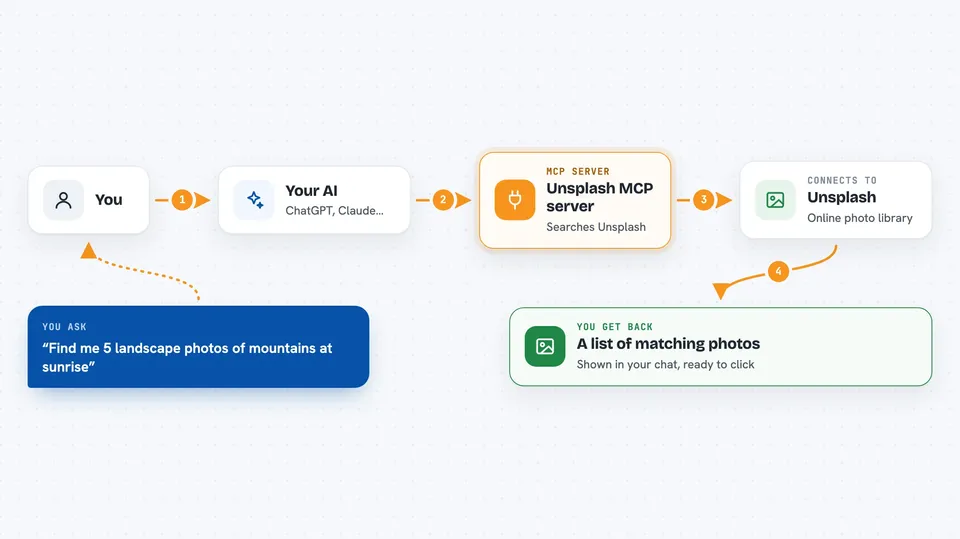
On its own, your AI can only chat with you. It cannot reach out to other websites or apps. An MCP server is a small helper program that gives your AI one new skill, and here that skill is talking to Unsplash. So when you ask for a photo, your AI passes the request to this helper, the helper asks Unsplash, and the answer comes back into your chat.
What this MCP server does
You type a request like you normally would, for example asking for photos of a mountain at sunrise. Your AI sends that request to this helper program. The helper then asks Unsplash's photo library, using the search words and any filters you mentioned, like color or whether the photo is wide or tall. Unsplash sends back a list of matching photos, and the helper passes that list to your AI. Your AI then shows you the results in the chat.
 Click to zoom
What you can do with it
- Search Unsplash for photos by keyword
- Filter results by color scheme
- Choose landscape, portrait, or other orientation
- Sort and page through results
- Get several photos at once for a topic
Try asking your AI
- “Find me 5 landscape photos of mountains at sunrise”
- “Show me some blue-toned photos of the ocean”
- “I need a portrait-style picture of a coffee cup for a blog post”
- “Search Unsplash for cozy autumn scenes and give me the top 3”
What it gives back to you
You get back a list of matching photos from Unsplash, usually with a few details for each one like the description and a link. It shows up right in your chat as text you can read and click. Your AI can then help you pick one or talk through the options with you.
Before you start
What you need
- An Unsplash account, then a developer account at unsplash.com/developers
- An Unsplash Access Key (a kind of password the site gives you for free when you register an app)
- A tool that can run MCP servers, like Cursor or Claude Desktop
Good to know
It only searches and shows photos, it does not change or delete anything, but you should keep your Unsplash Access Key private and check each photo's license before using it in your work.
Install it with your AI
Add Unsplash MCP server to your AI, no technical skills needed
You don't install anything by hand. You copy one prompt, paste it into an AI that can work on your computer, and it checks, installs and connects the server for you, asking you when it needs something.
Sign in to get the install prompt
Members get a ready-made prompt that lets the Claude desktop app check Unsplash MCP server, install it and connect it for them, step by step. You don't need any technical skills: you copy, paste and answer a few questions. Your connected AI can also find and install any of the 4,361 MCP servers here for you.
Who it's for
Anyone who needs photos for slides, blog posts, or social media and wants to find them by asking instead of browsing.


