MCP server · Productivity
Yuque MCP server
by HenryHaoson
Let your AI read, search, create and update your Yuque documents and knowledge bases for you.
This is a small helper that connects your AI assistant to Yuque, the Chinese knowledge base and document platform. Once it is set up, you can ask your AI to look things up, write new documents, or pull team numbers without leaving the chat. It is handy if you keep your notes, team wiki, or project docs in Yuque.
What is an MCP server? The 30-second version
On its own, your AI can only chat with you. An MCP server is a small helper program that gives your AI a new skill or a connection to an app. This one connects your AI to Yuque, so it can look things up or make changes there when you ask. You stay in the chat, and the helper does the back and forth with Yuque for you.
What this MCP server does
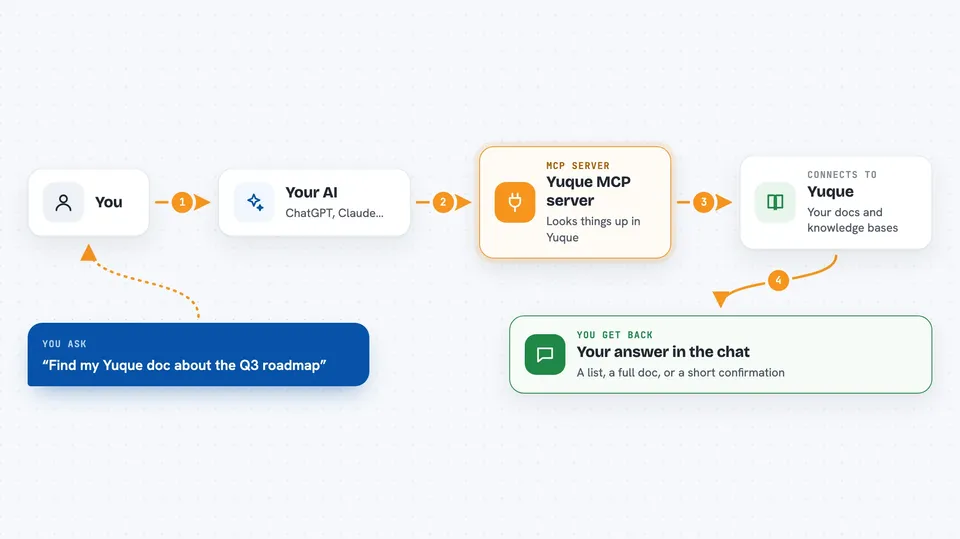
You ask your AI something about your Yuque account, like finding a document or listing your knowledge bases. The AI passes your request to this helper. The helper talks to Yuque using your account token, fetches or changes what you asked for, and sends the result back. Your AI then shows it to you in plain language in the chat. If you asked it to create or update something, the change happens in Yuque right away.
 Click to zoom
What you can do with it
- List your Yuque knowledge bases and the documents inside them
- Read the full content of a specific document
- Create a new document in a knowledge base you choose
- Update the title, content, or sharing settings of an existing document
- Delete a document you no longer need
- Search across Yuque for documents or knowledge bases
- Pull team statistics like member counts, reads, and likes
Try asking your AI
- “Show me all my Yuque knowledge bases and how many documents each one has”
- “Find any Yuque document that mentions our Q3 roadmap”
- “Create a new document in my Team Wiki called Meeting Notes for today with a short summary of our standup”
- “How many people read our onboarding doc last month, and who edited it most?”
What it gives back to you
You get answers in plain text in the chat: lists of knowledge bases or documents, the full body of a document you asked for, or numbers from team statistics. If you asked it to create, update, or delete something, it tells you what it did. Search results come back as a short list with titles and links.
Before you start
What you need
- A Yuque account
- A Yuque API token (a kind of password for apps; Yuque gives you one in your account settings)
- Node.js 18 or newer if you run it yourself, or Docker if you prefer that route
Good to know
It can create, change, and delete documents in your Yuque account, and deletions cannot be undone, so double check before you tell your AI to remove anything.
Install it with your AI
Add Yuque MCP server to your AI, no technical skills needed
You don't install anything by hand. You copy one prompt, paste it into an AI that can work on your computer, and it checks, installs and connects the server for you, asking you when it needs something.
Sign in to get the install prompt
Members get a ready-made prompt that lets the Claude desktop app check Yuque MCP server, install it and connect it for them, step by step. You don't need any technical skills: you copy, paste and answer a few questions. Your connected AI can also find and install any of the 4,361 MCP servers here for you.
Who it's for
People who keep their notes, team wiki, or project docs in Yuque and want their AI to read or update them without switching apps.