MCP server · Coding
PRIMS Python Sandbox MCP server
by hileamlakB
Lets your AI run Python code for you in a safe, throw-away sandbox and show you the results.

PRIMS is a small helper that gives your AI the ability to actually run Python code, not just talk about it. You ask for something, the AI writes the code, runs it in a fresh sandbox, and shows you what came out. It is handy if you work with data, spreadsheets, or small calculations and want answers without installing anything yourself.
What is an MCP server? The 30-second version
On its own, your AI can only chat. An MCP server is a small helper program that gives your AI a new skill or a connection to another tool. This one connects your AI to a Python runtime, so it can write and run code for you on the spot. You stay in the chat and just ask in plain words.
What this MCP server does
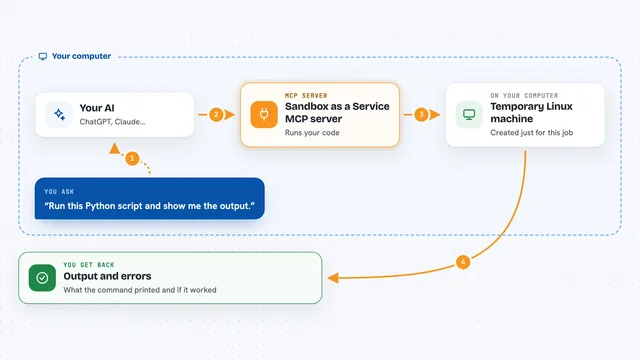
You ask your AI to do something that needs code, like reading a CSV file or making a chart. The AI writes the Python, then hands it to this helper. The helper starts a clean, temporary workspace, installs any packages the code needs, and runs it. When it finishes, it sends back whatever the code printed, plus any files it created. Then the workspace is wiped, so nothing lingers.
 Click to zoom
What you can do with it
- Run Python code you or the AI wrote, in a safe temporary sandbox
- Install extra Python packages on the fly for a single run
- Read a CSV or other file you point it to and work with the data
- List the files your code created in the session workspace
- Preview the first part of a text file to check the result
- Save a generated file (like a chart) to a permanent location
- Download a remote file once and reuse it during the session
Try asking your AI
- “Read this CSV file and tell me the average of the sales column”
- “Make a bar chart of these numbers and save it as a PNG”
- “Write a small Python script that cleans up this list of names and run it”
- “Install pandas and show me the first five rows of this dataset”
What it gives back to you
You get back whatever the code printed, plus any error messages if something went wrong. If the code created files, like a chart or a cleaned CSV, you can preview or download them. The AI usually summarizes the result in the chat too, so you do not have to read raw output.
Before you start
What you need
- Python 3.10 or newer installed on your computer
- The PRIMS server files from its GitHub page
- A terminal to run the setup script once
Good to know
The code runs in a sandbox, but it can still read any file you mount and use any packages it installs, so only run code and files you trust.
Install it with your AI
Add PRIMS Python Sandbox MCP server to your AI, no technical skills needed
You don't install anything by hand. You copy one prompt, paste it into an AI that can work on your computer, and it checks, installs and connects the server for you, asking you when it needs something.
Sign in to get the install prompt
Members get a ready-made prompt that lets the Claude desktop app check PRIMS Python Sandbox MCP server, install it and connect it for them, step by step. You don't need any technical skills: you copy, paste and answer a few questions. Your connected AI can also find and install any of the 4,609 MCP servers here for you.
Who it's for
Anyone who wants their AI to run small Python tasks for them, like analysts, students, or office workers handling data, without setting up a coding environment themselves.