MCP server · Notes
GoodMemory MCP server
by hjqcan
Give your AI a long-term memory that saves useful facts about you and your projects, and lets you review or delete them.
GoodMemory is a memory helper for AI tools. It lets your AI remember things about you and your projects between chats, instead of starting fresh every time. It is handy if you use Claude Code or Codex and want your assistant to keep track of context.
What is an MCP server? The 30-second version
On its own, your AI can only chat with what is in front of it right now. An MCP server is a small helper program that gives your AI a new skill or a connection to an app or service. This one connects your AI to GoodMemory, a memory store that lives on your own computer. When you ask something, your AI can look up what it already saved about you or your project, and can save new notes if you allow it.
What this MCP server does
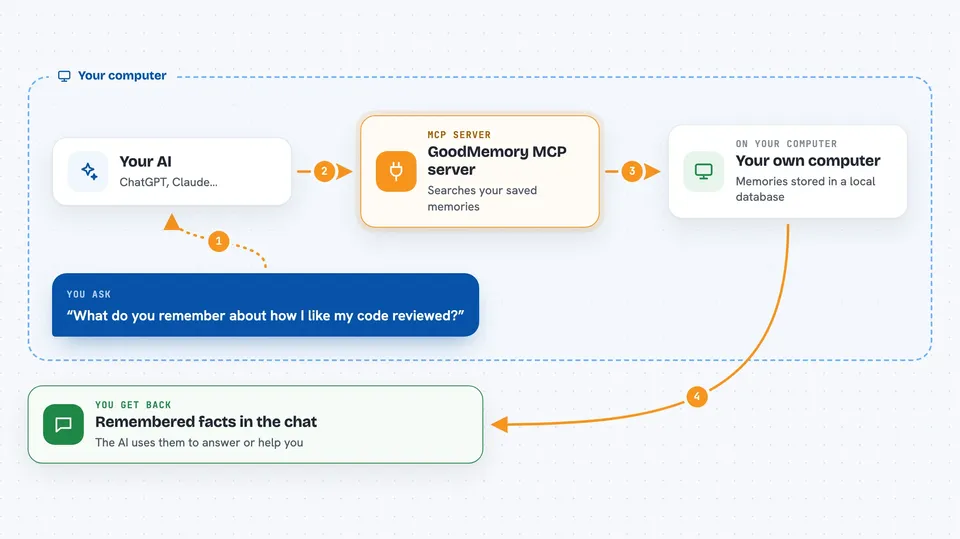
You ask your AI a question or start a task. The AI uses this helper to search your saved memories for anything relevant. The helper reads from a small local database on your machine and hands back the matching notes. Your AI then uses those notes to answer you or to do the task with better context. If writeback is turned on and you approve it, the AI can also save a new memory for next time.
 Click to zoom
What you can do with it
- Recall saved facts about you or your project before answering
- Save a new memory when you allow writeback
- Show what memories exist and where they came from
- Delete a memory that is wrong or outdated
- Export your memories to a file for backup
- Import memories back from a file
- Keep separate memories for different users or projects
Try asking your AI
- “What do you remember about how I like my code reviewed?”
- “Remember that this project uses tabs, not spaces.”
- “Show me the memories you have saved about this workspace.”
- “Forget the note about my old API key.”
What it gives back to you
You get back short notes or summaries in the chat, like a list of remembered facts or a snippet of context the AI used. If you ask it to save something, it tells you it saved it. If you ask to delete or export, it confirms what it did. Everything stays on your computer unless you choose to share it.
Before you start
What you need
- Node.js installed on your computer
- The GoodMemory package installed with npm
- The Claude desktop app or another MCP client, if you want to use it outside Codex or Claude Code
Good to know
It can read and, if you turn on writeback, save personal or project notes, so review what it stores and delete anything you do not want kept.
Install it with your AI
Add GoodMemory MCP server to your AI, no technical skills needed
You don't install anything by hand. You copy one prompt, paste it into an AI that can work on your computer, and it checks, installs and connects the server for you, asking you when it needs something.
Sign in to get the install prompt
Members get a ready-made prompt that lets the Claude desktop app check GoodMemory MCP server, install it and connect it for them, step by step. You don't need any technical skills: you copy, paste and answer a few questions. Your connected AI can also find and install any of the 4,066 MCP servers here for you.
Who it's for
People who use Claude Code or Codex for coding and want their assistant to remember project and personal context across sessions.