
MCP server · Developer tools
StacksFinder MCP server
by hoklims
Get plain tech stack suggestions and side-by-side comparisons for any project, right in your AI chat.
StacksFinder is a helper that gives your AI a set of ready-made answers about which technologies to use for a project. It scores tools like databases, frameworks, and hosting on six simple measures, then suggests a stack for you. It is handy if you are planning a new app or website and want a second opinion without digging through dozens of blog posts.
What is an MCP server? The 30-second version
On its own, your AI can only chat with you using what it already learned. An MCP server is a small helper program that gives your AI a new skill or a connection to a service. This one connects your AI to StacksFinder, a service that keeps scored information about technologies. Once it is connected, you can ask your AI about tech choices and it will look up real answers from StacksFinder instead of guessing.
What this MCP server does
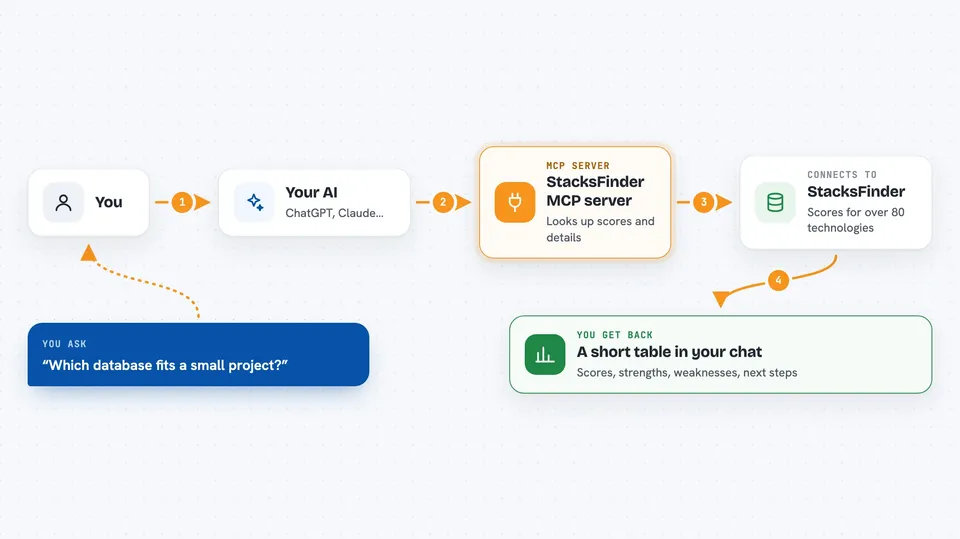
You ask your AI something like which database fits a small project. Your AI passes that question to this helper. The helper talks to the StacksFinder service, which holds scores and details for over 80 technologies. StacksFinder sends back a short table with scores, strengths, and weaknesses. Your AI shows you that table in the chat, and you can ask follow-up questions right away.
 Click to zoom
What you can do with it
- List all the technologies StacksFinder knows about, sorted by category
- Get a six-part score for a single technology, with strengths and weaknesses
- Compare two to four technologies side by side
- Get a suggested stack for a project type like a SaaS or a mobile app
- Estimate the hours and price range for a project you describe
- Run a health check on the technologies your project already uses
- Generate a starter kit with suggested tools and matching MCP helpers
Try asking your AI
- “Compare Next.js, SvelteKit and Nuxt for a small startup website”
- “What stack would you recommend for a SaaS project management tool at MVP stage”
- “Give me the scores for PostgreSQL in an enterprise context”
- “Estimate the hours and cost to build a booking app with payments and email notifications”
What it gives back to you
You get short tables and bullet lists right in the chat. Scores come as numbers out of 100 with a letter grade, plus a few lines about strengths and weaknesses. For bigger requests you also get a suggested stack, an estimate with hours and price ranges, or a health report on your existing tools. Everything is written in plain words so you can read it at a glance.
Before you start
What you need
- The Claude desktop app, Claude Code, Cursor, Windsurf, or another app that supports MCP servers
- Node.js installed on your computer (the free program that runs the helper)
- A StacksFinder account and API key for the paid tools (a kind of password; the free tools work without one)
Good to know
The paid tools need your API key and use up a quota, so keep an eye on how often you call them.
Install it with your AI
Add StacksFinder MCP server to your AI, no technical skills needed
You don't install anything by hand. You copy one prompt, paste it into an AI that can work on your computer, and it checks, installs and connects the server for you, asking you when it needs something.
Sign in to get the install prompt
Members get a ready-made prompt that lets the Claude desktop app check StacksFinder MCP server, install it and connect it for them, step by step. You don't need any technical skills: you copy, paste and answer a few questions. Your connected AI can also find and install any of the 4,066 MCP servers here for you.
Who it's for
Developers, technical leads, and anyone planning a new software project who wants quick, structured advice on which tools to pick.


