
MCP server · Productivity
Storyblok MCP server
by hypescale
Lets your AI read and update Storyblok content, components, assets, tags, and releases for you.
This is a small helper program that connects your AI assistant to Storyblok, the system many teams use to store and publish website content. Once it is set up, you can ask your AI in plain words to find, tag, update, or organize your Storyblok content, and it will do it for you. It is handy for content editors, marketers, and developers who work in Storyblok every day.
What is an MCP server? The 30-second version
On its own, your AI can only chat with you. An MCP server is a small helper program that gives your AI a new skill or a connection to an app or service. This one connects your AI to Storyblok, so the AI can look things up and make changes there when you ask. You stay in the chat, and the helper does the work in the background.
What this MCP server does
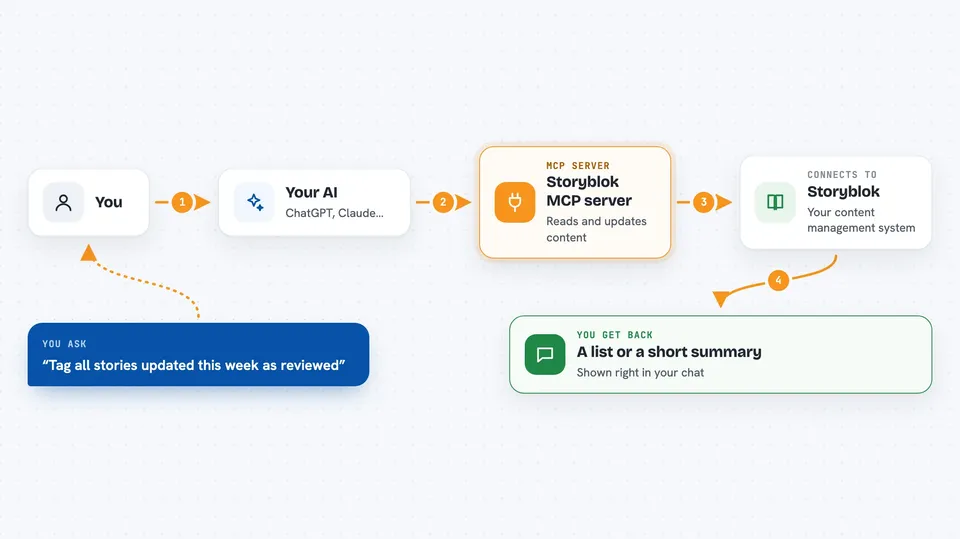
You type a request in plain words, like finding stories updated this week or tagging them as reviewed. Your AI reads the request and uses this helper to talk to Storyblok. The helper sends the right request to Storyblok and gets the answer back. Then your AI shows you the result in the chat, such as a list of stories or a short summary of what it changed. You do not need to open Storyblok yourself or click through menus.
 Click to zoom
What you can do with it
- List stories updated in the last few days
- Tag or untag stories in bulk
- Create a release and add stories to it
- Find unused components and see which stories still use them
- Upload assets and put them into folders
- Check workflow stages and move items along
- Manage datasources, webhooks, and team roles
Try asking your AI
- “List all stories updated in the last 7 days and tag them as reviewed.”
- “Create a release for next Friday and add the homepage and pricing stories.”
- “Find unused components and tell me which stories still reference them.”
- “Upload these assets and organize them into a new Campaign folder.”
What it gives back to you
You get answers right in the chat, like a list of stories with their names and dates, a count of items changed, or a short summary of what was updated. When you ask it to make changes, it tells you what it did, for example how many stories it tagged. It can also show details like component names, asset links, or release schedules.
Before you start
What you need
- A Storyblok account with a space
- Your Storyblok space ID (a number you can find in your Storyblok settings)
- A Storyblok Management token (a kind of password for apps, created in your Storyblok account)
- A Storyblok Public or Preview token (also created in your Storyblok account)
- Node.js version 20 or newer on the computer that runs the helper
Good to know
This helper can change or delete content in your Storyblok space, so use a token with the smallest permissions you need and double-check requests before you run them.
Install it with your AI
Add Storyblok MCP server to your AI, no technical skills needed
You don't install anything by hand. You copy one prompt, paste it into an AI that can work on your computer, and it checks, installs and connects the server for you, asking you when it needs something.
Sign in to get the install prompt
Members get a ready-made prompt that lets the Claude desktop app check Storyblok MCP server, install it and connect it for them, step by step. You don't need any technical skills: you copy, paste and answer a few questions. Your connected AI can also find and install any of the 4,361 MCP servers here for you.
Who it's for
Content editors, marketers, and developers who manage Storyblok content and want to do everyday tasks faster with AI help.





