MCP server · Analytics
Loki MCP server
by igorolv
Lets your AI read logs from Grafana Loki so you can search, count and export them by asking in plain words.
This is a small helper program that connects your AI assistant to Grafana Loki, the place where many teams keep their application logs. Once it is set up, you can ask your AI to look through those logs for you instead of clicking around in a log dashboard. It is handy for anyone who has to check what happened in a system, like support engineers, developers or on-call staff.
What is an MCP server? The 30-second version
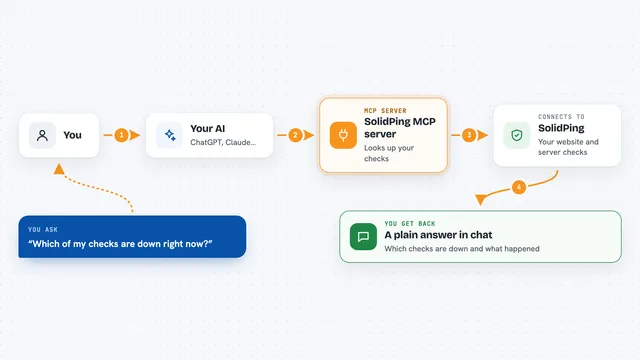
On its own, your AI can only chat with you. An MCP server is a small helper program that gives your AI a new skill or a connection to another app. This one connects your AI to Grafana Loki, so the AI can look up labels, read log lines, count them and save them to a file when you ask. You stay in the chat, and the helper does the talking to Loki behind the scenes.
What this MCP server does
You ask your AI something about your logs, like how many errors happened today or what a service printed last night. The AI uses this helper to talk to your Loki server. The helper sends a query to Loki, gets the matching log lines or counts back, and hands them to the AI as plain text. The AI then explains the result to you in the chat. If you want a file, the helper can save the matching lines to your computer and tell you where it put them.
What you can do with it
- List which Loki connections (stands) are set up and what limits each one has
- Discover label names and their values, like all the apps or namespaces that exist
- Read the newest or oldest log lines matching a query, in small pages
- Count matching log lines, either as a total or grouped by label or by time
- Save matching log lines to a local file, either raw or with a simple template
- Check how much log volume a service produced over a day or a week
Try asking your AI
- “How many ERROR lines did the backend app produce in the last 24 hours?”
- “Show me the newest log lines from app=backend that contain the word timeout.”
- “Which app labels exist on the dev stand?”
- “Export all lines from app=backend with ERROR yesterday to C:\tmp\logs.”
What it gives back to you
You get back plain text in the chat: lists of label names or values, short log lines with timestamps, or numbers for counts. Counts can be a single total, or a small table split by label or by time bucket. When you ask for an export, you get the file path, how many lines were written and which format was used, not the log contents themselves.
Before you start
What you need
- A Grafana Loki server you can reach (version 2.6.1 or 3.x)
- Java 21 or newer, or Docker if you prefer the container
- A connections.json file describing your Loki URL and any login details
- An MCP client like Claude Code or Codex, or another app that can launch a local MCP server
Good to know
It is read only on Loki, but it can save log files to your computer, so point exports at a folder you are happy to write to, and remember that log contents may include private data.
Install it with your AI
Add Loki MCP server to your AI, no technical skills needed
You don't install anything by hand. You copy one prompt, paste it into an AI that can work on your computer, and it checks, installs and connects the server for you, asking you when it needs something.
Sign in to get the install prompt
Members get a ready-made prompt that lets the Claude desktop app check Loki MCP server, install it and connect it for them, step by step. You don't need any technical skills: you copy, paste and answer a few questions. Your connected AI can also find and install any of the 4,361 MCP servers here for you.
Who it's for
Support engineers, developers and on-call staff who already keep logs in Grafana Loki and want to ask questions about them in plain language.