
MCP server · Research
SearXNG MCP server
Lets your AI search the web through a SearXNG search page you choose, and read the pages it finds.
This is a small helper that gives your AI assistant the ability to search the web. It works with SearXNG, a search page that you or someone you trust runs, instead of a big search company. It is handy if you want your AI to look things up online without handing your searches to an ad-driven search engine.
What is an MCP server? The 30-second version
On its own, your AI can only chat with what it already knows. An MCP server is a small helper program that gives your AI one new skill or one new connection. This helper connects your AI to a SearXNG search page, so when you ask a question, your AI can actually go and search there. You set it up once, and after that your AI just uses it when a question needs fresh information.
What this MCP server does
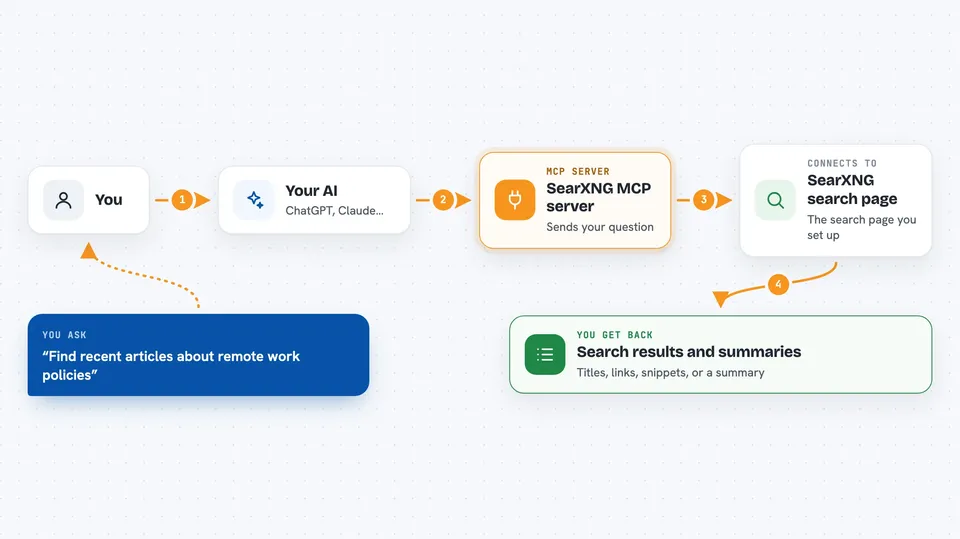
You ask your AI something that needs current information, like a news topic or a product. Your AI passes your question to this helper. The helper sends that question to the SearXNG search page you configured, and SearXNG gathers results from the search engines it uses. The helper brings those results back to your AI, which reads them and answers you in the chat. If you want, it can also open a specific web page and pull out the text for your AI to read.
 Click to zoom
What you can do with it
- Search the web and get a list of matching pages
- Ask for more results page by page instead of just the first few
- Get suggestions to refine or complete a search phrase
- Check what categories and search engines your SearXNG page offers
- Open a specific web address and read its text
- Read a PDF from a link and pull out its text
- Have your AI summarise what it found and point to the sources
Try asking your AI
- “Search the web for the latest news about electric cars in Norway”
- “Find three recent articles about remote work policies and summarise them”
- “Read this page and tell me the main points: https://example.com/article”
- “What search categories does my SearXNG instance support?”
What it gives back to you
You get answers in the chat, not files to download. Usually that means a short list of results with titles, links and snippets, or a summary your AI wrote from those results. If you asked it to read a page, you get the text or a summary of that page. If a search fails, you get an error message telling you something went wrong.
Before you start
What you need
- A SearXNG search page you can use, either one you run yourself or a public one you trust
- That SearXNG page must have its JSON search output turned on
- Node.js 22 or newer if you install it the usual way, or Docker if you prefer that
- The base web address of your SearXNG page, for example https://search.example.com
Good to know
Your searches go to whichever SearXNG page you point it at, so if you use a public one, that operator can see and may log your queries.
Install it with your AI
Add SearXNG MCP server to your AI, no technical skills needed
You don't install anything by hand. You copy one prompt, paste it into an AI that can work on your computer, and it checks, installs and connects the server for you, asking you when it needs something.
Sign in to get the install prompt
Members get a ready-made prompt that lets the Claude desktop app check SearXNG MCP server, install it and connect it for them, step by step. You don't need any technical skills: you copy, paste and answer a few questions. Your connected AI can also find and install any of the 4,361 MCP servers here for you.
Who it's for
People who want their AI to search the web through a privacy-friendly search page they control, rather than a big commercial search engine.


