
MCP server · Productivity · official
OfficeAgent MCP server
by ilia-sokolov · official
Let your AI edit Word, PowerPoint and Excel files, with changes you can review before saving.
OfficeAgent is a helper that lets your AI work inside real Office files: Word documents, PowerPoint decks and Excel workbooks. You ask in plain words, and it makes careful, reviewable edits instead of rewriting the whole file. It is handy if you deal with contracts, reports or templates and want your AI to do the fiddly parts.
What is an MCP server? The 30-second version
On its own, your AI can only chat. An MCP server is a small helper program that gives your AI a new skill or a connection to an app or service. This one connects your AI to Office files on your computer or on SharePoint, so it can open them, look things up and make changes when you ask. You install it once, and then your AI can work with your documents as part of the conversation.
What this MCP server does
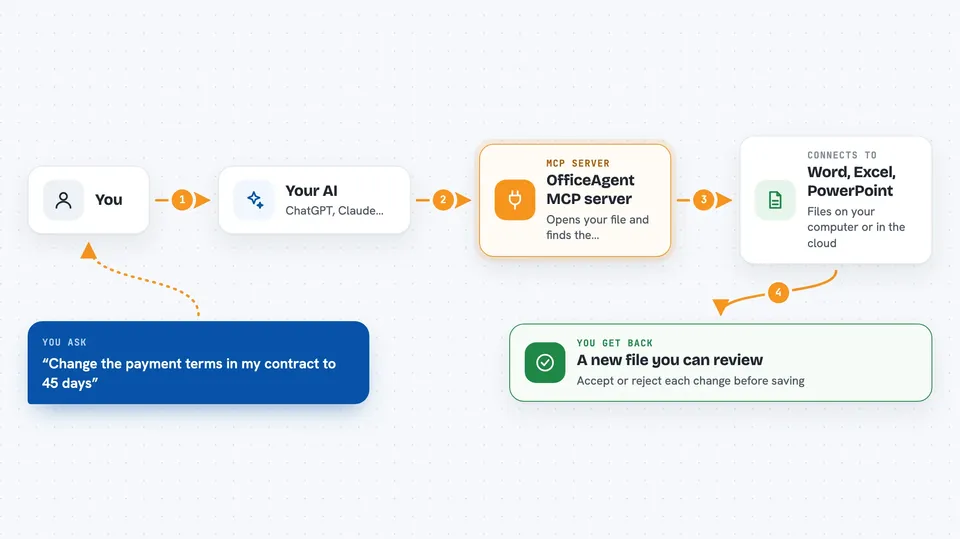
You tell your AI what you want changed, for example the payment terms in a contract. Your AI passes that request to this helper, which opens the file and finds the right spot. The helper makes the change as a tracked change, so it shows up in Word as something you can accept or reject. It also checks the edit first and shows a preview before anything is saved. When you are happy, it saves the result and gives you a new file to open.
 Click to zoom
What you can do with it
- Change words or clauses in a Word document as tracked changes
- Add or update rows in a Word or Excel table
- Create a new Word document or PowerPoint deck from scratch
- Read and manage comments in a Word document
- Fill in a Word template by tagging the parts to replace
- Inspect an Excel sheet to find values, formulas or notes
- Compare two Word documents and produce a redline
Try asking your AI
- “In services-agreement.docx, change the payment terms from thirty days to forty-five days.”
- “Add a row to the pricing table in quote.docx with item Widget, quantity 10, price 5.00.”
- “Draft a project brief in brief.docx with a heading, a short intro and a table of tasks.”
- “Show me the comments in contract.docx and list anything still open.”
What it gives back to you
You get back a short report in the chat: whether the change was saved, an id for the new file, and often a summary of what was changed. For reading tasks, you get the text, comments or values it found. For edits, the result is a new version of the file you can open and review in Word, PowerPoint or Excel.
Before you start
What you need
- The .NET runtime installed on your computer (the free software from Microsoft that runs .NET programs)
- A folder on your computer where the AI is allowed to work, set as an absolute path
- The OfficeAgent.Mcp tool installed with the dotnet tool install command
- An MCP client such as Claude Code, Codex or Copilot Studio
Good to know
This server can change and save your files, so point it at a folder you are happy for it to edit, and keep a backup of anything important.
Install it with your AI
Add OfficeAgent MCP server to your AI, no technical skills needed
You don't install anything by hand. You copy one prompt, paste it into an AI that can work on your computer, and it checks, installs and connects the server for you, asking you when it needs something.
Sign in to get the install prompt
Members get a ready-made prompt that lets the Claude desktop app check OfficeAgent MCP server, install it and connect it for them, step by step. You don't need any technical skills: you copy, paste and answer a few questions. Your connected AI can also find and install any of the 4,609 MCP servers here for you.
Who it's for
People who work with Word, PowerPoint or Excel files all day, like contract reviewers, report writers, operations staff and anyone who fills in the same templates again and again.





