
MCP server · Research
IP2Location MCP server
by ip2location
Ask your AI where an IP address is, who runs its network, and whether it looks like a proxy.
This is a small helper that lets your AI look up information about an IP address for you. You just type an address like 8.8.8.8 in plain language, and it comes back with the country, city, network owner, and more. It is handy for anyone who deals with logs, support tickets, or security questions and wants quick answers without leaving the chat.
What is an MCP server? The 30-second version
On its own, your AI can only chat with you. An MCP server is a small helper program that gives your AI a new skill or a connection to another service. This one connects your AI to IP2Location.io, a service that knows about IP addresses. Once it is connected, your AI can look up an IP address for you whenever you ask, instead of you having to visit a website and fill in a form.
What this MCP server does
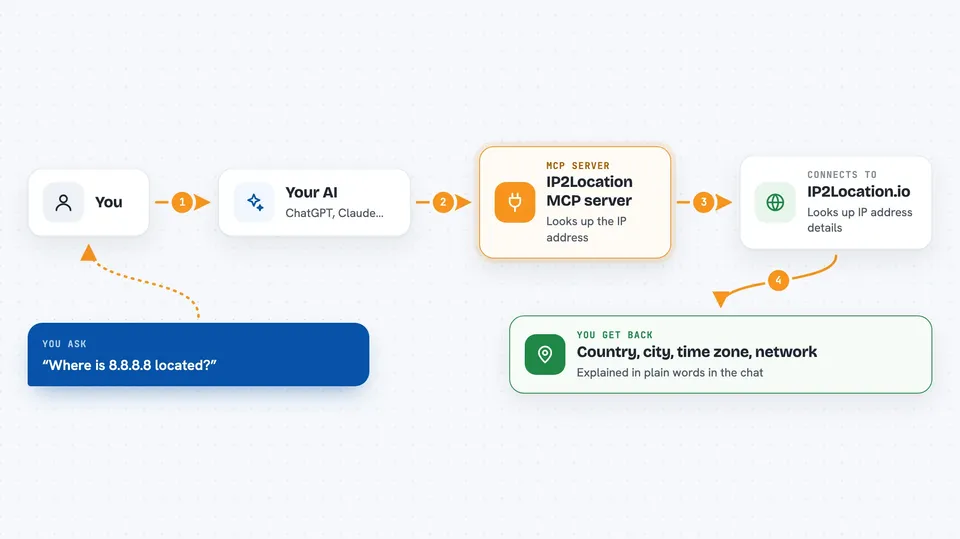
You ask your AI something like where is 8.8.8.8 located. The AI passes that address to this helper. The helper sends it to the IP2Location.io service and waits for the answer. The answer comes back with details like country, city, time zone, and the network provider. Your AI then explains it to you in normal words in the chat.
 Click to zoom
What you can do with it
- Find the country, region, and city for an IP address
- Get the latitude, longitude, and time zone of an IP
- Look up the network owner, ISP, and ASN behind an IP
- Check whether an IP looks like a proxy
- Look up several IP addresses in one go
- Enrich IP addresses you copied from a log file
Try asking your AI
- “Where is 8.8.8.8 located?”
- “What is the latitude and longitude of 1.1.1.1?”
- “Who operates the network for 9.9.9.9 and where is it?”
- “Look up 8.8.8.8, 8.8.6.6, and 9.9.9.9”
What it gives back to you
You get a short answer in the chat, usually with the country, city, time zone, and network details spelled out. If you asked about several IP addresses, you get a small list, one entry per address. If an address is invalid or the lookup fails, you get a plain error message instead. The exact details depend on your IP2Location.io plan.
Before you start
What you need
- The Claude desktop app (or another AI app that supports MCP)
- An IP2Location.io API key (a kind of password for the service; the free plan gives you one)
- For the cloud option: Node.js installed on your computer
- For the local option: Python 3.13 or later and the uv tool
Good to know
The extra details you get back depend on your IP2Location.io plan, and the free plan has monthly query limits, so keep an eye on your usage.
Install it with your AI
Add IP2Location MCP server to your AI, no technical skills needed
You don't install anything by hand. You copy one prompt, paste it into an AI that can work on your computer, and it checks, installs and connects the server for you, asking you when it needs something.
Sign in to get the install prompt
Members get a ready-made prompt that lets the Claude desktop app check IP2Location MCP server, install it and connect it for them, step by step. You don't need any technical skills: you copy, paste and answer a few questions. Your connected AI can also find and install any of the 4,609 MCP servers here for you.
Who it's for
Support agents, IT and security staff, and analysts who often need to check where an IP address comes from.



