MCP server · Security · official
IPLocate MCP server
by iplocate · official
Your AI can look up where an IP address is, who owns it, and whether it is a VPN or proxy.
This is a helper that connects your AI assistant to IPLocate, a service that keeps information about IP addresses. An IP address is the number every device uses to talk on the internet, a bit like a postal address for a computer. If you ever need to check where a visitor came from or whether a signup looks suspicious, this is for you.
What is an MCP server? The 30-second version
On its own, your AI can only chat with you using what it already knows. An MCP server is a small helper program that gives your AI one new skill. This helper gives it a connection to IPLocate, so when you ask about an IP address, your AI can actually look it up instead of guessing. You install it once, and after that it just works quietly in the background.
What this MCP server does
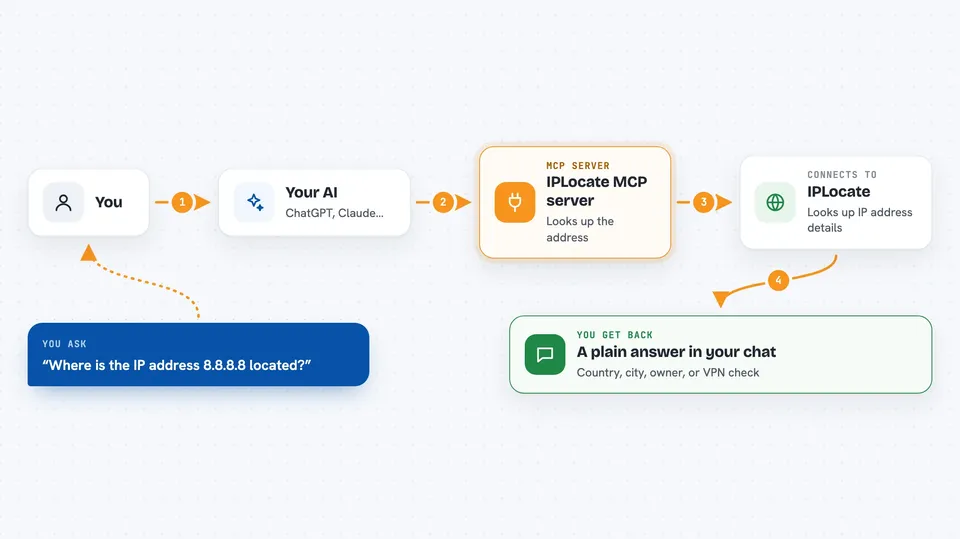
You ask your AI something like where the address 8.8.8.8 is located. Your AI passes that question to this helper program running on your computer. The helper sends the address to IPLocate and waits for the answer. When the answer comes back, your AI reads it and explains it to you in normal words. You never see the technical part, just the result in your chat window.
 Click to zoom
What you can do with it
- Find the country, city, and timezone of an IP address
- Check whether an IP address is a VPN, a proxy, or a Tor exit node
- See which company or internet provider owns an IP address
- Look up the network range and registration details behind an address
- Get the abuse contact email and phone for reporting bad traffic
- Compare two IP addresses side by side
- Look up your own current IP address when you leave the field blank
Try asking your AI
- “Where is the IP address 8.8.8.8 located?”
- “Is 203.0.113.45 a VPN or a proxy?”
- “Who owns the IP address 1.1.1.1 and what company is behind it?”
- “Compare 1.1.1.1 and 8.8.8.8 for me”
What it gives back to you
You get a short, readable answer in the chat, like the country and city, the internet provider name, or a simple yes or no on VPN and proxy checks. If you ask for the full picture, your AI will lay out the company name, network range, and abuse contact details as a list. Nothing is changed anywhere, it is all just reading and reporting back.
Before you start
What you need
- The Claude desktop app or another app that supports MCP servers, such as Cursor or VS Code
- Node.js 18 or newer installed on your computer
- A free IPLocate account and API key from iplocate.io/signup (an API key is a kind of password for apps; the site gives you one for free)
Good to know
Every lookup uses up your daily quota, so a free account gives you 1,000 lookups a day and no key gives you 50.
Install it with your AI
Add IPLocate MCP server to your AI, no technical skills needed
You don't install anything by hand. You copy one prompt, paste it into an AI that can work on your computer, and it checks, installs and connects the server for you, asking you when it needs something.
Sign in to get the install prompt
Members get a ready-made prompt that lets the Claude desktop app check IPLocate MCP server, install it and connect it for them, step by step. You don't need any technical skills: you copy, paste and answer a few questions. Your connected AI can also find and install any of the 4,609 MCP servers here for you.
Who it's for
Anyone who deals with website visitors, signups, or suspicious traffic, like support staff, fraud reviewers, and small business owners.