MCP server · Research
StatusCraft MCP server
by jabbawocky
Ask your AI if a service like GitHub, Slack or Stripe is down, and get a live answer from its official status page.
StatusCraft is a small helper that lets your AI check whether a software service is working right now. It looks at the official status pages of over 3,300 services, so you get a real answer instead of a guess. It is handy for anyone who gets stuck waiting on a tool and wonders if the problem is on their side or the service's side.
What is an MCP server? The 30-second version
On its own, your AI can only chat with you from what it already knows. An MCP server is a small helper program you connect once, and it gives your AI a new skill. This one gives your AI a direct line to the status pages of many software services. So when you ask "is GitHub down?", your AI uses this helper to fetch the live answer and tells you.
What this MCP server does
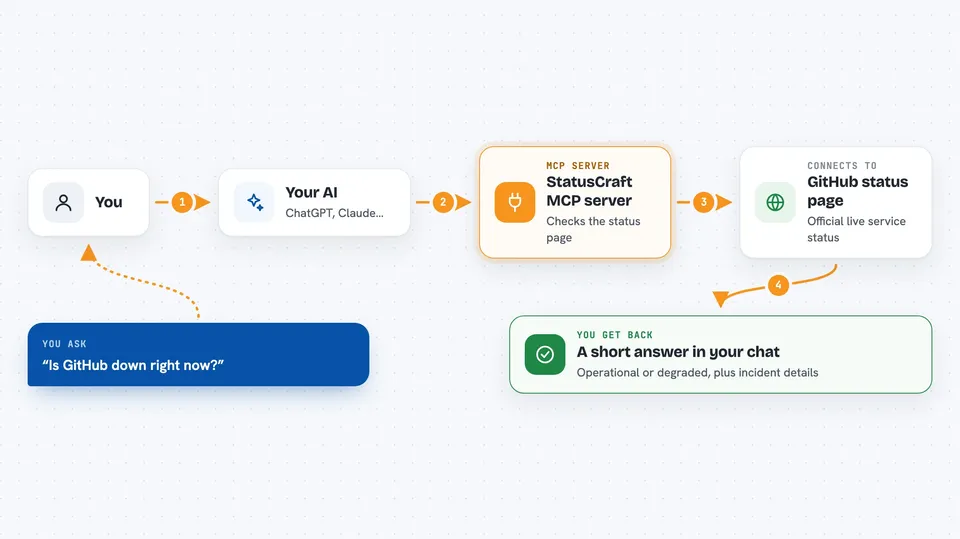
You ask your AI a question like "is Sentry having issues?". Your AI passes that question to StatusCraft. StatusCraft looks up the service's official status page and reads the current state. If something is broken, it also pulls the incident details, like what is affected and when it started. Then your AI shows you a short, clear answer in the chat.
 Click to zoom
What you can do with it
- Check whether one service is up or down right now
- Check a list of services you care about all at once
- See the current incident details when something is broken
- Browse all tracked services and filter them by category
- Force a fresh check during an active outage instead of using the short cache
- Ask which AI services or observability tools are having issues today
Try asking your AI
- “Is GitHub down right now?”
- “What's wrong with Sentry?”
- “Are Stripe and SendGrid both operational?”
- “Check openai, anthropic, and github”
- “Is Grafana Cloud having a major outage?”
What it gives back to you
You get a short answer in the chat, like "operational" or "degraded". When something is not working, you also get the incident name, how serious it is, when it started, and the latest update from the service. For a list of services, you get them grouped by status so you can see at a glance what is fine and what is not.
Before you start
What you need
- The Claude desktop app or another app that supports MCP
- Node.js 18 or newer installed on your computer
- No account or API key needed
Good to know
It only reads public status pages, so it cannot fix anything or see private information about your own accounts.
Install it with your AI
Add StatusCraft MCP server to your AI, no technical skills needed
You don't install anything by hand. You copy one prompt, paste it into an AI that can work on your computer, and it checks, installs and connects the server for you, asking you when it needs something.
Sign in to get the install prompt
Members get a ready-made prompt that lets the Claude desktop app check StatusCraft MCP server, install it and connect it for them, step by step. You don't need any technical skills: you copy, paste and answer a few questions. Your connected AI can also find and install any of the 4,609 MCP servers here for you.
Who it's for
Anyone who relies on online tools for work and wants a quick way to tell if a service is down, especially support, operations and IT people.