MCP server · Research
Status Observer MCP server
by imprvhub
Ask your AI whether big platforms like GitHub, Slack or OpenAI are up or having problems.
Status Observer is a small helper that lets your AI check the current health of popular online services. You ask in normal words, and it tells you if something like GitHub, Slack or OpenAI is running fine or having trouble. It is handy if your work depends on these tools and you want a quick answer without hunting through status pages.
What is an MCP server? The 30-second version
On its own, your AI can only chat with you using what it already knows. An MCP server is a small helper program that gives your AI one extra skill or a connection to a service. This one connects your AI to the official status pages of many big platforms, so it can look up live information for you. You just ask, and the AI uses this helper behind the scenes.
What this MCP server does
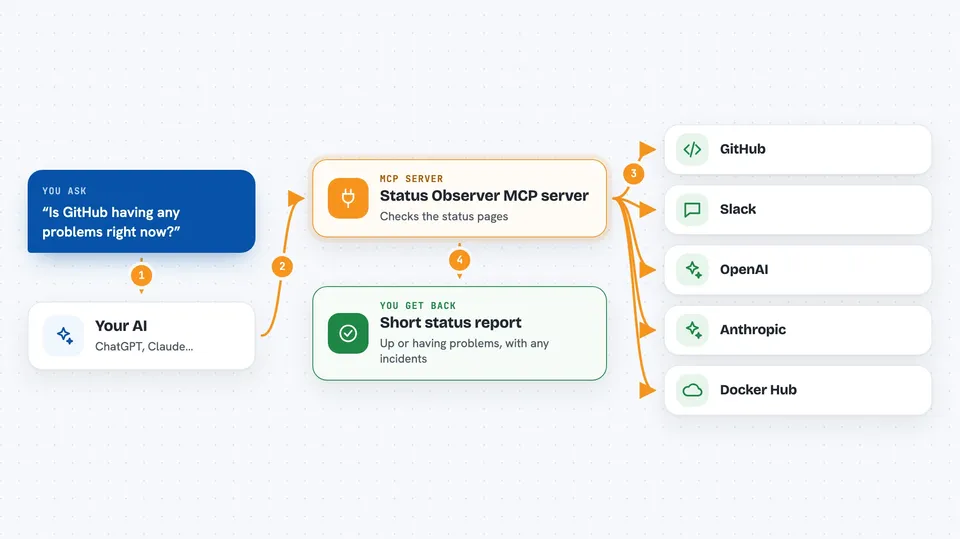
You ask your AI something like whether GitHub is down. The AI passes your question to this helper program. The helper then contacts the official status page of that platform and reads the latest information. It comes back with a short report, such as whether everything is fine or whether there is an ongoing problem. You see the answer right in your chat.
 Click to zoom
What you can do with it
- Check if a specific platform like GitHub, Slack or OpenAI is currently up
- See whether a platform has any active incidents or recent problems
- Look at the status of individual parts of a service, such as GitHub Actions or Docker Hub
- Get a quick overview of all supported platforms at once
- Ask in plain words and get a short, readable answer in the chat
Try asking your AI
- “Is GitHub having any problems right now?”
- “What is the current status of OpenAI and Anthropic?”
- “Show me the status of all platforms you can check”
- “Has Slack had any recent incidents?”
What it gives back to you
You get a short written answer in the chat, usually a few lines. It tells you the overall state of the platform, like operational or degraded, and mentions any active incidents if there are some. For some services it can also list which parts are affected. Everything appears as normal text you can read right away.
Before you start
What you need
- The Claude desktop app
- Node.js version 20 or newer installed on your computer
- An internet connection so the helper can reach the official status pages
Good to know
This helper only reads public status information, so it does not change anything on your accounts, but it needs an internet connection and the answers are only as fresh as the official status pages.
Install it with your AI
Add Status Observer MCP server to your AI, no technical skills needed
You don't install anything by hand. You copy one prompt, paste it into an AI that can work on your computer, and it checks, installs and connects the server for you, asking you when it needs something.
Sign in to get the install prompt
Members get a ready-made prompt that lets the Claude desktop app check Status Observer MCP server, install it and connect it for them, step by step. You don't need any technical skills: you copy, paste and answer a few questions. Your connected AI can also find and install any of the 4,609 MCP servers here for you.
Who it's for
Anyone whose work depends on online tools, like developers, support teams or project managers who want a fast answer when something seems broken.