
MCP server · Developer tools
Online Cyber Tools MCP server
by Jambozx
Lets your AI encode, hash, decode, format, and run network checks through onlinecybertools.com for you.
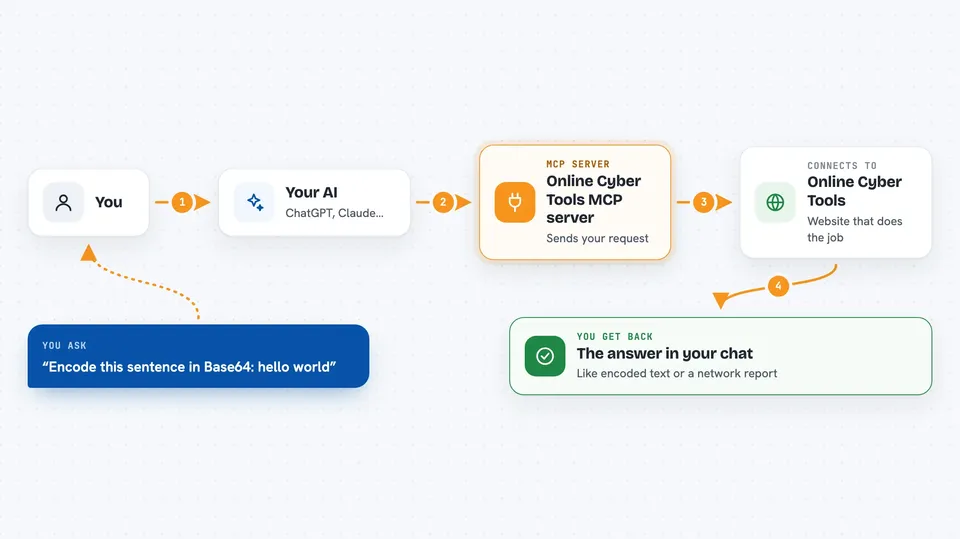
This is a helper that connects your AI assistant to a big online toolbox called Online Cyber Tools. Once it is set up, your AI can run small technical jobs for you, like turning text into code, checking a password hash, or testing a web address. It is handy for developers, IT folks, and anyone who often needs quick utility tasks done without leaving the chat.
What is an MCP server? The 30-second version
On its own, your AI can only chat. An MCP server is a small helper program that gives your AI a new skill or a connection to another service. This one connects your AI to Online Cyber Tools, a website full of small technical utilities. When you ask for something, your AI sends the request through this helper to that site and brings the answer back to you.
What this MCP server does
You ask your AI to do something like encode a piece of text or look up a domain. Your AI picks the right tool from this server and sends your request to the Online Cyber Tools website. The website does the actual work, like hashing or formatting, and sends the result back. Your AI then shows you the answer right in the chat. Nothing is re-implemented on your computer; it all runs on the live site.
 Click to zoom
What you can do with it
- Encode or decode text in formats like Base64 and URL encoding
- Generate hashes like SHA-256 or MD5 for a piece of text
- Decode a JWT token to see what is inside
- Test a regular expression against sample text
- Format or tidy up JSON, XML, or other data
- Run network checks like ping or traceroute
- Look up OSINT details about a domain or IP address
Try asking your AI
- “Encode this sentence in Base64: hello world”
- “What is the SHA-256 hash of the word password123?”
- “Decode this JWT and tell me when it expires”
- “Ping example.com and show me the result”
What it gives back to you
You get the result of the job you asked for, like the encoded text, the hash value, a decoded token, or a network report. It usually appears as plain text or a small list right in the chat. For longer jobs like traceroute, you might see a summary or a note that the output was cut short. You can then copy it or ask follow-up questions.
Before you start
What you need
- Node.js installed on your computer (the free software that runs the helper)
- An MCP client like Claude Code, Codex, Cursor, or Continue
Good to know
Some tools can send data to an outside website, so avoid pasting private or secret information unless you are sure it is safe.
Install it with your AI
Add Online Cyber Tools MCP server to your AI, no technical skills needed
You don't install anything by hand. You copy one prompt, paste it into an AI that can work on your computer, and it checks, installs and connects the server for you, asking you when it needs something.
Sign in to get the install prompt
Members get a ready-made prompt that lets the Claude desktop app check Online Cyber Tools MCP server, install it and connect it for them, step by step. You don't need any technical skills: you copy, paste and answer a few questions. Your connected AI can also find and install any of the 4,609 MCP servers here for you.
Who it's for
Developers, IT support staff, and security-minded people who often need quick encoding, hashing, formatting, or network checks.



