
MCP server · Developer tools
LoopSense MCP server
Let your AI watch CI runs, processes, files, and web addresses, then tell you what happened.
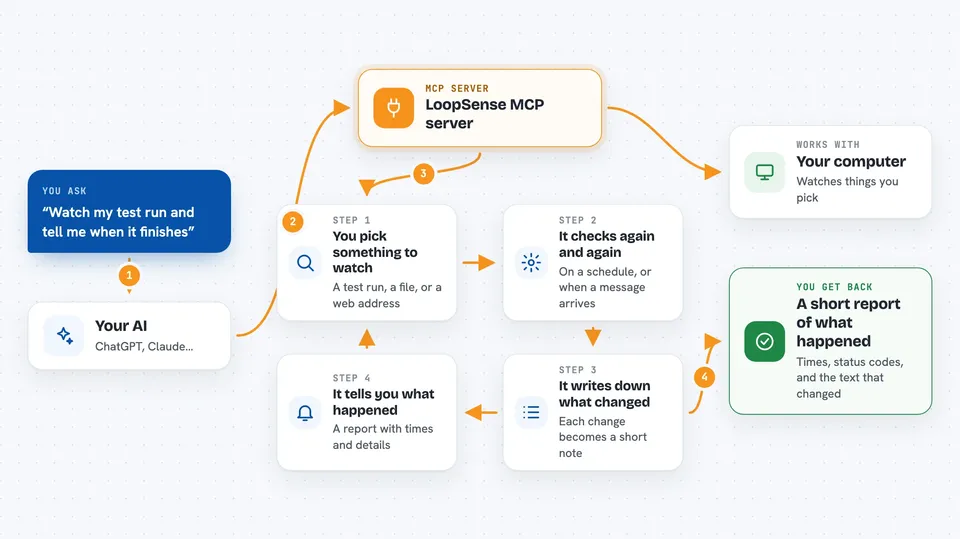
LoopSense is a helper that lets your AI keep an eye on things that change over time, like a code test run, a file being edited, or a web address going up or down. It is made for people who use AI coding tools and want the AI to notice what happens after it does something, instead of guessing. If you have ever pushed code and wondered whether the tests passed, this is for you.
What is an MCP server? The 30-second version
On its own, your AI can only chat with you. An MCP server is a small helper program that gives your AI a new skill or a connection to something outside the chat. LoopSense is that helper, and its skill is watching things for you: it can look at a GitHub Actions run, a local process, a folder, or a web address and report back. Once it is connected, your AI can ask LoopSense what is going on and use the answer in its reply to you.
What this MCP server does
You ask your AI to keep an eye on something, like a test run or a web address. The AI tells LoopSense to start watching it. LoopSense checks that thing again and again on a schedule, or listens for a message from a service. When something changes, LoopSense writes it down as an event. Later, you or the AI can ask LoopSense what happened, and it gives back a list of events with times and details.
 Click to zoom
What you can do with it
- Watch a GitHub Actions workflow run and report when it finishes
- Run a command on your computer and capture its output and exit code
- Watch a file or folder and notice when files change
- Poll a web address and alert you if the status or content changes
- Receive incoming webhook messages on a local port
- List all the things currently being watched
- Stop a watch you no longer need
- Look up what happened after a specific action
Try asking your AI
- “Watch the CI run on my main branch and tell me when it finishes”
- “Run npm test in my project folder and show me the output”
- “Keep an eye on this health check URL and tell me if it stops returning ok”
- “What happened after my deploy action called deploy-2024-01”
What it gives back to you
LoopSense gives back lists of events, each with a time, a source, and details like a status code, an exit code, or the text that changed. It can also give you a summary of everything that happened for a specific action you named. In the chat, you will see this as a short report or a table of events. If you asked it to run a command, you also get the command's output and its exit code.
Before you start
What you need
- Node.js 18 or newer installed on your computer
- A GitHub personal access token if you want to watch GitHub Actions runs (a kind of password for apps; GitHub gives you one for free in your account settings)
Good to know
LoopSense can run commands on your computer and read files, so only point it at folders and commands you trust.
Install it with your AI
Add LoopSense MCP server to your AI, no technical skills needed
You don't install anything by hand. You copy one prompt, paste it into an AI that can work on your computer, and it checks, installs and connects the server for you, asking you when it needs something.
Sign in to get the install prompt
Members get a ready-made prompt that lets the Claude desktop app check LoopSense MCP server, install it and connect it for them, step by step. You don't need any technical skills: you copy, paste and answer a few questions. Your connected AI can also find and install any of the 4,609 MCP servers here for you.
Who it's for
Developers and anyone using AI coding tools who wants the AI to notice what happens after it pushes code, runs tests, or changes files.



