
MCP server · Developer tools
Cloud Cost MCP server
by jasonwilbur
Compare cloud prices across AWS, Azure, GCP and OCI, and estimate what a workload or migration would cost.
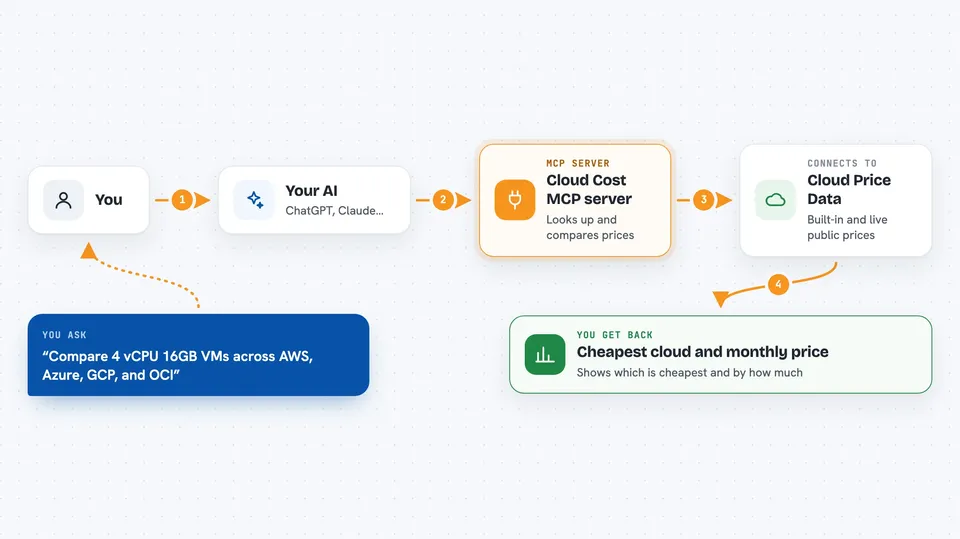
This is a small helper that lets your AI compare prices for cloud services across AWS, Azure, Google Cloud and Oracle Cloud. You ask a normal question like "what's the cheapest 4-core machine?" and it looks up the numbers for you. It is handy for anyone who has to guess at cloud bills, like developers, IT folks, and managers planning a move.
What is an MCP server? The 30-second version
On its own, your AI can only chat. It cannot look up today's cloud prices by itself. An MCP server is a small helper program you connect once, and it gives your AI a new skill. This one connects your AI to public cloud price lists from AWS, Azure, GCP and OCI, so it can fetch and compare real numbers when you ask.
What this MCP server does
You ask your AI a pricing question in plain words, like comparing a 4 vCPU, 16 GB machine across clouds. The AI passes that to this helper. The helper looks up its built-in price data, or fetches live prices from public provider APIs, and lines the options up side by side. Then you get a small table or a short answer in the chat, showing which cloud is cheapest and by how much. It can also add up a whole workload (computers, storage, data transfer) and estimate what you would save by switching providers.
 Click to zoom
What you can do with it
- Compare virtual machine prices across AWS, Azure, GCP and OCI
- Find the cheapest provider for a given number of cores and memory
- Compare storage and data transfer (egress) prices
- Estimate the monthly cost of a full workload, like a small web app or a database
- Estimate how much you could save by migrating from one cloud to another
- Compare managed Kubernetes prices, including the free control planes on OCI and Azure
- Look up GPU shapes and prices on Oracle Cloud
Try asking your AI
- “Compare 4 vCPU 16GB VMs across AWS, Azure, GCP, and OCI”
- “What's the cheapest cloud for 10TB of data transfer per month?”
- “Estimate cost for 3 VMs with 4 vCPU each, 500GB storage, and 1TB egress”
- “How much could I save migrating from AWS to OCI?”
What it gives back to you
You get a short answer or a small table in the chat. It shows the provider, the instance name, the specs, and the monthly price, plus which one is cheapest. For workload estimates, you get a total per cloud with a breakdown of compute, storage and data transfer. For migration questions, you get an estimated monthly saving and a percentage.
Before you start
What you need
- The Claude desktop app or Claude Code (or another MCP-capable client)
- Node.js installed on your computer (the installer will fetch the helper for you)
Good to know
Prices come from public sources and change often, so always check the real numbers with the cloud provider before you decide or buy anything.
Install it with your AI
Add Cloud Cost MCP server to your AI, no technical skills needed
You don't install anything by hand. You copy one prompt, paste it into an AI that can work on your computer, and it checks, installs and connects the server for you, asking you when it needs something.
Sign in to get the install prompt
Members get a ready-made prompt that lets the Claude desktop app check Cloud Cost MCP server, install it and connect it for them, step by step. You don't need any technical skills: you copy, paste and answer a few questions. Your connected AI can also find and install any of the 4,361 MCP servers here for you.
Who it's for
Developers, IT admins, and anyone who has to plan or explain cloud bills, especially people comparing providers or planning a migration.




