
MCP server · Notes
People Context MCP server
Your AI can remember who people are, how you know them, and how to talk to them.
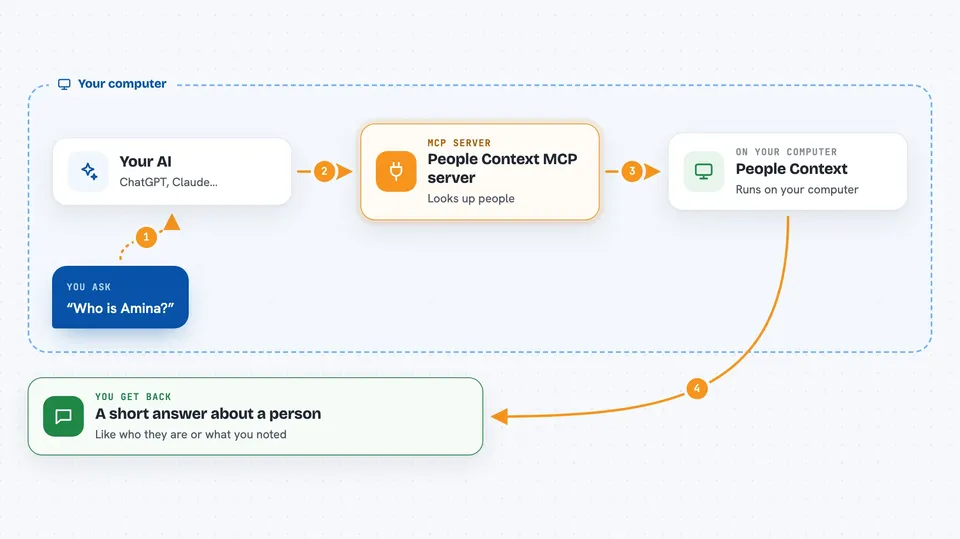
People Context is a small helper that gives your AI a memory about the people in your life. It keeps names, relationships, notes, and reminders in one file on your own computer, not in the cloud. It is handy if you deal with many contacts and want your assistant to know who is who before a meeting or a message.
What is an MCP server? The 30-second version
On its own, your AI can only chat with you. It does not know your contacts, your colleagues, or your clients. An MCP server is a small helper program that gives your AI a new skill or a connection. This one connects your AI to your own private address book, so it can look up a person or save a note when you ask.
What this MCP server does
You ask your AI something about a person, like who they are or what you last agreed. The AI sends that question to this helper program running on your computer. The helper looks in its own small database file and finds the matching person, their role, their organisation, and any notes you saved. Then it sends a short, clear answer back, and your AI explains it to you in the chat. When you ask it to remember something new, it writes that down too, but only after checking with you.
 Click to zoom
What you can do with it
- Look up who a person is, including nicknames and alternate spellings
- See how two people in your list are connected
- Save a fact, a preference, or a note about someone
- Get a short brief before a meeting with a person
- Find people you have not talked to in a while
- See upcoming dates like birthdays or follow-ups
- Review and approve contacts imported from email or a contacts file
Try asking your AI
- “Who is Amina?”
- “Remember that Amina from Open City Lab prefers short emails and hates surprise calls.”
- “What should I know before my meeting with Daniel tomorrow?”
- “Who have I not talked to in a while?”
What it gives back to you
You get short, plain answers in the chat, like a summary of a person, a list of matching names, or a note that something was saved. When a name is unclear, it shows you a few candidates with a reason instead of guessing. Reports come back as simple lists, for example people you have gone quiet with or dates coming up. Nothing is written down unless you approve it.
Before you start
What you need
- Python 3.11 or newer
- The uv tool (a small program that installs and runs Python tools)
- An MCP client like Claude Desktop, Claude Code, Cursor, or VS Code
Good to know
It stores personal notes about real people in a plain file on your computer, so keep that file private, and remember that asking it to forget something deletes it for good.
Install it with your AI
Add People Context MCP server to your AI, no technical skills needed
You don't install anything by hand. You copy one prompt, paste it into an AI that can work on your computer, and it checks, installs and connects the server for you, asking you when it needs something.
Sign in to get the install prompt
Members get a ready-made prompt that lets the Claude desktop app check People Context MCP server, install it and connect it for them, step by step. You don't need any technical skills: you copy, paste and answer a few questions. Your connected AI can also find and install any of the 4,609 MCP servers here for you.
Who it's for
Anyone who juggles many contacts, like salespeople, recruiters, managers, consultants, and founders, and wants their AI to know who people are.





