
MCP server · Developer tools
LightCMS MCP server
by jonradoff
Let your AI write, edit, and publish website pages and content on a LightCMS site for you.
LightCMS is a content management system, which is a tool for building and running a website. This MCP server is the bridge that lets your AI assistant work inside a LightCMS site for you. It is handy if you run a site on LightCMS and would rather ask for changes in plain language than click around an admin panel.
What is an MCP server? The 30-second version
On its own, your AI can only chat with you. An MCP server is a small helper program that gives your AI a new skill or a connection to an app. This one connects your AI to a LightCMS site, so the AI can look things up there and make changes for you when you ask. You do not need to understand how it works under the hood. You just talk to your AI like normal.
What this MCP server does
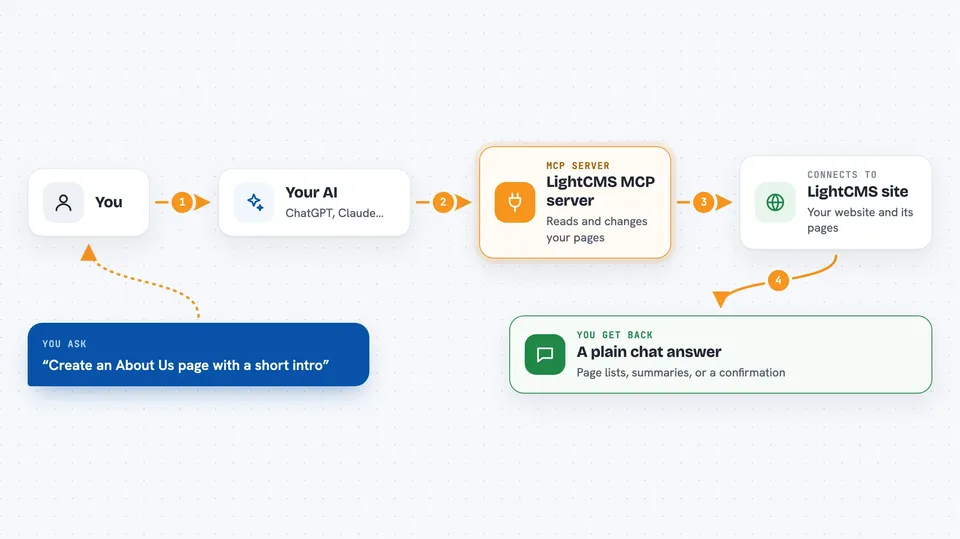
You ask your AI to do something on your LightCMS site, like create a page or fix a typo. The AI uses this helper to talk to your LightCMS site. The helper reads or changes the content there, following your instructions. Then it tells the AI what happened, and the AI explains the result back to you in the chat.
 Click to zoom
What you can do with it
- Create new pages and fill in their fields
- Edit or update existing content
- Publish pages or schedule them for later
- Search your site's content, including by meaning, not just exact words
- Import a batch of pages from Markdown or a CSV file
- Manage templates, themes, assets, and redirects
- Work in a separate draft copy and merge it when ready
Try asking your AI
- “Create a new page called About Us with a short intro paragraph”
- “Find every page that mentions our old phone number and update it”
- “Import these Markdown files as blog posts and publish them”
- “Show me the pages that have not been updated in a long time”
What it gives back to you
You get answers in plain chat: lists of pages, short summaries, or a confirmation that something was created, changed, or published. For imports you can see a running log of what was added. If something could not be done, the AI tells you why.
Before you start
What you need
- A LightCMS site you can manage
- An MCP-compatible AI client, such as Claude Code or Claude Desktop
- Access credentials for your site, set up by whoever runs it
Good to know
It can create, change, publish, and delete content on your live site, so be clear about what you want and check the result before trusting it.
Install it with your AI
Add LightCMS MCP server to your AI, no technical skills needed
You don't install anything by hand. You copy one prompt, paste it into an AI that can work on your computer, and it checks, installs and connects the server for you, asking you when it needs something.
Sign in to get the install prompt
Members get a ready-made prompt that lets the Claude desktop app check LightCMS MCP server, install it and connect it for them, step by step. You don't need any technical skills: you copy, paste and answer a few questions. Your connected AI can also find and install any of the 4,361 MCP servers here for you.
Who it's for
People who run or edit a LightCMS website and want to make changes by talking to their AI instead of using the admin screens.



