MCP server · Analytics
Databricks MCP server
by JordiNeil
Let your AI run SQL queries, list jobs, and check job status in your Databricks workspace.

This is a small helper that connects your AI assistant to Databricks, the place where your company keeps data and runs jobs. Once it is set up, you can ask your AI in plain English to run a query or check on a job, and it will do it for you. It is handy if you already use Databricks at work but do not want to click around the website every time.
What is an MCP server? The 30-second version
On its own, your AI can only chat. It cannot see your Databricks workspace or do anything inside it. An MCP server is a small helper program that gives your AI a new skill, in this case a connection to Databricks. So when you ask your AI a question about your data or jobs, it quietly passes the request to this helper, which talks to Databricks and brings the answer back to your chat.
What this MCP server does
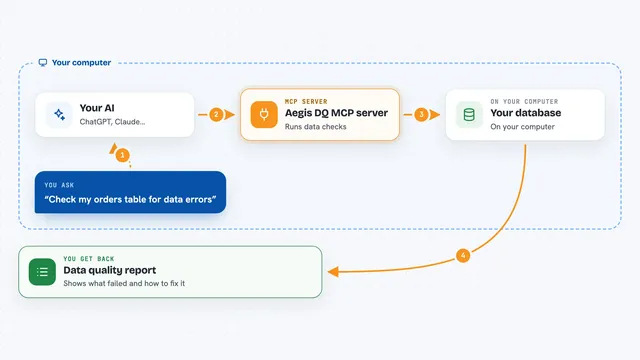
You type a request in your AI chat, like asking for a count of rows in a table. Your AI sends that request to this helper program running on your computer. The helper logs into Databricks using your personal access token and runs the SQL query or looks up the job you asked about. Databricks sends the result back, and the helper hands it to your AI. Your AI then shows you the answer in the chat, as a table, a list, or a short summary.
 Click to zoom
What you can do with it
- Run SQL queries on your Databricks SQL warehouse
- List all the jobs in your Databricks workspace
- Check the status of a specific job by its ID
- Get detailed information about a job, like its settings and schedule
- Ask questions about your data in plain English and get results back
- Look up which tables exist in a database
Try asking your AI
- “Show me all tables in the database”
- “Run a query to count records in the customer table”
- “List all my Databricks jobs”
- “Check the status of job 123”
What it gives back to you
You get answers right in your AI chat. For a query, that is usually a small table or a number, like the count of rows. For jobs, you get a list of job names and IDs, or the status of one job, such as running, succeeded, or failed. For job details, you get a longer description with things like the schedule and settings.
Before you start
What you need
- A Databricks workspace you can access
- A personal access token from Databricks (a kind of password you create in your user settings)
- The HTTP path of your SQL warehouse (found in the SQL Warehouses page in Databricks)
- Python 3.7 or newer installed on your computer
Good to know
Your Databricks token gives direct access to your workspace, so keep the .env file private and only use a token with the permissions you actually need.
Install it with your AI
Add Databricks MCP server to your AI, no technical skills needed
You don't install anything by hand. You copy one prompt, paste it into an AI that can work on your computer, and it checks, installs and connects the server for you, asking you when it needs something.
Sign in to get the install prompt
Members get a ready-made prompt that lets the Claude desktop app check Databricks MCP server, install it and connect it for them, step by step. You don't need any technical skills: you copy, paste and answer a few questions. Your connected AI can also find and install any of the 4,609 MCP servers here for you.
Who it's for
Office workers and analysts who already use Databricks at work and want to ask questions or check jobs without clicking through the Databricks website.