
MCP server · Developer tools · official
Globalping MCP server
by jsdelivr · official
Let your AI run ping, traceroute, DNS, MTR and HTTP tests from locations around the world.
This is a helper that lets your AI check how the internet looks from other places on the planet. You ask in plain words, and it runs network tests such as ping or traceroute from cities, countries or cloud regions you choose. It is handy if you deal with websites, servers or networks and want quick answers without installing anything.
What is an MCP server? The 30-second version
On its own, your AI can only chat with you. An MCP server is a small helper that gives your AI a new skill or a connection to another service. This one connects your AI to Globalping, a free public service with probes in thousands of locations worldwide. So when you ask your AI to test a website from Tokyo, it can actually do it through this helper and bring the result back to your chat.
What this MCP server does
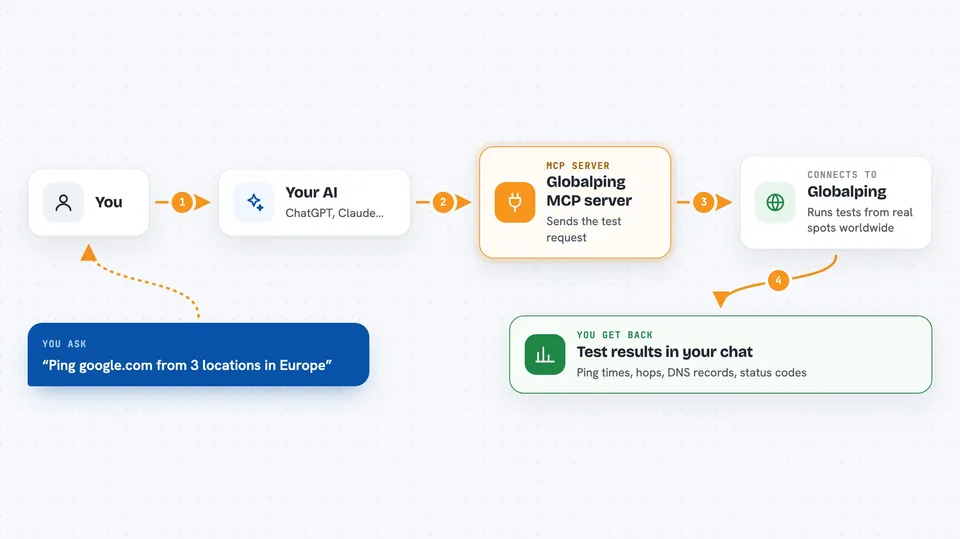
You ask your AI something like ping this site from three places in Europe. The AI sends that request to this helper. The helper talks to Globalping, which picks real probes in those locations and runs the test. The results come back to your AI, which explains them to you in the chat. You never have to install or run anything yourself.
 Click to zoom
What you can do with it
- Ping a website or server from several countries at once
- Run a traceroute to see the path your traffic takes
- Check DNS records using a specific resolver
- Run MTR tests that combine ping and traceroute
- Send HTTP or HTTPS requests from probes around the world
- Compare response times between different regions
- Look up which locations and networks are available
Try asking your AI
- “Ping google.com from 3 locations in Europe”
- “Run a traceroute to github.com from Japan and compare with one from the US”
- “Check the DNS resolution of example.com using Google DNS 8.8.8.8”
- “Is jsdelivr.com reachable from China? Test with both ping and HTTP”
What it gives back to you
You get back clear answers in the chat: ping times, the list of hops in a traceroute, DNS records, HTTP status codes and response times. Your AI usually sums it up in a sentence or two and can show the raw numbers if you ask. It can also compare results between locations for you.
Before you start
What you need
- An AI app that supports remote MCP servers, such as ChatGPT, Claude, Cursor, Gemini CLI or VS Code
- Nothing else to install, since it runs in the cloud
- Optional: a free Globalping account for higher limits
Good to know
Each test uses your free hourly allowance, and extra tests beyond that spend credits if you have them.
Install it with your AI
Add Globalping MCP server to your AI, no technical skills needed
You don't install anything by hand. You copy one prompt, paste it into an AI that can work on your computer, and it checks, installs and connects the server for you, asking you when it needs something.
Sign in to get the install prompt
Members get a ready-made prompt that lets the Claude desktop app check Globalping MCP server, install it and connect it for them, step by step. You don't need any technical skills: you copy, paste and answer a few questions. Your connected AI can also find and install any of the 4,609 MCP servers here for you.
Who it's for
Anyone who needs to check websites, servers or networks from other parts of the world, like IT support, web developers, and people managing remote teams or sites.



