MCP server · Productivity
PDF Content Search MCP server
Let your AI search all your PDFs, including scanned ones, and pull out dates, senders and amounts.
This is a small helper that connects your AI assistant to the PDF Content Search app on your Mac. Once it is hooked up, you can just ask your AI in plain words to find things inside your PDFs, and it will look them up for you. It is handy for anyone who keeps a lot of documents, like invoices, contracts or letters.
What is an MCP server? The 30-second version
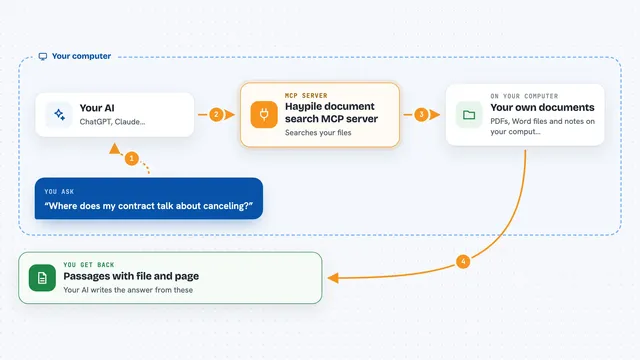
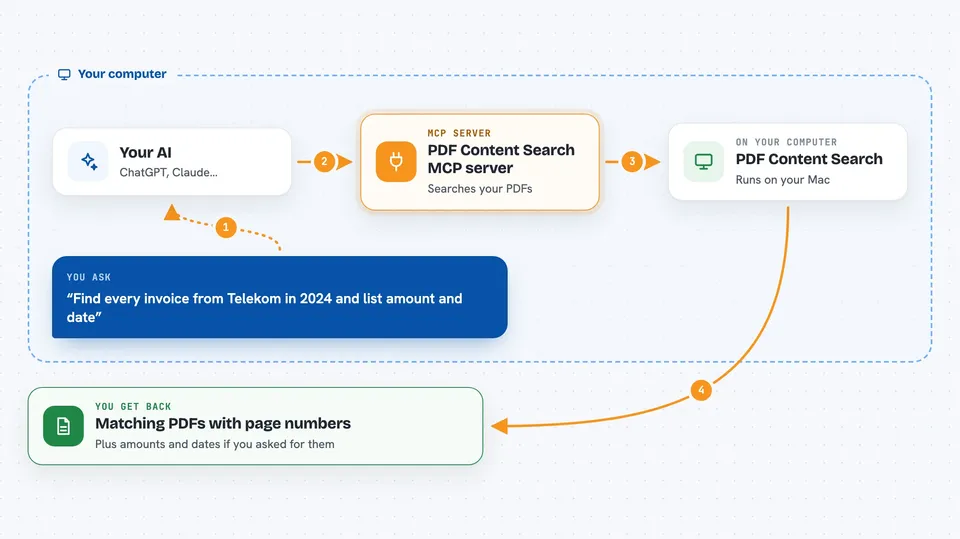
On its own, your AI can only chat with you. An MCP server is a small helper program that gives your AI a new skill, here a connection to the PDF Content Search app on your Mac. So when you ask a question about your PDFs, your AI passes the request to this helper, which talks to the app, and the app does the actual searching. You get the answer back in your chat, as if your AI had read all your files itself.
What this MCP server does
You type a question in your AI chat, like asking for every invoice from a certain company in a certain year. Your AI sends that request to this helper program. The helper passes it to the PDF Content Search app running on your Mac. The app searches its index of your PDFs, including text it has read from scanned pages, and finds the matches. The results come back through the helper to your AI, which shows them to you in the chat.
 Click to zoom
What you can do with it
- Search the full text of all your indexed PDFs at once
- Find text inside scanned PDFs using OCR
- Filter results by date, category, sender or amount
- Use wildcards and boolean operators in your search
- Get the matching PDF name and page number for each hit
- See highlighted snippets of the text that matched
- Ask your AI to list amounts and dates from a set of invoices
Try asking your AI
- “Find every invoice from Telekom in 2024 across all my PDFs and list amount and date”
- “Search for data processing agreement across my contracts folder and return the matching PDF and page number”
- “Show me all documents from my insurance company with an amount over 500 euros”
- “Which PDFs mention my old address, and on which pages”
What it gives back to you
You get back a list of matching documents, each with the file name, the page number, and a short snippet of the text that matched. If you asked for amounts or dates, those come back too. Your AI can then summarise the list or pull out just the numbers you wanted. Everything shows up right in your chat, so you do not have to open the app yourself.
Before you start
What you need
- A Mac running macOS 12 (Monterey) or later
- The PDF Content Search app installed and running (one-time purchase, 30-day free trial)
- The token from the app's Settings, under API Server (a kind of password the app gives you)
Good to know
This helper only reads from your PDF index, but it needs a token from the app, so keep that token private and only share it with your own AI setup.
Install it with your AI
Add PDF Content Search MCP server to your AI, no technical skills needed
You don't install anything by hand. You copy one prompt, paste it into an AI that can work on your computer, and it checks, installs and connects the server for you, asking you when it needs something.
Sign in to get the install prompt
Members get a ready-made prompt that lets the Claude desktop app check PDF Content Search MCP server, install it and connect it for them, step by step. You don't need any technical skills: you copy, paste and answer a few questions. Your connected AI can also find and install any of the 4,361 MCP servers here for you.
Who it's for
People who deal with lots of PDFs, like office workers, lawyers, accountants and anyone who keeps invoices, contracts or scanned letters.