
MCP server · Developer tools · official
Jungle Grid MCP server
by Jungle-Grid · official
Lets your AI estimate, run and check GPU jobs on Jungle Grid, then fetch the results.
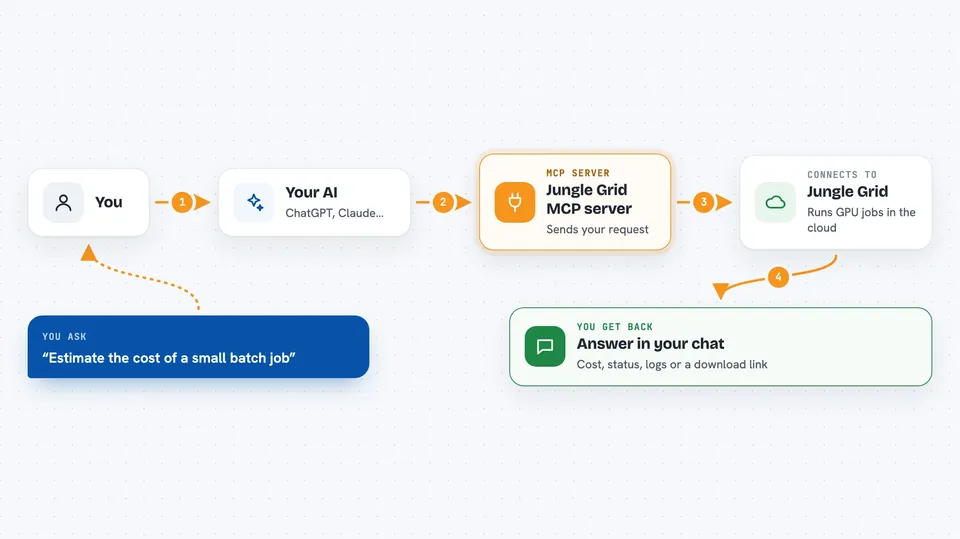
This is a small helper that connects your AI assistant to Jungle Grid, a service that runs heavy computing jobs on rented GPUs. Once it is set up, you can ask your AI in plain words to start a job, watch it, and bring back the output. It is handy for people who run training, fine-tuning, batch or inference work but do not want to click around a dashboard all day.
What is an MCP server? The 30-second version
On its own, your AI can only chat. An MCP server is a small helper program that gives your AI a new skill or a connection to another service. This one connects your AI to Jungle Grid, so when you ask it to run something on a GPU or check on a job, it can actually do that for you. You still talk to your AI the same way. The helper does the quiet work in the background.
What this MCP server does
You ask your AI something like estimate a small batch job or check on my last job. Your AI passes that request to this helper, and the helper talks to Jungle Grid on your behalf. Jungle Grid returns an estimate, a job status, some log lines, or a download link for a result file. Your AI then explains what came back in normal words in the chat. You never have to touch the Jungle Grid website yourself unless you want to.
 Click to zoom
What you can do with it
- Get a cost and capacity estimate before running anything
- Submit a GPU job for inference, training, fine-tuning or batch work
- Check the status and current phase of a running job
- Read the events and logs to see what a job is doing or why it failed
- Cancel a job that is still queued or running
- List the output files a finished job produced
- Get a temporary download link for a result file
Try asking your AI
- “Estimate the cost of a small batch job that runs a Python script on a CPU image”
- “Submit a batch job called hello-test using python:3.11-slim and tell me the job id”
- “How is job job_123 doing, and show me the last 50 log lines”
- “List the artifacts for job job_123 and give me a download link for the first one”
What it gives back to you
You get answers in the chat: an estimated cost range, a job id, a status like queued or running, event lines, log lines, or a list of output files. For files, it gives you a temporary download link you can open. If something went wrong, it shows the failure reason and the events around it. Everything is written out in the conversation, so you can copy what you need.
Before you start
What you need
- A Jungle Grid account with an API key (a long password-like string the site gives you)
- Node.js 18 or newer installed on your computer if you run it locally
- The Claude desktop app or another AI app that supports MCP servers
- API scopes on your key that match the actions you want to use
Good to know
Submitting a job can start paid GPU work, so check the estimate first and cancel jobs you no longer need.
Install it with your AI
Add Jungle Grid MCP server to your AI, no technical skills needed
You don't install anything by hand. You copy one prompt, paste it into an AI that can work on your computer, and it checks, installs and connects the server for you, asking you when it needs something.
Sign in to get the install prompt
Members get a ready-made prompt that lets the Claude desktop app check Jungle Grid MCP server, install it and connect it for them, step by step. You don't need any technical skills: you copy, paste and answer a few questions. Your connected AI can also find and install any of the 4,609 MCP servers here for you.
Who it's for
People who run machine learning or batch jobs on GPUs and want to start and check them by chatting with an AI instead of using a web dashboard.



