MCP server · Developer tools
llmprobe MCP server
by Jwrede
Let your AI check whether your LLM provider is healthy, fast, and responding before users notice problems.
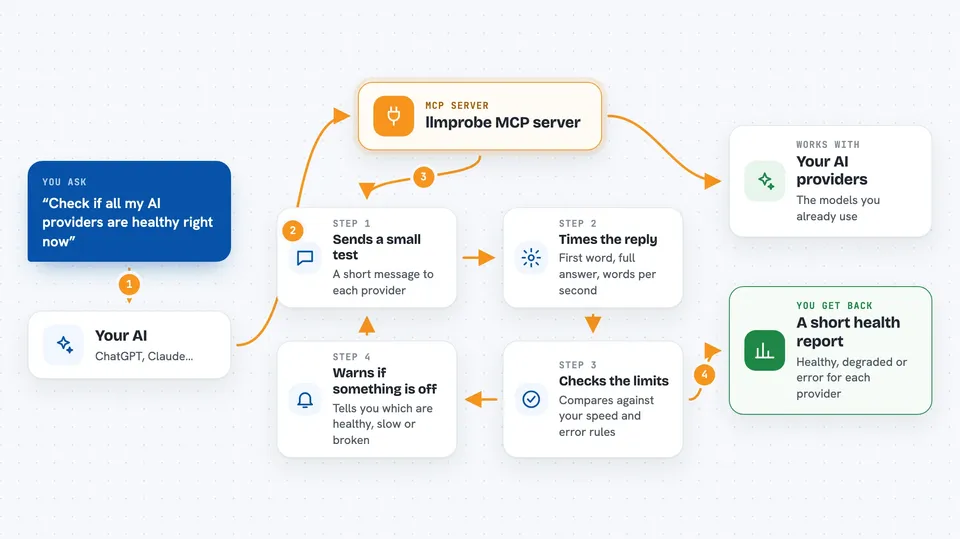
llmprobe is a small helper program that checks how well your AI provider is doing. It measures things like how long you wait before the answer starts and how fast it streams. It is handy for anyone who depends on an AI service and wants to know early when it slows down or breaks.
What is an MCP server? The 30-second version
On its own, your AI can only chat with you. An MCP server is a small helper program that gives your AI a new skill or a connection to another tool. This one connects your AI to llmprobe, which checks the health of AI providers. Once connected, you can ask your AI to run a health check and it will use llmprobe to do it for you.
What this MCP server does
You ask your AI to check your AI providers. Your AI calls this helper, and the helper sends a small test message to each provider you set up. It times how long the first word takes, how long the whole answer takes, and how many words per second come back. Then it tells you which providers are healthy, slow, or broken.
 Click to zoom
What you can do with it
- Check all your configured AI providers at once and see which are healthy
- Test a single model by name without writing a config file
- List the providers and models you have set up
- See the thresholds you set for speed and errors
- Find out which provider is slow before your users complain
- Use it as a gate before deploying, so slow providers block the release
Try asking your AI
- “Check if all my AI providers are healthy right now”
- “Probe just the gpt-4o model and tell me its time to first token”
- “List the providers and models I have configured”
- “Show me the current config with all thresholds”
What it gives back to you
You get back a short health report for each provider and model. It shows time to first token, total latency, tokens per second, and a status like healthy, degraded, or error. In the chat it looks like a small table or a few lines of plain text.
Before you start
What you need
- The llmprobe program installed on your computer
- A probes.yml file listing the providers and models you want to check
- API keys for those providers, stored as environment variables
- An MCP host like Claude Code that can run local helper programs
Good to know
It sends small test messages to your AI providers, which may cost a tiny amount of money depending on your provider's pricing.
Install it with your AI
Add llmprobe MCP server to your AI, no technical skills needed
You don't install anything by hand. You copy one prompt, paste it into an AI that can work on your computer, and it checks, installs and connects the server for you, asking you when it needs something.
Sign in to get the install prompt
Members get a ready-made prompt that lets the Claude desktop app check llmprobe MCP server, install it and connect it for them, step by step. You don't need any technical skills: you copy, paste and answer a few questions. Your connected AI can also find and install any of the 4,609 MCP servers here for you.
Who it's for
People who run or depend on AI services and want a simple way to check that those services are fast and working.