MCP server · Analytics
CloudSealed MCP server
by cloudsealed
Let your AI spot cloud cost spikes and risky systems, and tell you which ones are both.
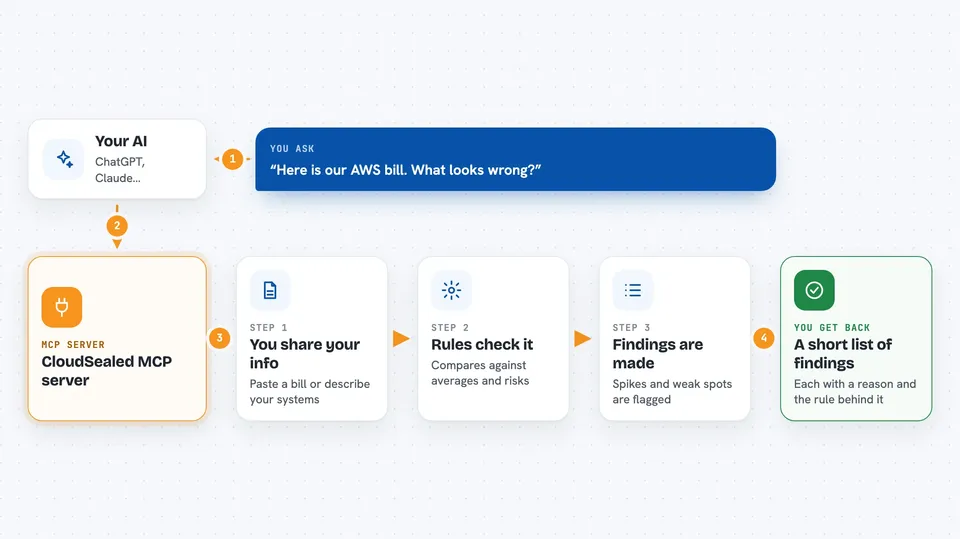
CloudSealed is a helper that lets your AI look at your cloud bills and your system list, then point out what is costing too much and what is fragile. It is handy if you get a cloud bill every month and wonder where the money went, or if you want a second set of eyes on which parts of your setup could break. You do not need to be an engineer to read the answers it gives back.
What is an MCP server? The 30-second version
On its own, your AI can only chat with you. An MCP server is a small helper program that gives your AI a new skill or a connection to a service, here to CloudSealed's cost and risk analysis tools. Once it is connected, your AI can ask CloudSealed to crunch your billing file or your system list and then explain the results to you in plain words. You just ask a question in the chat, and the AI quietly calls this helper behind the scenes.
What this MCP server does
You paste a cloud billing file into the chat, or you describe your systems in a sentence or two. Your AI sends that to CloudSealed, which runs a set of fixed rules over it. For bills, it compares each day or service against a rolling average and flags the odd ones out. For systems, it checks for things like single points of failure, too much coupling, and places that will not scale. Then your AI tells you what stood out and why, in the same chat window.
 Click to zoom
What you can do with it
- Find unusual cost spikes in a cloud billing file you paste in
- Point out which services are the biggest money wasters
- Score your systems for reliability risks like single points of failure
- Flag systems that are both expensive and fragile at the same time
- Explain each finding with the exact rule it came from
- Rank your cloud cleanup work by cost and risk together
Try asking your AI
- “Here is our AWS bill for last month. What looks wrong and what should we fix first?”
- “We have a checkout service, an orders database, and a third-party payment gateway. What is our biggest architecture risk?”
- “Here is our billing export and our system list. Which service is both burning money and a reliability risk?”
- “Give me a short list of cost anomalies from this file, with the reason for each one.”
What it gives back to you
You get back a short list of findings, each with a plain reason and the rule that triggered it. For cost, that means the service or day, the amount, and why it stood out. For risk, that means the system name, the risk type, and a score. When you ask for both together, you get a ranked shortlist of systems that are both costly and risky.
Before you start
What you need
- The uvx tool installed on your computer (a small helper that runs Python programs)
- A cloud billing file you can paste in (like an AWS, GCP, or Azure cost export)
- For the risk scoring tool only: a running Predictive-ML-Core service, usually started with Docker
Good to know
The billing tool reads whatever file you paste in, so avoid pasting anything with account numbers or personal details you would not want in the chat.
Install it with your AI
Add CloudSealed MCP server to your AI, no technical skills needed
You don't install anything by hand. You copy one prompt, paste it into an AI that can work on your computer, and it checks, installs and connects the server for you, asking you when it needs something.
Sign in to get the install prompt
Members get a ready-made prompt that lets the Claude desktop app check CloudSealed MCP server, install it and connect it for them, step by step. You don't need any technical skills: you copy, paste and answer a few questions. Your connected AI can also find and install any of the 4,361 MCP servers here for you.
Who it's for
Anyone who pays a cloud bill or owns a system and wants a plain-language read on where the money and the risk are, without hiring a specialist.