
MCP server · Productivity
Notipo MCP server
by kfuras
Publish and manage WordPress posts from your AI chat, with images and SEO handled for you.
Notipo is a helper that connects your AI assistant to your own WordPress site. You tell your AI what to write, and Notipo turns it into a real post on your blog, images and all. It is handy for anyone who writes for a WordPress site and would rather not click through the WordPress editor.
What is an MCP server? The 30-second version
On its own, your AI can only chat with you. An MCP server is a small helper program that gives your AI a new skill or a connection to another service. This one connects your AI to Notipo, which in turn talks to your WordPress site. So when you ask your AI to publish something, it can actually do it instead of just writing text you copy and paste.
What this MCP server does
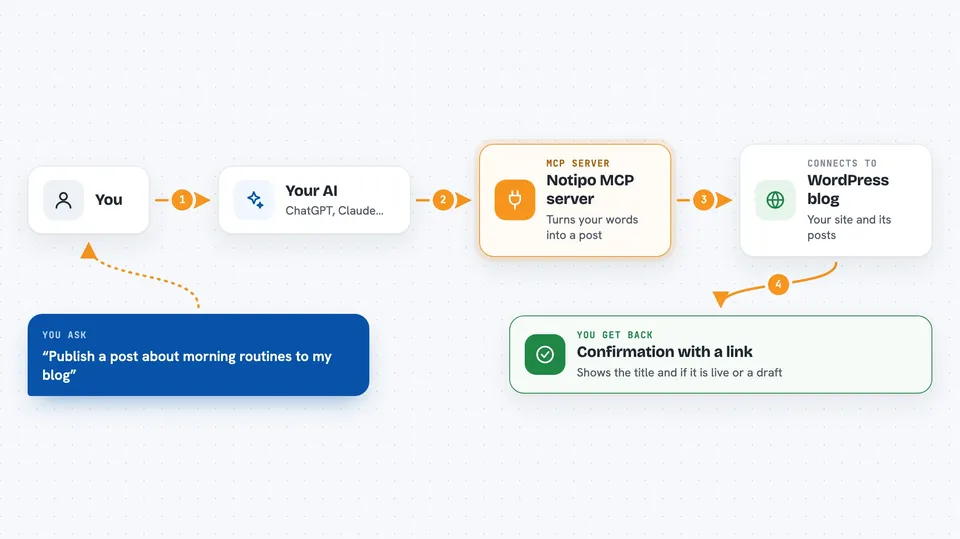
You ask your AI to write or change a post. Your AI sends that request to Notipo through this helper. Notipo converts your text into the format WordPress uses, uploads any images to your WordPress media library, and adds your SEO details. Then it creates or updates the post on your site. When it is done, it tells your AI what happened, and your AI tells you.
 Click to zoom
What you can do with it
- Create a new WordPress post from text your AI writes
- Update or edit an existing post
- Publish a post right away or save it as a draft
- Delete a post you no longer want
- Upload images to your WordPress media library
- Set a featured image for a post
- Fill in SEO title and description fields
Try asking your AI
- “Write a 600 word post about morning routines and publish it to my blog”
- “Update my latest post and add a section about coffee”
- “Add this image as the featured image on my draft about hiking”
- “Delete the post titled Old News from my WordPress site”
What it gives back to you
You get back a short confirmation in the chat, like the post title, whether it was published or saved as a draft, and a link to it. If you asked for a list of posts, you get that list. If something went wrong, your AI tells you what the problem was.
Before you start
What you need
- A WordPress site with Application Passwords turned on (WordPress 5.6 or newer)
- An account at notipo.com, or your own self-hosted Notipo setup
- A Notipo API key (a kind of password for apps; you get it from your Notipo account)
Good to know
It can publish, change, and delete posts on your live WordPress site, so double check before you tell your AI to delete anything.
Install it with your AI
Add Notipo MCP server to your AI, no technical skills needed
You don't install anything by hand. You copy one prompt, paste it into an AI that can work on your computer, and it checks, installs and connects the server for you, asking you when it needs something.
Sign in to get the install prompt
Members get a ready-made prompt that lets the Claude desktop app check Notipo MCP server, install it and connect it for them, step by step. You don't need any technical skills: you copy, paste and answer a few questions. Your connected AI can also find and install any of the 4,361 MCP servers here for you.
Who it's for
Bloggers, marketers, and small business owners who write for a WordPress site and want their AI to handle the publishing steps.





