
MCP server · Notes
Khwan memory MCP server
by khwanlabs
Give your AI a lasting memory of your corrections, so it remembers your rules in later sessions.
Khwan is a memory helper for coding assistants. It remembers the corrections and decisions you make, turns them into standing rules, and hands them back the next time you work on the same project. It is handy if you use Claude Code or Claude Desktop for coding and you are tired of repeating yourself every session.
What is an MCP server? The 30-second version
On its own, your AI can only chat. It forgets everything the moment the session ends. An MCP server is a small helper program that gives your AI a new skill or a connection to a service. This one connects your AI to Khwan, a memory service, so it can save facts you tell it and look them up again later.
What this MCP server does
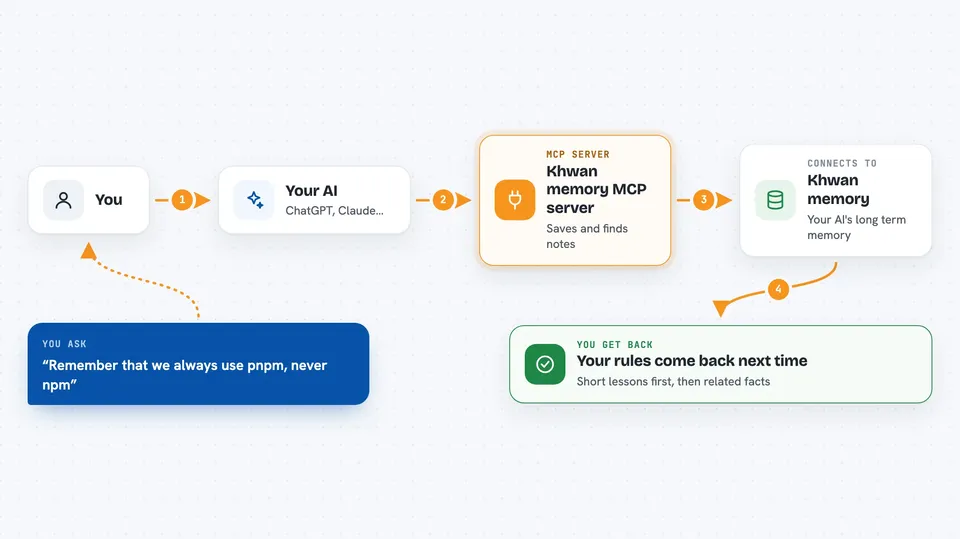
You ask your AI to remember something, or to recall what it knows about a task. The AI calls this helper, which talks to Khwan over the internet using your account key. Khwan stores the fact in a memory space tied to your project, or searches that space and sends back the most relevant notes. Overnight, Khwan also reads through what was stored and distils it into short standing lessons, so the rules you taught it come back first next time.
 Click to zoom
What you can do with it
- Save a durable fact or preference so future sessions know it
- Recall relevant memory at the start of a task or before spawning a helper agent
- Keep separate memory for each project so one project's notes do not leak into another
- Inspect what the brain currently remembers
- List the memory spaces (called cores) on your account
- Replay old Claude Code transcripts into a new brain so it starts with history
Try asking your AI
- “Call khwan_recall with the query deploy runbook and use the returned seed_text as context.”
- “That is a standing decision, please call khwan_remember with this fact: we always use pnpm, never npm.”
- “Show me what this brain currently remembers with khwan_memory.”
- “List the cores on my account with khwan_cores.”
What it gives back to you
You get text back in the chat. Recall gives you a short seed_text with any distilled lessons first, then up to three related facts. Remember confirms the fact was saved. Memory and cores give you simple lists. An empty result from recall means the brain has nothing close to your question, not that something broke.
Before you start
What you need
- A Khwan account and an API key from the Khwan dashboard (it looks like kwk_live_...)
- Python installed so you can run pip install khwan-mcp, or uvx
- Claude Code or Claude Desktop, or another app that supports MCP servers
Good to know
This helper reads what you type and sends it to Khwan's servers using your key, so anything you ask it to remember leaves your machine; do not store secrets or private data you would not want on that service.
Install it with your AI
Add Khwan memory MCP server to your AI, no technical skills needed
You don't install anything by hand. You copy one prompt, paste it into an AI that can work on your computer, and it checks, installs and connects the server for you, asking you when it needs something.
Sign in to get the install prompt
Members get a ready-made prompt that lets the Claude desktop app check Khwan memory MCP server, install it and connect it for them, step by step. You don't need any technical skills: you copy, paste and answer a few questions. Your connected AI can also find and install any of the 4,609 MCP servers here for you.
Who it's for
Developers and anyone who uses Claude Code or Claude Desktop for coding and wants their assistant to remember project rules across sessions.





