
MCP server · Notes
data-olympus MCP server
by knaisoma
Lets your AI look up your team's agreed coding rules and decisions before it writes code.
data-olympus is a shared knowledge base for your team's coding rules and decisions, kept as plain markdown files in git. It gives your AI a way to check those rules before suggesting code, so it follows what your team already agreed on. It is handy for teams who use coding assistants and keep running into the same old arguments about which library or pattern to use.
What is an MCP server? The 30-second version
On its own, your AI can only chat with you. An MCP server is a small helper program that gives your AI a new skill or a connection to something useful. This one connects your AI to your team's knowledge base, so when you ask a question about how your project should do something, the AI can look it up there and answer with your team's actual rules instead of guessing.
What this MCP server does
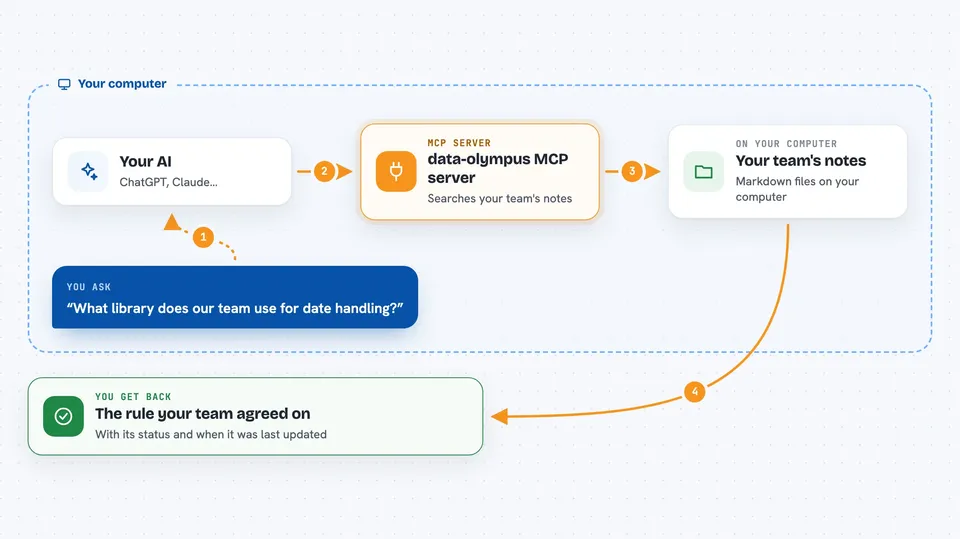
You ask your AI something like which library to use for a task. The AI sends that question to this helper program. The helper searches your team's markdown knowledge base for the rule or decision that applies. It only returns entries that are marked as accepted and still valid, skipping old or replaced ones. Then the AI uses that answer to guide what it writes for you.
 Click to zoom
What you can do with it
- Look up your team's accepted coding standards before suggesting code
- Check whether a decision has been replaced by a newer one
- Search the knowledge base by topic, status, or type
- Add a proposed rule to a pending queue for review
- Trace the history of a decision through its replacement chain
- Filter results to only show rules that are currently valid
Try asking your AI
- “What library does our team use for date handling?”
- “Is there an accepted decision about how we do database migrations?”
- “Has the rule about logging been replaced by something newer?”
- “What is our standard for error handling in this project?”
What it gives back to you
You get back plain answers in the chat, usually a short summary of the rule or decision that applies, with a note about its status and when it was last updated. If several entries match, you get a short list. If nothing matches, the AI tells you that too, so you know there is no agreed rule yet.
Before you start
What you need
- Python 3.13 or newer
- The uv tool installed (a small program that runs Python tools)
- A data-olympus knowledge base folder, which you create with one command
Good to know
It can add proposed entries to your knowledge base, so check what it wrote before accepting it.
Install it with your AI
Add data-olympus MCP server to your AI, no technical skills needed
You don't install anything by hand. You copy one prompt, paste it into an AI that can work on your computer, and it checks, installs and connects the server for you, asking you when it needs something.
Sign in to get the install prompt
Members get a ready-made prompt that lets the Claude desktop app check data-olympus MCP server, install it and connect it for them, step by step. You don't need any technical skills: you copy, paste and answer a few questions. Your connected AI can also find and install any of the 4,609 MCP servers here for you.
Who it's for
Software teams who use coding assistants and want them to follow the team's own agreed standards and decisions.





