
MCP server · Productivity
doc-extract MCP server
by koraynar
Let your AI read PDFs, text, CSV and JSON files, check the data against a schema, and save clean results.
This is a small helper program that lets your AI read documents on your computer and turn them into tidy data. It handles the boring, careful parts: opening files, pulling out text, splitting long documents, and checking that the final result matches the shape you asked for. It is handy if you deal with invoices, purchase orders or reports and want the numbers pulled out without retyping them.
What is an MCP server? The 30-second version
On its own, your AI can only chat with you. An MCP server is a small helper program that gives your AI a new skill, in this case a connection to the documents folder on your computer. Once it is set up, your AI can look inside your PDFs and text files and work with them when you ask. This server is the bridge between your AI and your files, and it keeps everything inside one folder you choose.
What this MCP server does
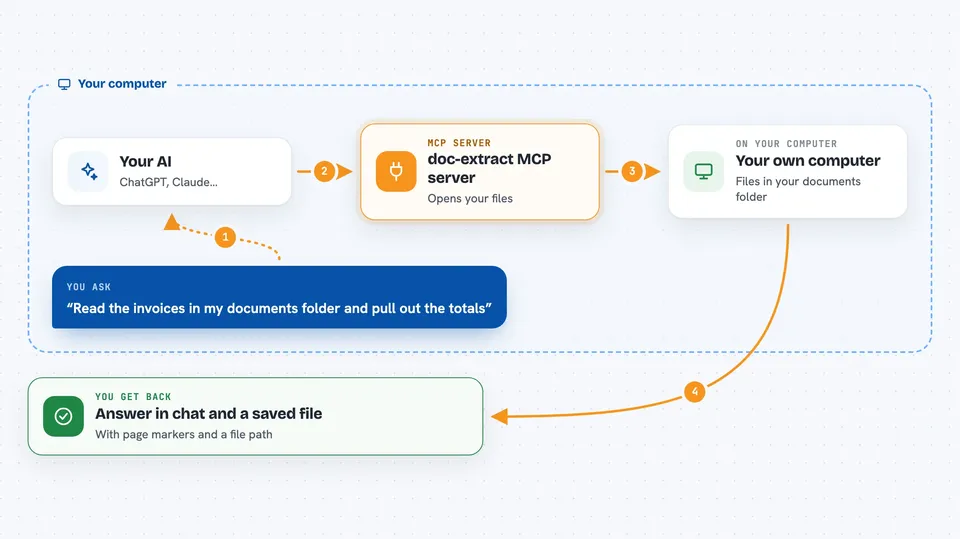
You ask your AI something like "read the invoices in my documents folder and pull out the totals". The AI uses this helper to list the files, open each one, and get the text back with clear page markers. The helper can also split a long document into smaller pieces so nothing gets lost. When the AI has the data, this helper checks it against a rulebook you provide and writes the final file for you. You get the answer in the chat and a saved file on disk.
 Click to zoom
What you can do with it
- List files in a folder, including all PDFs in subfolders
- Read the text of a PDF, text, markdown, CSV or JSON file
- Check the page count and basic details of a document
- Split a long document into smaller overlapping pieces
- Check extracted data against a JSON Schema and list every mistake
- Save the final result as a JSON or CSV file
Try asking your AI
- “List all the PDFs in my documents folder.”
- “Read pages 1 to 3 of invoice.pdf and pull out the invoice number, date and total.”
- “Check this JSON against my schema and tell me everything that is wrong.”
- “Save the extracted rows to out/invoices.csv.”
What it gives back to you
You get text back in the chat, with page markers like --- page 3 --- so you know where things came from. For checks, you get a list of every problem found, each with the exact spot in the data. When you save, you get the file path, the number of rows and the size in bytes. The AI then explains the result to you in normal words.
Before you start
What you need
- Python 3.11 or newer
- The uv tool installed (a free helper for running Python programs)
- A folder on your computer with the documents you want to work with
- A Claude app or another AI tool that supports MCP servers
Good to know
It can read any file inside the folder you point it at and can write new files there, so choose a folder you are comfortable sharing with your AI.
Install it with your AI
Add doc-extract MCP server to your AI, no technical skills needed
You don't install anything by hand. You copy one prompt, paste it into an AI that can work on your computer, and it checks, installs and connects the server for you, asking you when it needs something.
Sign in to get the install prompt
Members get a ready-made prompt that lets the Claude desktop app check doc-extract MCP server, install it and connect it for them, step by step. You don't need any technical skills: you copy, paste and answer a few questions. Your connected AI can also find and install any of the 4,361 MCP servers here for you.
Who it's for
Anyone who regularly turns PDFs like invoices or reports into spreadsheets or structured data, especially in finance, admin or operations roles.




