MCP server · Speech to text
Talkthrough MCP server
by korovin-aa97
Turn screen recordings, videos and audio into searchable transcripts, keyframes and OCR your AI can read.
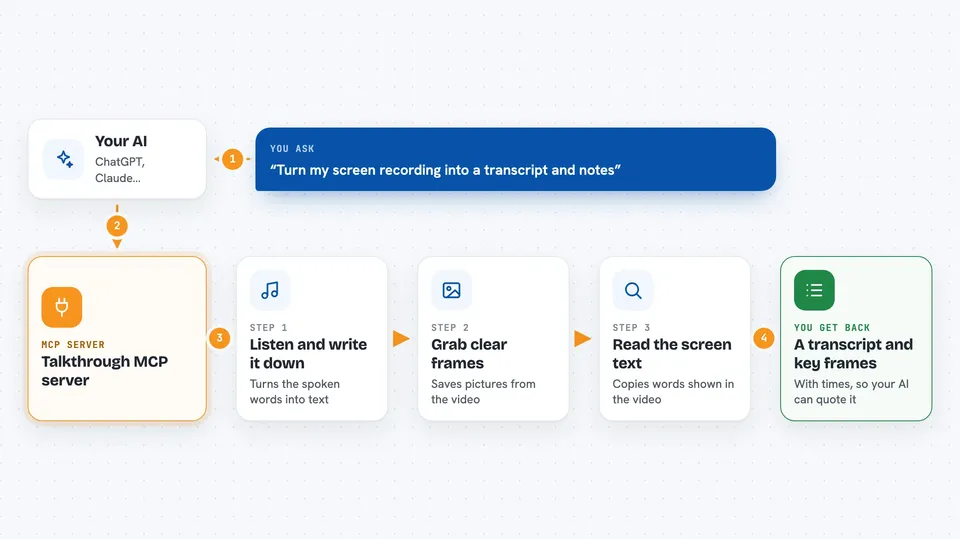
Talkthrough is a helper that lets your AI watch and listen to a recording for you. You give it a video or audio file on your computer, and it pulls out the spoken words, the on-screen text, and clear still frames. It is handy if you record bugs, meetings, demos or workshops and want notes without rewatching everything.
What is an MCP server? The 30-second version
On its own, your AI can only chat with you. An MCP server is a small helper program that gives your AI a new skill, like a connection to a specific tool or app. This one connects your AI to recordings on your own machine, so it can open a video, read the words and frames, and answer questions about what happened. Everything stays on your computer, and nothing gets posted anywhere.
What this MCP server does
You point your AI at a recording file, like a screen capture or a meeting audio. Your AI asks this helper to process that file. The helper listens to the audio, writes down what was said, grabs clear frames from the video, reads any text shown on screen, and lines everything up with real clock times. Then your AI can search it, quote it, and write you a summary or a draft report.
 Click to zoom
What you can do with it
- Turn a recording into a searchable transcript
- Pull out key frames and read the text on screen
- Find the exact moment someone said something
- Label who said what in a meeting
- Draft a bug report from a narrated screen recording
- Summarize a workshop or demo into notes
- Match remarks in a recording to system logs by time
Try asking your AI
- “Process ~/Desktop/recording.mov and tell me what bugs were mentioned”
- “Search this recording for the part about the login error”
- “Give me the transcript of the meeting and list the action items”
- “Pull the frames around the crash and read the error text on screen”
What it gives back to you
You get back a short summary of the recording, plus a transcript, key frames as image files, and the text found on screen. You can ask for just a slice of the transcript, a few frames near a moment, or a search result with the exact time. Your AI then writes the answer, notes or draft in the chat, quoting the recording.
Before you start
What you need
- The uv tool installed (a small program that runs the helper; the README gives a one-line install)
- A video or audio file on your computer, or a public video link
- An MCP client like Claude Code, Claude Desktop, Cursor or Codex
Good to know
It reads the recording files you point it at, so only give it files you are comfortable having your AI look at.
Install it with your AI
Add Talkthrough MCP server to your AI, no technical skills needed
You don't install anything by hand. You copy one prompt, paste it into an AI that can work on your computer, and it checks, installs and connects the server for you, asking you when it needs something.
Sign in to get the install prompt
Members get a ready-made prompt that lets the Claude desktop app check Talkthrough MCP server, install it and connect it for them, step by step. You don't need any technical skills: you copy, paste and answer a few questions. Your connected AI can also find and install any of the 4,361 MCP servers here for you.
Who it's for
People who record bugs, meetings, demos or workshops and want their AI to take notes and find the important moments.