MCP server · Speech to text · official
TranscriptFetch MCP server
by TranscriptFetch · official
Lets your AI pull transcripts from YouTube, TikTok, Instagram and podcasts, and search videos for you.
TranscriptFetch is a helper that lets your AI grab the words spoken in a video or podcast. You give it a link, and it hands back the transcript so your AI can read it, summarize it, or answer questions about it. It is handy if you watch a lot of talks, interviews, or short clips and want the text without typing it out yourself.
What is an MCP server? The 30-second version
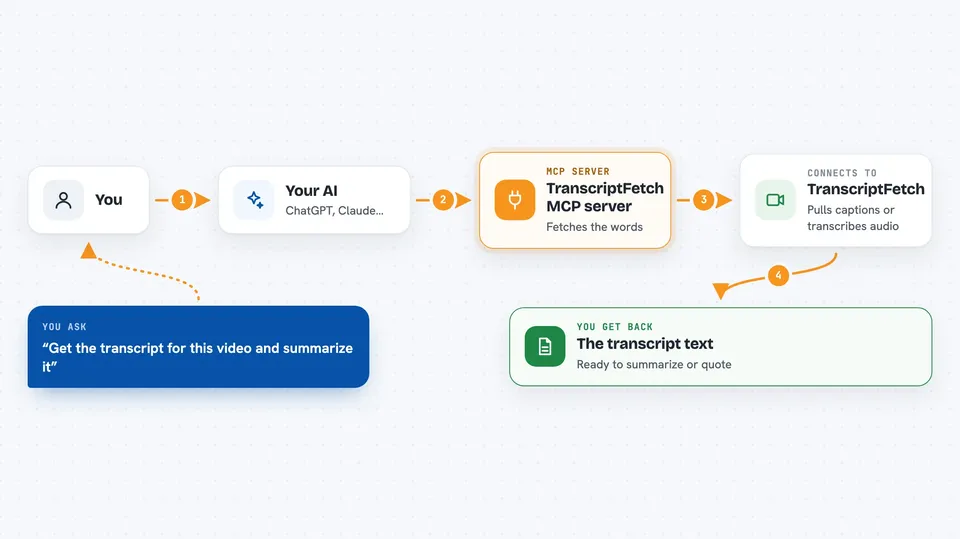
On its own, your AI can only chat with you using what it already knows. An MCP server is a small helper program that gives your AI a new skill, in this case a connection to TranscriptFetch, a service that turns videos and audio into text. Once it is connected, your AI can ask TranscriptFetch for a transcript when you paste a link, then read that text and work with it for you. You do not need to understand how it works under the hood. You just ask in plain words.
What this MCP server does
You paste a video link and ask your AI for the transcript. Your AI passes the link to this helper, which sends it to TranscriptFetch. TranscriptFetch fetches the captions if the video has them, or transcribes the audio with AI if it does not. The text comes back to your AI, and your AI shows it to you or uses it to answer your question. You can also ask it to search YouTube, list a channel's videos, or check how many credits you have left.
 Click to zoom
What you can do with it
- Get the transcript of a YouTube, TikTok, or Instagram video from a link
- Transcribe a video that has no captions using AI
- Search YouTube for videos by keyword
- List all the videos on a YouTube channel
- List all the videos in a YouTube playlist
- Check how many TranscriptFetch credits you have left
Try asking your AI
- “Get the transcript for https://youtu.be/aircAruvnKk and summarize the key points.”
- “Search YouTube for how transformers work and list the top 5 videos.”
- “List the latest videos from @lexfridman and pull the transcript of the newest one.”
- “How many TranscriptFetch credits do I have left?”
What it gives back to you
You get back plain text: the transcript itself, a list of videos with titles and links, or a number for your credit balance. Your AI can then summarize it, quote parts of it, or answer follow-up questions. For long videos the transcript can be long, so it helps to ask for a summary or specific parts. If a video has no speech at all, you get a short note saying no transcript was found.
Before you start
What you need
- A free TranscriptFetch account (no card needed)
- An API key from your TranscriptFetch dashboard (it starts with tf_live_)
- The Claude desktop app or another MCP client like Cursor
- Node.js 18 or newer on your computer if you run it locally
Good to know
Each successful transcript or video list uses credits from your account, and AI transcription costs extra per minute of audio, so keep an eye on your balance if you fetch a lot of long videos.
Install it with your AI
Add TranscriptFetch MCP server to your AI, no technical skills needed
You don't install anything by hand. You copy one prompt, paste it into an AI that can work on your computer, and it checks, installs and connects the server for you, asking you when it needs something.
Sign in to get the install prompt
Members get a ready-made prompt that lets the Claude desktop app check TranscriptFetch MCP server, install it and connect it for them, step by step. You don't need any technical skills: you copy, paste and answer a few questions. Your connected AI can also find and install any of the 4,361 MCP servers here for you.
Who it's for
Anyone who works with video or audio content, like researchers, marketers, journalists, students, or podcast fans who want the text without watching or listening.