MCP server · Speech to text
Video Analyzer MCP server
by guimatheus92
Lets your AI watch a video link and pull out the transcript, key frames, on-screen text, and a timeline.
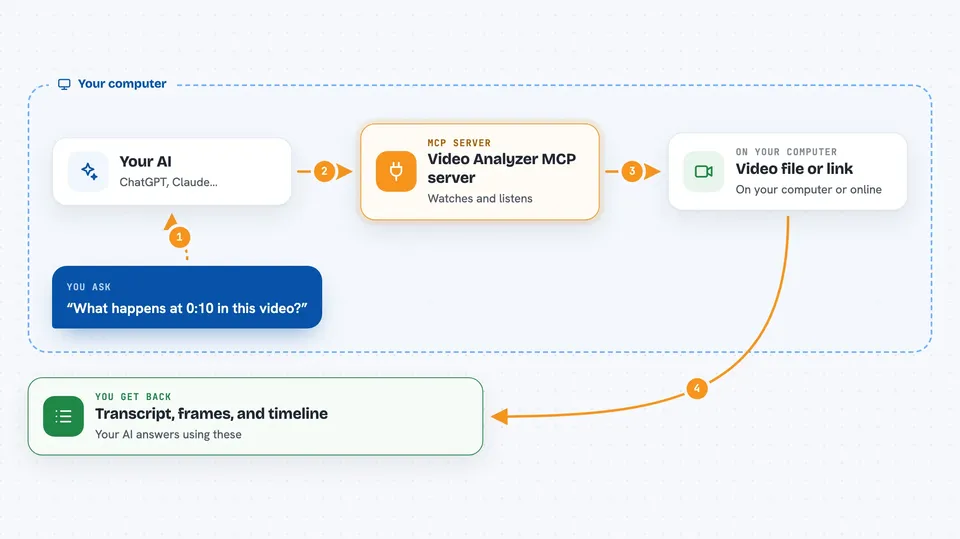
This is a small helper that lets your AI look inside a video. You give it a link or a file, and it comes back with what was said, what was on screen, and when each thing happened. It is handy if you deal with recordings, demos, or social clips and do not want to watch them all yourself.
What is an MCP server? The 30-second version
On its own, your AI can only chat with you. It cannot open a video and watch it. An MCP server is a small helper program that gives your AI a new skill, and this one gives it the skill of reading videos. Once it is connected, your AI can take a video link you paste in, send it to this helper, and bring the results back into your chat.
What this MCP server does
You paste a video link or point to a file on your computer, and you ask your AI a question about it. Your AI passes the video to this helper. The helper downloads or opens the video, listens to the audio, and grabs a set of still pictures from key moments. It also reads any text visible on screen, like error messages or prices. Then it hands everything back to your AI, which answers you in plain words.
 Click to zoom
What you can do with it
- Get the full transcript of a video with timestamps
- Pull out key frames as image files you can look at
- Read text that appears on screen, like code or error messages
- See a timeline that lines up what was said with what was shown
- Ask about one specific moment, like what happens at 1:30
- Grab metadata, comments, and chapters without downloading the video
- Analyze a whole folder of videos in one go
Try asking your AI
- “Analyze this video: https://www.youtube.com/watch?v=jNQXAC9IVRw”
- “What happens at 0:10 in this Loom link?”
- “Get the transcript from this screen recording file on my desktop”
- “Show me the frame at 1:23 in this video”
What it gives back to you
You get back a mix of text and files. There is a transcript with timestamps, a list of key frames saved as images, any text found on screen, and a timeline that ties it all together. Your AI then summarizes it or answers your question using those pieces.
Before you start
What you need
- Node.js 22.12 or newer on your computer
- yt-dlp installed if you want to use YouTube, Vimeo, TikTok, Instagram, X, Twitch, Dailymotion, or Facebook links (a free tool you install with pip install yt-dlp)
- Chrome or Chromium is optional, only as a backup for grabbing frames
Good to know
It downloads videos and saves frame images to your computer, so keep an eye on disk space and only point it at links and files you are allowed to use.
Install it with your AI
Add Video Analyzer MCP server to your AI, no technical skills needed
You don't install anything by hand. You copy one prompt, paste it into an AI that can work on your computer, and it checks, installs and connects the server for you, asking you when it needs something.
Sign in to get the install prompt
Members get a ready-made prompt that lets the Claude desktop app check Video Analyzer MCP server, install it and connect it for them, step by step. You don't need any technical skills: you copy, paste and answer a few questions. Your connected AI can also find and install any of the 4,361 MCP servers here for you.
Who it's for
People who work with recorded meetings, product demos, social clips, or screen recordings and want quick answers without watching everything.