MCP server · Finance and crypto
Cointelegraph News MCP server
by kukapay
Lets your AI pull the latest Cointelegraph crypto news and summaries right into your chat.
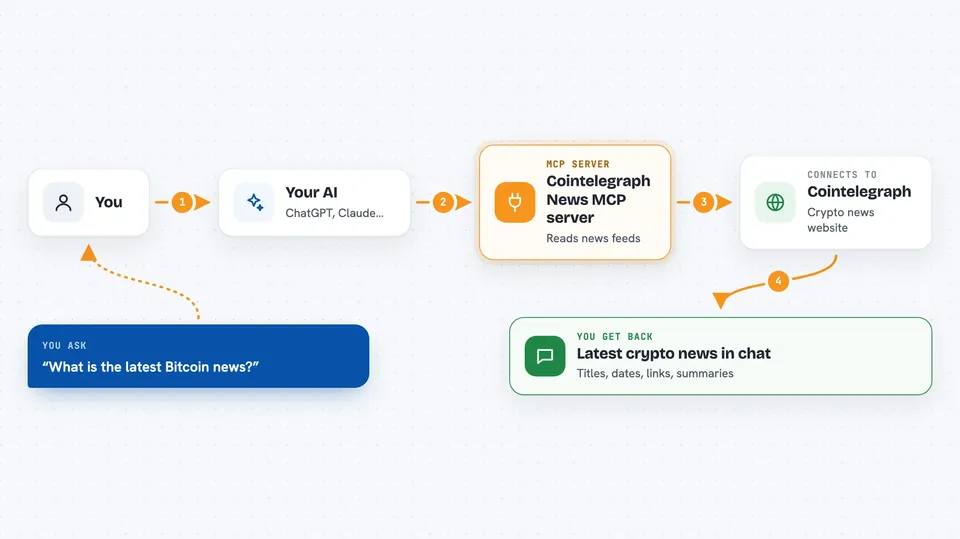
This is a small helper that connects your AI assistant to Cointelegraph, a well known crypto news site. Once it is set up, you can just ask your AI for the latest Bitcoin or Ethereum headlines and it will fetch them for you. It is handy if you follow crypto news but do not want to keep refreshing the website yourself.
What is an MCP server? The 30-second version
On its own, your AI can only chat with you using what it already knows. An MCP server is a small helper program that gives your AI a new skill or a connection to an app or service. This one connects your AI to Cointelegraph's news feeds, so the AI can look up fresh articles for you when you ask. You do not need to understand how it works; you just install it once and then talk to your AI as usual.
What this MCP server does
You ask your AI something like what is the latest Bitcoin news. The AI passes your request to this helper program. The helper then reads Cointelegraph's news feeds, which are simple lists of recent articles the site publishes. It picks out the newest ones, cleans up the text into a readable format, and hands them back to your AI. Your AI then shows you the titles, dates, links, and short summaries in the chat.
 Click to zoom
What you can do with it
- List all the news categories available, like bitcoin, ethereum, or regulation
- Fetch the latest articles from any category you choose
- Limit how many articles you want back, from one to all of them
- Control how long the summary of each article should be
- Get clickable links to the full articles on Cointelegraph
- Ask for news across all categories at once
Try asking your AI
- “What are the available Cointelegraph news categories?”
- “Show me the latest 3 articles from the bitcoin category.”
- “Give me the newest ethereum news with short summaries.”
- “Show the latest regulation article with a 200 character summary.”
What it gives back to you
You get a list of articles in the chat, each with an ID number, the title, the publish date, a link, and a short summary. The summaries are cleaned up so they read nicely instead of showing raw web code. You can ask for just a couple of articles or all of them, and you can set how long each summary should be. It is all text in the chat, nothing is changed on any website.
Before you start
What you need
- Python 3.10 or newer installed on your computer
- An internet connection so it can fetch the news feeds
- The Claude desktop app if you want to use it inside Claude (optional)
Good to know
It only reads public news feeds, so there is nothing risky to change or delete, but the news it shows comes straight from Cointelegraph and is not checked or verified by the tool.
Install it with your AI
Add Cointelegraph News MCP server to your AI, no technical skills needed
You don't install anything by hand. You copy one prompt, paste it into an AI that can work on your computer, and it checks, installs and connects the server for you, asking you when it needs something.
Sign in to get the install prompt
Members get a ready-made prompt that lets the Claude desktop app check Cointelegraph News MCP server, install it and connect it for them, step by step. You don't need any technical skills: you copy, paste and answer a few questions. Your connected AI can also find and install any of the 4,609 MCP servers here for you.
Who it's for
Anyone who follows crypto news and wants quick headlines without leaving their AI chat, from curious hobbyists to analysts and writers.