
MCP server · Developer tools
Docker MCP server
by L337-org
Lets your AI look at and manage your Docker containers, images and services for you.
This is a helper that connects your AI assistant to Docker, the tool many teams use to run apps in containers. Once it is set up, you can ask your AI plain questions about your containers and it can check them, read their logs, and even start or stop things for you. It is handy if you work with Docker but do not want to memorize all the commands.
What is an MCP server? The 30-second version
On its own, your AI can only chat with you. An MCP server is a small helper program that gives your AI a new skill or a connection to another app. This one connects your AI to Docker, so it can look things up and do things there when you ask. You stay in charge: you decide what it is allowed to touch.
What this MCP server does
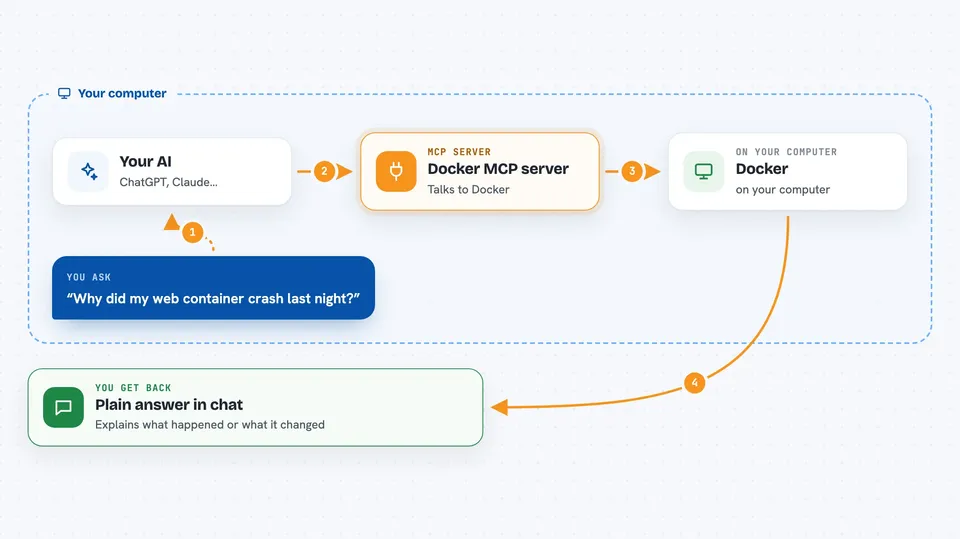
You ask your AI something about your Docker setup, like why a container stopped. The AI uses this helper, and the helper talks to Docker on your machine or a remote machine. Docker sends back the details, like logs, status and resource use. The AI then explains it to you in normal words, or makes the change you asked for.
 Click to zoom
What you can do with it
- List your containers and see which ones are running or stopped
- Read the logs of a container to find out why it crashed
- Check memory, CPU and disk usage of your containers and volumes
- Start, stop or restart a container
- Look at your images, networks and volumes
- Inspect your Docker Swarm services and nodes
- Compare your test and production Docker environments
Try asking your AI
- “Why did my web container crash last night?”
- “Which containers are using the most memory right now?”
- “Show me the logs of the api container from the last hour.”
- “What is the state of my swarm and are all services healthy?”
What it gives back to you
You get answers in the chat, in plain language. That can be a list of containers, a summary of a log file, numbers about memory or disk use, or a short explanation of what went wrong. If you asked it to change something, it tells you what it did.
Before you start
What you need
- Docker running on your machine (or a remote Docker you can reach)
- Python 3.14 or newer and uv, unless you use the container or desktop extension version
- On Intel Macs, Rust and OpenSSL 3.x if you install it natively
Good to know
It can start, stop and delete containers and other resources, so use the read-only mode or confirm carefully when you are working on anything important.
Install it with your AI
Add Docker MCP server to your AI, no technical skills needed
You don't install anything by hand. You copy one prompt, paste it into an AI that can work on your computer, and it checks, installs and connects the server for you, asking you when it needs something.
Sign in to get the install prompt
Members get a ready-made prompt that lets the Claude desktop app check Docker MCP server, install it and connect it for them, step by step. You don't need any technical skills: you copy, paste and answer a few questions. Your connected AI can also find and install any of the 4,361 MCP servers here for you.
Who it's for
Developers, system administrators and anyone who runs apps in Docker and wants quick answers without typing commands.




