
MCP server · Security
qURL MCP server
by layervai
Create, share, and revoke secure expiring access links to files and content from your AI chat.
This is a helper that connects your AI assistant to qURL, a service for making secure access links that expire and can be limited in scope. It is handy if you share files or links with clients, partners, or teammates and want them to stop working after a set time. You ask your AI in plain words, and it creates, checks, or revokes the link for you.
What is an MCP server? The 30-second version
On its own, your AI can only chat with you. An MCP server is a small helper program that gives your AI a new skill or a connection to another service. This one connects your AI to qURL, so it can create and manage secure access links on your behalf. When you ask for a link, your AI passes the request to this helper, and the helper talks to qURL for you.
What this MCP server does
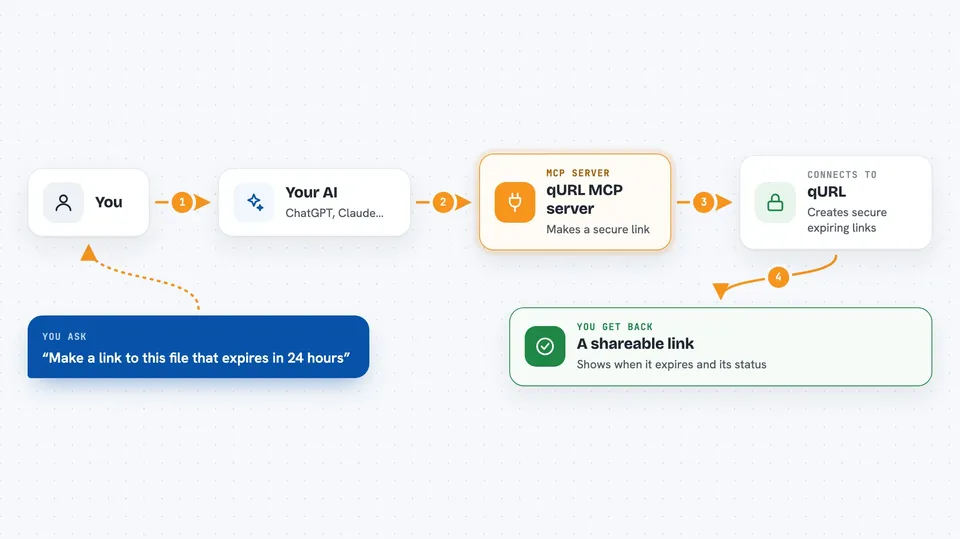
You tell your AI what you want, for example to share a file with someone for one day. Your AI uses this helper to send the request to qURL. qURL creates a special link that expires and can be limited to certain uses. The helper sends the link back to your AI, and your AI shows it to you in the chat. You can also ask your AI to list your links, check who has used them, or turn them off.
 Click to zoom
What you can do with it
- Create a new expiring access link for a file or piece of content
- List all your current links and see their status
- Check the details of one link, including when it expires
- Extend or shorten how long a link stays valid
- Revoke a link or a specific access token so it stops working
- Upload a text or file and get a shareable link back
- See active sessions and end them if needed
Try asking your AI
- “Create a link to this document that expires in 24 hours”
- “List all my active qURL links”
- “Revoke the link I made for the client yesterday”
- “Upload this text and give me a one-time link to share”
What it gives back to you
You get back the link itself, plus details like when it expires and its current status. When you ask for a list, your AI shows a table or bullet list of your links with their key details. If you revoke or extend a link, your AI confirms the change in the chat. For uploads, you get a fresh link ready to copy and send.
Before you start
What you need
- A qURL account and an API key (a kind of password for apps; you get it from your qURL account settings)
- The Claude desktop app or another MCP-compatible client
- Node.js 18 or newer if you run it on your own computer
Good to know
This helper can create, change, and delete your access links, and uploading a file shares its content, so only share files you mean to share and prefer short expiry times for sensitive material.
Install it with your AI
Add qURL MCP server to your AI, no technical skills needed
You don't install anything by hand. You copy one prompt, paste it into an AI that can work on your computer, and it checks, installs and connects the server for you, asking you when it needs something.
Sign in to get the install prompt
Members get a ready-made prompt that lets the Claude desktop app check qURL MCP server, install it and connect it for them, step by step. You don't need any technical skills: you copy, paste and answer a few questions. Your connected AI can also find and install any of the 4,361 MCP servers here for you.
Who it's for
Anyone who shares files or links with people outside their team and needs those links to expire or be revocable, like consultants, lawyers, and support staff.




