MCP server · Notes
WhiteMagic MCP server
by lbailey94
Give your AI a private memory that survives restarts, so it remembers your project from one session to the next.
WhiteMagic is a memory helper for your AI. It lets your AI write down important things about your work and find them again later, even after you close the app and come back tomorrow. It is handy if you use ChatGPT or Claude for ongoing projects and are tired of re-explaining everything each time.
What is an MCP server? The 30-second version
On its own, your AI can only chat. It forgets everything the moment the conversation ends. An MCP server is a small helper program that gives your AI a new skill or a connection to something outside the chat. WhiteMagic is that helper for memory: it runs quietly on your own computer and lets your AI save notes and look them up again when you ask.
What this MCP server does
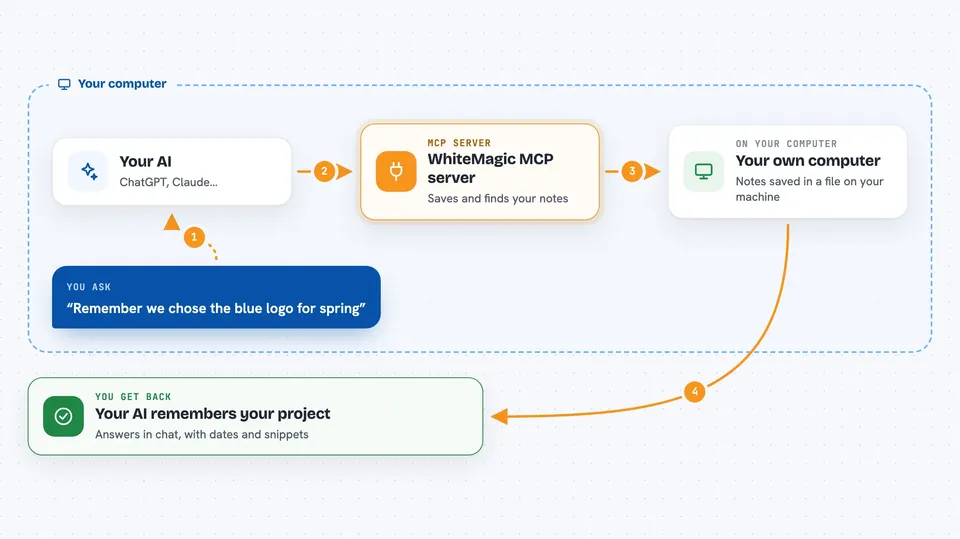
You tell your AI something worth remembering, like a decision you made or a detail about your project. Your AI passes that to WhiteMagic, which stores it in a file on your own computer. Later, in a new chat or a new day, you ask your AI about that topic. Your AI asks WhiteMagic to search, WhiteMagic finds the matching notes, and your AI reads them back to you. Nothing is sent to a company server unless you choose to use the separate hosted option.
 Click to zoom
What you can do with it
- Save a note or decision so your AI remembers it later
- Search your saved notes by keyword
- Start a session and pick up where you left off
- List everything your AI has stored about a topic
- Back up your whole memory store to a folder or external disk
- Restore your memory from a backup if something goes wrong
- Check that your memory files have not been changed unexpectedly
Try asking your AI
- “Remember that we decided to use the blue logo for the spring campaign.”
- “What did we decide about the client's budget last week?”
- “Start a new session and remind me what we were working on.”
- “List everything you have saved about the Henderson project.”
What it gives back to you
You get answers in the chat, written in normal sentences. When you save something, your AI usually confirms it in one line. When you search, you get a short list of matching notes with the date and a snippet. Backups and checks give you a short status message, like whether the backup succeeded or the files are intact.
Before you start
What you need
- A computer running Linux or a Mac with an Apple chip (Windows and older Macs are published but not officially supported yet)
- The WhiteMagic program installed on your computer (the README gives a one-line install command)
- An MCP client like the Claude desktop app, already set up on your machine
Good to know
Your notes are stored as plain files on your computer, so do not save passwords or other secrets in them, and keep a backup on a different disk.
Install it with your AI
Add WhiteMagic MCP server to your AI, no technical skills needed
You don't install anything by hand. You copy one prompt, paste it into an AI that can work on your computer, and it checks, installs and connects the server for you, asking you when it needs something.
Sign in to get the install prompt
Members get a ready-made prompt that lets the Claude desktop app check WhiteMagic MCP server, install it and connect it for them, step by step. You don't need any technical skills: you copy, paste and answer a few questions. Your connected AI can also find and install any of the 4,066 MCP servers here for you.
Who it's for
Anyone who uses an AI assistant for long-running projects and wants it to remember context between sessions without sending notes to a cloud service.