
MCP server · Notes
passbaton MCP server
by leesgit
Your AI remembers what you did last session, so you never re-explain your project again.
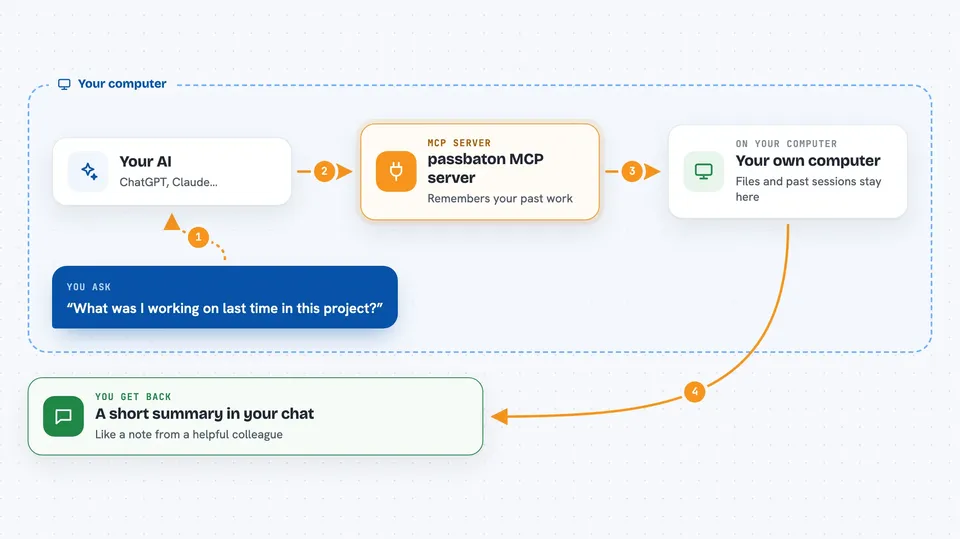
passbaton is a small helper that keeps notes about your work and hands them back to your AI at the start of every new session. It works with Claude Code, Codex CLI and Gemini CLI, and it keeps everything on your own computer. It is handy if you are tired of typing the same project background over and over.
What is an MCP server? The 30-second version
On its own, your AI can only chat with you in the moment. It forgets everything when the session ends. An MCP server is a small helper program that gives your AI a new skill or a connection to something outside the chat. passbaton is that helper here: it watches your coding sessions, saves the important bits to a local file, and quietly feeds them back to your AI next time you start working.
What this MCP server does
You install passbaton once, and it hooks into your AI tool in the background. When you start a new session, it looks up what you worked on before and shows a short summary at the top. While you work, it notices decisions, errors and fixes, and saves them. If your session gets compressed to save space, passbaton writes a handover so nothing important is lost. When you close the session, it reads the conversation and pulls out commits, decisions and error-fix pairs for next time.
 Click to zoom
What you can do with it
- See a summary of your last sessions the moment you open a new one
- Stop retyping project background and past decisions
- Search your past work in English, Korean or Japanese
- Get past solutions suggested when the same error shows up again
- Keep a list of tasks with priorities across sessions
- Share one memory across Claude Code, Codex CLI and Gemini CLI
- Keep everything on your own machine with no cloud and no API cost
Try asking your AI
- “What was I working on last time in this project?”
- “Have we seen this build error before, and how did we fix it?”
- “What decisions did we make about the auth system?”
- “Show me my open tasks for this project”
What it gives back to you
You get short summaries in the chat: what you did recently, which files were active, decisions you made, and any past solutions to errors. It can also return search results from your saved memories and a list of tasks. Everything appears as plain text inside the conversation, so you can read it like a note from a colleague.
Before you start
What you need
- Node.js 22 or newer installed on your computer
- Claude Code, Codex CLI or Gemini CLI set up and working
- A terminal where you can run one install command
Good to know
It reads your session transcripts and saves notes about your work to a local database, so keep that file out of git if your project has secrets in the conversation.
Install it with your AI
Add passbaton MCP server to your AI, no technical skills needed
You don't install anything by hand. You copy one prompt, paste it into an AI that can work on your computer, and it checks, installs and connects the server for you, asking you when it needs something.
Sign in to get the install prompt
Members get a ready-made prompt that lets the Claude desktop app check passbaton MCP server, install it and connect it for them, step by step. You don't need any technical skills: you copy, paste and answer a few questions. Your connected AI can also find and install any of the 4,609 MCP servers here for you.
Who it's for
Developers and technical folks who use AI coding tools daily and are tired of repeating project context every session.





