
MCP server · Notes
Hypermnesic MCP server
Give your AI a shared memory of Markdown notes stored in your own Git repo, readable by every assistant.
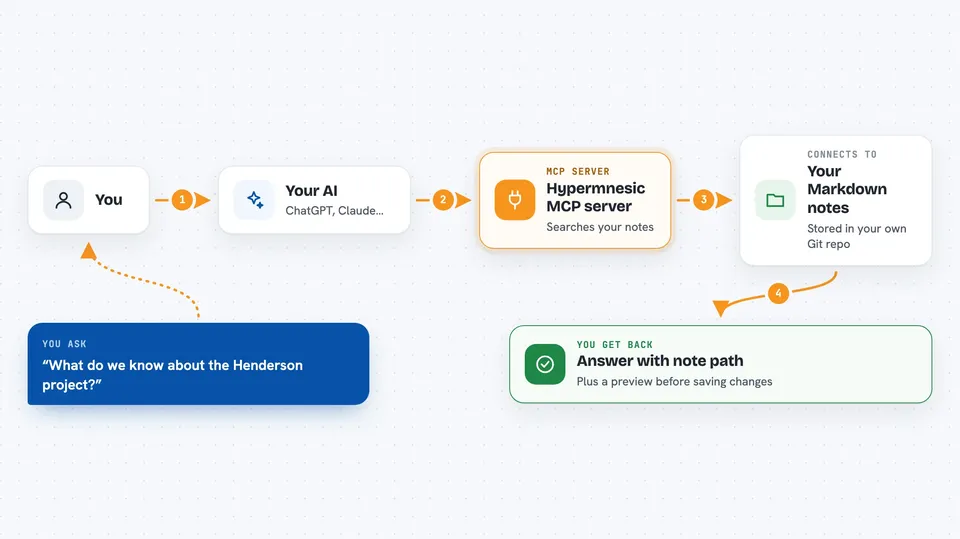
Hypermnesic is a memory helper for your AI assistants. It keeps your notes as plain Markdown files in a Git repository that you own, and lets ChatGPT, Claude, and other tools read and write to that same set of notes. It is handy if you want your AI to remember things across apps without handing your notes to a company.
What is an MCP server? The 30-second version
On its own, your AI can only chat with you in the moment. An MCP server is a small helper program that gives your AI a new skill or a connection to an app or service. This one connects your AI to your own folder of Markdown notes kept in a Git repository. Once connected, your AI can look things up in those notes or add new ones when you ask.
What this MCP server does
You ask your AI a question or tell it something worth remembering. The AI passes that to the Hypermnesic helper. The helper searches your Markdown notes, or prepares a new note to be saved as a Git commit. You get back the answer, the note it found, or a preview of the change before it is saved. Because every change is a Git commit, you can review, undo, or keep it.
 Click to zoom
What you can do with it
- Search your notes for something you discussed before
- Save a new fact, decision, or meeting note as a Git commit
- List which folders in your notes can be written to
- Preview a note change before it is actually saved
- Forget a note by removing its source file
- See which apps have been granted access to your notes
- Run a daily review of what was captured and written
Try asking your AI
- “What do we know about the Henderson project?”
- “Save a note that the team decided to move the launch to March.”
- “Find any notes mentioning the new pricing plan.”
- “Show me what was captured in my notes this week.”
What it gives back to you
You get answers written in the chat, usually with the path of the Markdown note it came from. When you ask it to save something, it shows a preview of the change first, then saves it as a Git commit you can review. Searches return short lists of matching notes or a summary. Nothing is written until you or your AI confirm it.
Before you start
What you need
- A folder of Markdown notes kept in a Git repository
- Python and the uv tool installer on the machine that holds the notes
- Tailscale installed and logged in, if you want to reach it from your phone or the cloud
- An OpenAI API key, optional, only if you want smarter search results
Good to know
It can add, change, or remove notes in your Git repository, so keep backups and review the previews before confirming writes.
Install it with your AI
Add Hypermnesic MCP server to your AI, no technical skills needed
You don't install anything by hand. You copy one prompt, paste it into an AI that can work on your computer, and it checks, installs and connects the server for you, asking you when it needs something.
Sign in to get the install prompt
Members get a ready-made prompt that lets the Claude desktop app check Hypermnesic MCP server, install it and connect it for them, step by step. You don't need any technical skills: you copy, paste and answer a few questions. Your connected AI can also find and install any of the 4,609 MCP servers here for you.
Who it's for
Developers and heavy note-takers who want their AI memory to live in files they own and control.





