
MCP server · Notes
Memento MCP server
Give your AI coding assistant a lasting memory of your project, so it stops forgetting decisions and repeating itself.
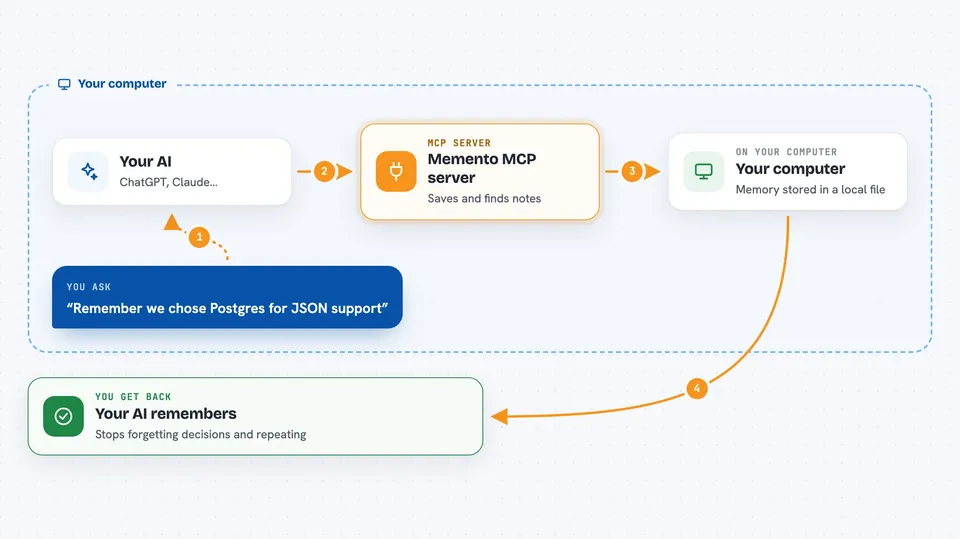
Memento is a small helper that gives your AI coding assistant a memory. It remembers facts, decisions, patterns, and past problems about your project, stored safely on your own computer. It is handy for anyone who uses an AI coding tool and is tired of explaining the same project details in every new chat.
What is an MCP server? The 30-second version
On its own, your AI can only chat with what is in front of it right now. An MCP server is a small helper program that gives your AI a new skill or a connection to something else. This one connects your AI to a local memory store for your project. So when you ask a question, the AI can look up what was decided or tried before, instead of starting from zero.
What this MCP server does
You install Memento once and connect it to your AI coding tool. From then on, when you ask your AI something, the AI can quietly check the memory store for related notes. If you tell the AI to remember something, it saves that note for later. The memory lives in a small database file on your computer, and you can browse it in a local web page. You can also share selected notes with your team through your project's normal file sharing.
 Click to zoom
What you can do with it
- Remember project decisions so you do not re-explain them
- Save known pitfalls and debugging notes for later
- Store coding patterns and conventions your project follows
- Import existing notes from files like CLAUDE.md or AGENTS.md
- Search past session summaries to see what you were doing
- Browse and inspect everything the AI has remembered in a local web page
- Share chosen notes with teammates through your project files
Try asking your AI
- “Remember that we chose Postgres over MySQL for this project because of the JSON support.”
- “What did we decide about the login flow last week?”
- “Have we hit this error before? Check your memory.”
- “Summarize what we worked on in this session and save it.”
What it gives back to you
You get answers in plain chat, drawn from what was saved before. When the AI saves something, it confirms the note was stored. When you search, you get a short list of matching notes with a snippet. In the local web page you can see full lists of memories, sessions, and projects.
Before you start
What you need
- Node.js 20 or newer installed on your computer
- An AI coding tool that supports MCP, such as Claude Code, Codex, or Cursor
Good to know
It saves notes on your computer and can share chosen notes through your project files, so avoid storing secrets and check what gets shared with your team.
Install it with your AI
Add Memento MCP server to your AI, no technical skills needed
You don't install anything by hand. You copy one prompt, paste it into an AI that can work on your computer, and it checks, installs and connects the server for you, asking you when it needs something.
Sign in to get the install prompt
Members get a ready-made prompt that lets the Claude desktop app check Memento MCP server, install it and connect it for them, step by step. You don't need any technical skills: you copy, paste and answer a few questions. Your connected AI can also find and install any of the 4,609 MCP servers here for you.
Who it's for
Developers and technical teams who use AI coding assistants daily and want them to remember project context between sessions.





