
MCP server · Notes
LinkLore MCP server
by linklore
Your AI can save project decisions and notes, then remember them in your next session.
LinkLore is a memory helper for AI coding assistants. It lets your AI write down decisions, warnings, and plans as it works, and read them back the next time you open the project. It is handy if you use an AI to help with code and you are tired of it forgetting everything between sessions.
What is an MCP server? The 30-second version
On its own, your AI can only chat. It cannot remember anything from one session to the next. An MCP server is a small helper program that gives your AI a new skill. LinkLore is that helper for project memory: it stores notes in a small database inside your project folder, and your AI can read and write those notes when you ask.
What this MCP server does
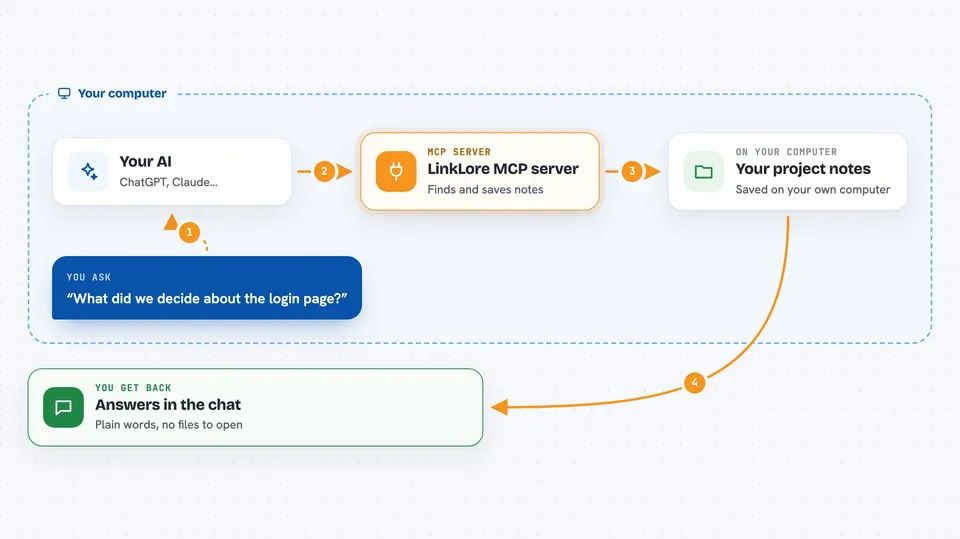
You ask your AI something like what did we decide about the login page. Your AI uses LinkLore to look through the saved notes for your project. LinkLore finds the matching entries and hands them back. Your AI then explains them to you in the chat. When you and your AI make a new decision, your AI can save it as a new note, linked to the files it touches.
 Click to zoom
What you can do with it
- Save a decision or a warning as a note for later
- Look up past decisions tied to a specific file or topic
- See a short summary of open items at the start of a session
- Write a spec or plan as a structured note instead of a separate file
- Link two notes together so related ideas stay connected
- Spot notes that may be out of date because the code changed
- Back up your project notes to your own space
Try asking your AI
- “What did we decide about how user sessions work?”
- “Show me any warnings or pitfalls linked to the login file.”
- “Save this decision as a note and link it to the files we just changed.”
- “Give me a short brief of open items before we start today.”
What it gives back to you
You get answers in the chat, in plain words. Your AI can show you a list of matching notes, a short summary of open items, or a single note with its details. When it saves something, it tells you what it saved and which files it linked to. Nothing shows up as a file you have to open yourself unless you ask.
Before you start
What you need
- An AI client that supports MCP, such as Claude Code, Cursor, Codex, or Windsurf
- Python and the uvx tool installed on your computer (uvx runs small Python programs without a full install)
- A project folder on your computer where the notes will live
Good to know
It can save, change, and delete notes in your project, so ask your AI to confirm before deleting or overwriting anything important.
Install it with your AI
Add LinkLore MCP server to your AI, no technical skills needed
You don't install anything by hand. You copy one prompt, paste it into an AI that can work on your computer, and it checks, installs and connects the server for you, asking you when it needs something.
Sign in to get the install prompt
Members get a ready-made prompt that lets the Claude desktop app check LinkLore MCP server, install it and connect it for them, step by step. You don't need any technical skills: you copy, paste and answer a few questions. Your connected AI can also find and install any of the 4,609 MCP servers here for you.
Who it's for
Developers and anyone using an AI assistant to help with code who wants the AI to remember project context between sessions.





