MCP server · Productivity
MinerU MCP server
by linxule
Turn PDFs, images, Word and PowerPoint files into clean text your AI can read and summarize.
This is a helper that lets your AI read documents it normally cannot open, like scanned PDFs, photos of pages, Word files and slide decks. You give it a link or a file, and it sends the document to MinerU, an online service that pulls the text out. It is handy if you deal with reports, papers or contracts and want your AI to read them for you.
What is an MCP server? The 30-second version
On its own, your AI can only chat with you. An MCP server is a small helper program that gives your AI a new skill or a connection to another service. This one connects your AI to MinerU, a document reading service. Once it is set up, you can ask your AI to read a PDF or a scanned page, and it will go and fetch the text for you.
What this MCP server does
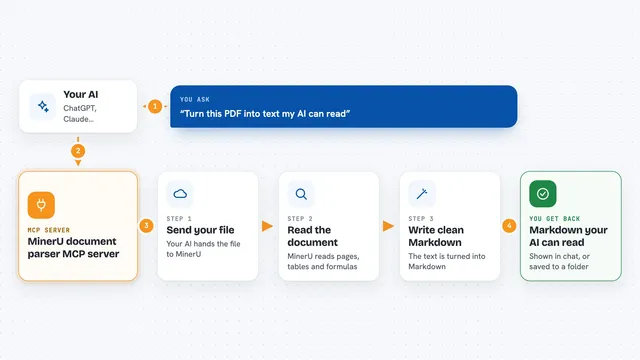
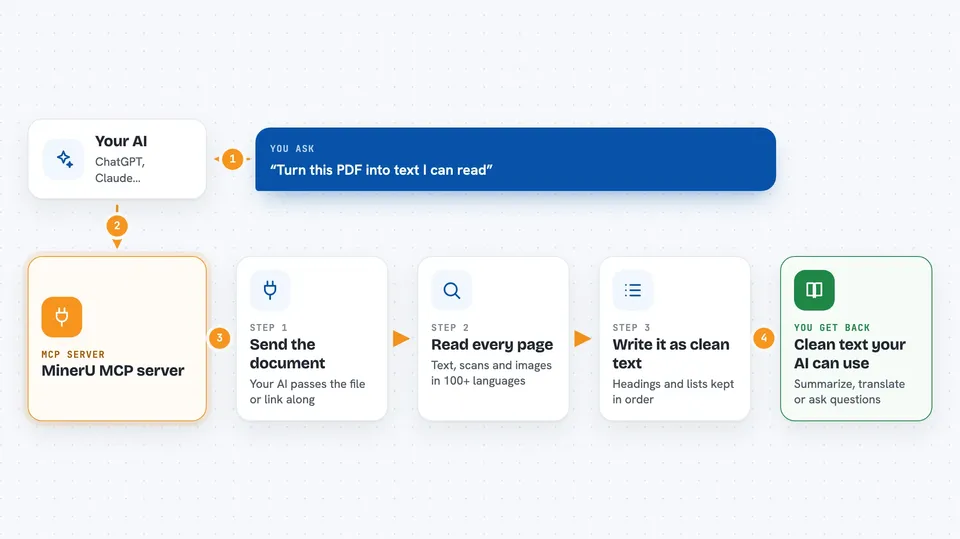
You ask your AI to read a document, and you give it a web link or a file on your computer. Your AI passes that to this helper, which sends the document to MinerU for processing. MinerU reads the pages, including text inside images, in over 100 languages. When it is done, the helper brings back the text, usually as Markdown, which your AI can then summarize, translate or answer questions about. For very long documents, it can split the file into parts and stitch the results back together.
 Click to zoom
What you can do with it
- Read a PDF from a web link and turn it into text
- Read a scanned page or photo and pull out the words
- Read Word documents and PowerPoint slides
- Process many documents at once, up to 200
- Extract only certain pages, like pages 1 to 10
- Handle very long documents by splitting and rejoining them
- Save the extracted text and images to a folder on your computer
What it gives back to you
You get back the text of the document, usually as Markdown, which is a simple way of writing that keeps headings and lists. Your AI can then show you a summary, answer your questions, or save the text to a file. For batches, you get results for each document, and you can download the full set as files. If something is missing or unclear, it tells you instead of guessing.
Before you start
What you need
- A MinerU account and an API key from mineru.net (an API key is like a password that lets apps use the service; you get one for free when you sign up)
- Node.js version 18 or newer installed on your computer
- A supported AI app like Claude Desktop, Cursor, VS Code or a similar tool
Good to know
It sends your documents to the MinerU online service, so do not use it for private or confidential files unless you are allowed to share them with that service.
Install it with your AI
Add MinerU MCP server to your AI, no technical skills needed
You don't install anything by hand. You copy one prompt, paste it into an AI that can work on your computer, and it checks, installs and connects the server for you, asking you when it needs something.
Sign in to get the install prompt
Members get a ready-made prompt that lets the Claude desktop app check MinerU MCP server, install it and connect it for them, step by step. You don't need any technical skills: you copy, paste and answer a few questions. Your connected AI can also find and install any of the 4,361 MCP servers here for you.
Who it's for
Anyone who works with PDFs, scans or Office files and wants their AI to read and summarize them, like researchers, analysts, lawyers and office workers.