
MCP server · Notes
skillmem MCP server
by liza-studio
Give your coding AI a local memory of skills it can learn, recall, strengthen, and forget over time.
skillmem is a memory helper for coding agents like Claude Code and Codex. It lets your AI save how it solved a task, remember that skill later, and slowly forget the ones it never uses. It is handy if you work with an AI on code every day and are tired of it starting from zero each time.
What is an MCP server? The 30-second version
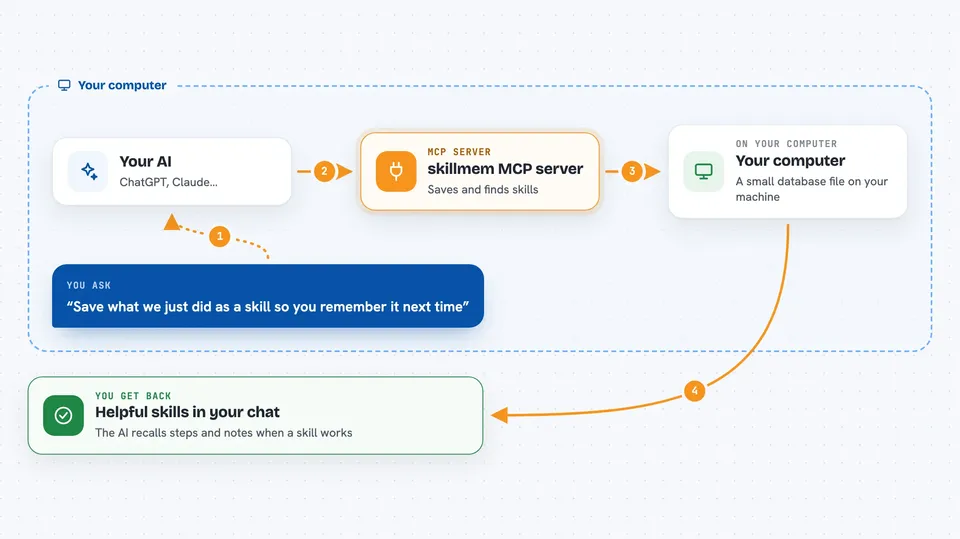
On its own, your AI can only chat with you using what is in the current conversation. An MCP server is a small helper program that gives your AI a new skill or a connection to something outside the chat. This one connects your AI to a local skill memory stored on your own computer. When you ask it to remember or recall something, the AI talks to skillmem, and skillmem reads or writes the notes on your disk.
What this MCP server does
After a hard task, your AI can write down how it was done as a skill: when to use it, the steps, the outcome, and what it learned. Before the next task, it can search that memory for relevant skills and bring them back into the conversation. When a skill actually helps, for example a test passes or you accept the change, its strength goes up. Skills nobody uses lose strength over time and are moved to an archive, not deleted. Everything stays on your computer in a small database file.
 Click to zoom
What you can do with it
- Save a skill after a tricky coding task
- Search your saved skills for something relevant
- Recall the best skills for the task in front of you
- Mark a skill as helpful after it works
- Pin an important but rarely used rule so it does not fade
- List and read your saved memories
- Export everything to plain markdown files
Try asking your AI
- “Save what we just did as a skill so you remember it next time”
- “Do you have a skill for fixing failing database migrations?”
- “That fix worked, mark the skill as helpful”
- “Pin the rule about never committing secrets so it never expires”
What it gives back to you
You get back short answers and lists in the chat. A recall gives you the most relevant skills with their trigger and steps. A search gives you matching memories with short previews. When the AI saves or updates something, it tells you what it wrote and under which name.
Before you start
What you need
- Python installed on your computer
- The skillmem package installed (pip install 'skillmem[semantic]')
- A coding agent like Claude Code or the Codex CLI, or the Claude Desktop app
Good to know
Your AI can write, change, and archive memories on your computer, so review what it saves before you rely on it.
Install it with your AI
Add skillmem MCP server to your AI, no technical skills needed
You don't install anything by hand. You copy one prompt, paste it into an AI that can work on your computer, and it checks, installs and connects the server for you, asking you when it needs something.
Sign in to get the install prompt
Members get a ready-made prompt that lets the Claude desktop app check skillmem MCP server, install it and connect it for them, step by step. You don't need any technical skills: you copy, paste and answer a few questions. Your connected AI can also find and install any of the 4,609 MCP servers here for you.
Who it's for
Developers and technical teams who use coding agents every day and want them to build up useful habits instead of repeating the same mistakes.





