
MCP server · Generative art
Dali MCP server
Check and improve your AI image and video prompts before you spend money generating them.
Dali is a helper that checks your AI image or video prompt before you hit generate. It gives the prompt a score out of 100 and tells you what is missing, like camera movement or lighting. It is handy if you make ads or content with tools like Veo, Kling, Midjourney or Flux and you are tired of wasting credits on bad results.
What is an MCP server? The 30-second version
On its own, your AI can only chat with you. An MCP server is a small helper program that gives your AI a new skill or a connection to another service. This one connects your AI to Dali, a scoring service for image and video prompts. Once connected, your AI can send your prompt to Dali, get a score and a list of things to fix, then rewrite the prompt for you.
What this MCP server does
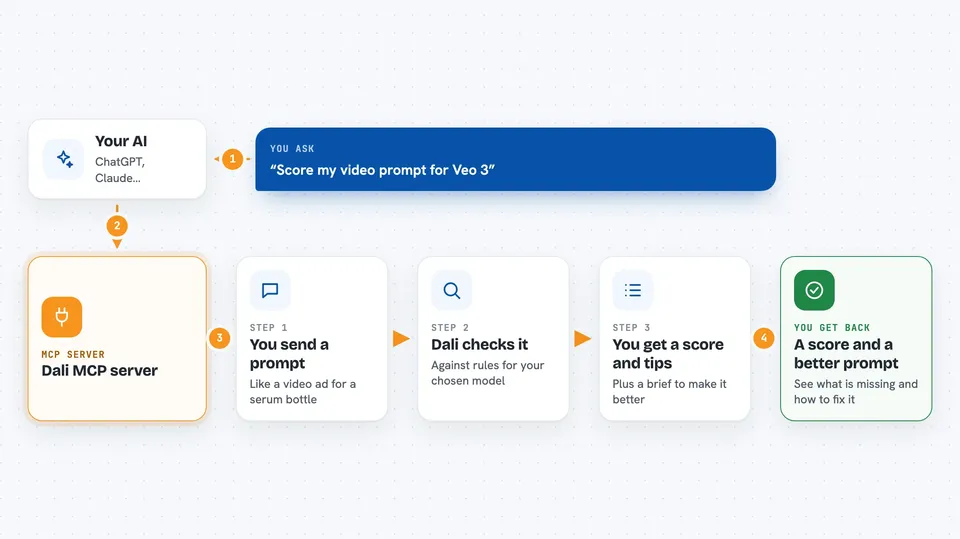
You type a prompt you are thinking of using, like a video ad for a serum bottle. Your AI sends it to Dali along with the model you plan to use, such as Veo 3 or Kling. Dali checks it against its rules for that model and gives back a score, a grade, and a short list of what is missing, like no camera move or no lighting. If the score is low, Dali also sends a rewrite brief, and your AI uses that brief to write a better prompt. You can then score the new prompt again to see if it is ready.
 Click to zoom
What you can do with it
- Score a prompt out of 100 before you generate anything
- Get a list of what is missing, like camera, motion or lighting
- Get a rewrite brief your AI can use to improve the prompt
- Rank several prompt versions from best to worst in one go
- Check an image against examples of ads that have been running a long time
- Compare your prompt with what other people are scoring well
- Pick a generator that fits your idea and your budget
Try asking your AI
- “Score this prompt for Veo 3: a glass serum bottle on a marble table”
- “This prompt got a 40, rewrite it using the brief Dali gave me”
- “Rank these three Midjourney prompts from best to worst”
- “Which model should I use for a 10 second product video with a 20 dollar budget”
What it gives back to you
You get a score from 0 to 100, a letter grade, and a short verdict like safe to generate or enhance first. Dali also lists the weak spots, such as no camera move or no lighting, and when the score is low it includes a rewrite brief. For images, it can show which long-running ads your picture resembles and which winning details are missing. Everything comes back as text in your chat, so you can read it and act on it right away.
Before you start
What you need
- An AI app that can connect to MCP servers, like Claude Code, Cursor or Windsurf
- An internet connection, since the scoring runs on Dali's hosted server
- Nothing to install if you use the hosted version
Good to know
The scores are based on how long ads have been running, not on proven sales results, so treat them as a strong hint rather than a guarantee.
Install it with your AI
Add Dali MCP server to your AI, no technical skills needed
You don't install anything by hand. You copy one prompt, paste it into an AI that can work on your computer, and it checks, installs and connects the server for you, asking you when it needs something.
Sign in to get the install prompt
Members get a ready-made prompt that lets the Claude desktop app check Dali MCP server, install it and connect it for them, step by step. You don't need any technical skills: you copy, paste and answer a few questions. Your connected AI can also find and install any of the 4,361 MCP servers here for you.
Who it's for
People who make ads or social content with AI image and video tools and want fewer wasted generations.




