MCP server · Email
Outlook Mailbox Cleanup MCP server
by ma2no4413
Let your AI tidy up a huge Outlook or Hotmail mailbox: move folders, bulk move and mark read, and manage inbox rules.
This is a helper that connects your AI assistant to your Outlook or Hotmail mailbox so it can help you clean it up. It is made for big, messy mailboxes where you want to move whole folders around, clear out thousands of old messages, or sort things by sender. It is handy if you have years of mail piled up and no time to click through it all.
What is an MCP server? The 30-second version
On its own, your AI can only chat with you. An MCP server is a small helper program that gives your AI a new skill, in this case a connection to your Outlook mailbox. Once it is connected, you can ask your AI to look through your mail or reorganise folders, and it does that for you. This particular helper is built so it can never send email or permanently delete anything, which keeps things safer.
What this MCP server does
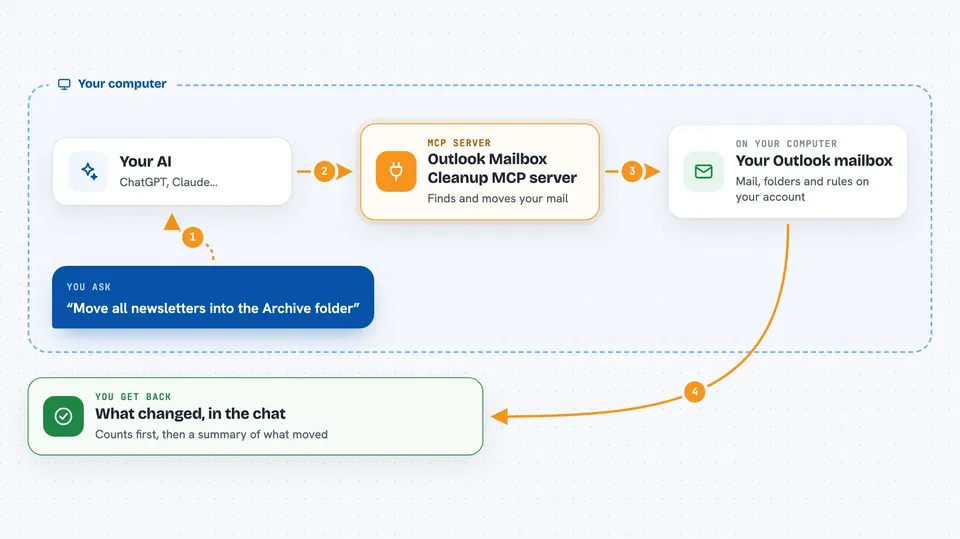
You ask your AI something like "move all newsletters into the Archive folder". Your AI passes that request to this helper. The helper talks to your Outlook mailbox through Microsoft's own connection service, finds the matching messages, and moves or marks them. Then it tells you back in the chat what it did, or shows you a preview count first if you asked for a dry run. It can also read your mail, list your folders, and set up inbox rules that keep working even when your AI is not running.
 Click to zoom
What you can do with it
- Search your mailbox by keyword, sender, date range, unread status, or folder
- Read message bodies, with HTML turned into plain readable text
- Move a whole folder, including everything inside it, to a new place in one go
- Bulk move or mark read hundreds or thousands of messages, with a preview first
- Create, rename, move, and delete folders
- Read, create, and delete inbox rules on the server
- Write a draft or a reply and leave it in Drafts for you to send yourself
Try asking your AI
- “Show me all unread messages from the last two weeks”
- “Move everything from newsletters@example.com into the Newsletters folder, but show me the count first”
- “Mark all messages in the Promotions folder as read”
- “Create an inbox rule that moves anything from my boss into the Work folder”
What it gives back to you
You get answers in the chat: lists of matching messages with subject, sender, and date, folder trees with item and unread counts, or a summary of what changed. For bulk actions, it first tells you how many messages matched before anything moves. After a real run, it reports how many messages were moved or marked. Drafts it writes show up in your Outlook Drafts folder, not in the chat.
Before you start
What you need
- A Microsoft account (personal Hotmail/Outlook.com, or a work or school account)
- Python 3.10 or newer installed on your computer
- An MCP client such as Claude Code
- A one-time app registration in Azure to get an application ID (free, no Azure subscription needed; the README has a step-by-step guide)
Good to know
It can move and mark read large numbers of messages, and marking read cannot be undone, so always check the dry-run count before running a bulk action for real.
Install it with your AI
Add Outlook Mailbox Cleanup MCP server to your AI, no technical skills needed
You don't install anything by hand. You copy one prompt, paste it into an AI that can work on your computer, and it checks, installs and connects the server for you, asking you when it needs something.
Sign in to get the install prompt
Members get a ready-made prompt that lets the Claude desktop app check Outlook Mailbox Cleanup MCP server, install it and connect it for them, step by step. You don't need any technical skills: you copy, paste and answer a few questions. Your connected AI can also find and install any of the 4,361 MCP servers here for you.
Who it's for
Anyone with a large, cluttered Outlook or Hotmail mailbox who wants help sorting, archiving, and clearing it out, especially people who get a lot of email and have let it pile up.