
MCP server · Productivity
Everything Search MCP server
Lets your AI search the files and folders on your own computer by name, size, or date.
This is a small helper that lets your AI search the files on your own computer. You ask in plain words, and it finds matching files and folders for you. It is handy if you often lose track of where you saved something.
What is an MCP server? The 30-second version
On its own, your AI can only chat. It cannot see your computer. An MCP server is a small helper program that gives your AI a new skill, and here that skill is searching your files. Once it is connected, your AI can look things up on your machine when you ask, instead of you digging through folders yourself.
What this MCP server does
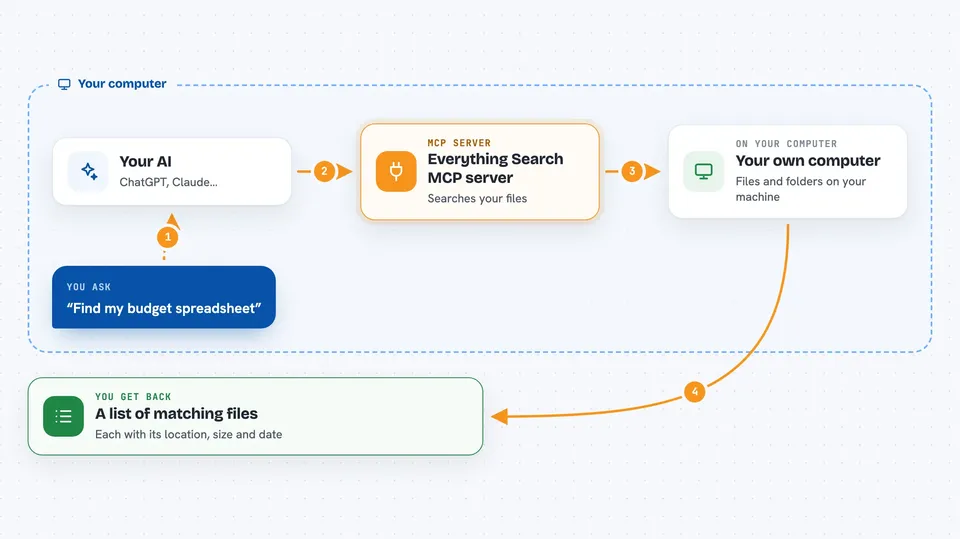
You ask your AI something like find my budget spreadsheet. Your AI passes that request to this helper. The helper searches your computer's file index and sends back a list of matches. Your AI then shows you the results in the chat. On Windows it uses the Everything search tool, on Mac it uses the built-in Spotlight search, and on Linux it uses the locate tool.
 Click to zoom
What you can do with it
- Find files by name or part of a name
- Find files by type, like all PDFs or all spreadsheets
- Sort results by size, date, or name
- Search for files changed today or this week
- Match against the full folder path, not just the file name
- Limit how many results you get back
Try asking your AI
- “Find all my PDF files from this month”
- “Where is the presentation I made last week?”
- “Show me the ten biggest files in my Downloads folder”
- “Find any file with invoice in the name”
What it gives back to you
You get a list of matching files and folders. Each result shows the full location, the file size, and when it was last changed. Your AI can then read that list out, group it, or help you decide which one you meant.
Before you start
What you need
- The Claude desktop app
- On Windows: the free Everything search tool from voidtools, running as a service
- On Windows: the Everything SDK files downloaded to your computer
- On Linux: the locate or plocate tool installed and its database updated
Good to know
This only searches your files, it does not change or delete anything, but the results can reveal private file names and locations, so be careful what you share from them.
Install it with your AI
Add Everything Search MCP server to your AI, no technical skills needed
You don't install anything by hand. You copy one prompt, paste it into an AI that can work on your computer, and it checks, installs and connects the server for you, asking you when it needs something.
Sign in to get the install prompt
Members get a ready-made prompt that lets the Claude desktop app check Everything Search MCP server, install it and connect it for them, step by step. You don't need any technical skills: you copy, paste and answer a few questions. Your connected AI can also find and install any of the 4,361 MCP servers here for you.
Who it's for
Anyone who works with lots of files on their own computer and wants to find them by asking instead of clicking through folders.




