
MCP server · Productivity
Zero Slop MCP server
by manavmishra
Your AI can score a draft for AI slop and rewrite it without losing your names, numbers or links.
Zero Slop is a free, open-source helper that finds the telltale wording that makes writing sound machine-made, then guides your AI through a careful edit. It is handy for anyone who drafts with an AI and wants the result to sound like a person wrote it. It also checks that your important details survive the rewrite.
What is an MCP server? The 30-second version
On its own, your AI can only chat with you. An MCP server is a small helper program that gives your AI a new skill or a connection to a service. This one connects your AI to Zero Slop, a writing checker that lives on the web. Once it is connected, your AI can send your draft to Zero Slop and get back a score and a cleaned-up version.
What this MCP server does
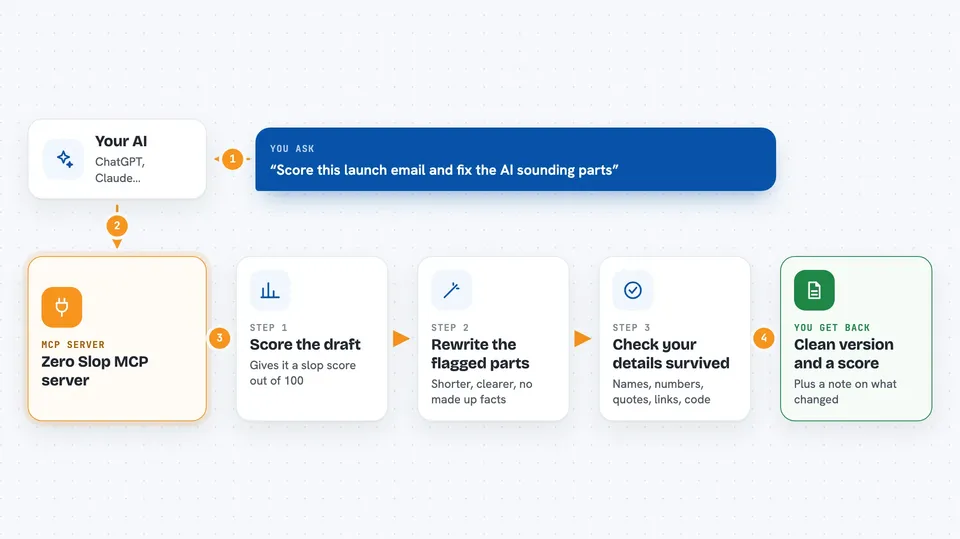
You paste a draft into your chat and ask your AI to run it through Zero Slop. Your AI sends the text to the Zero Slop service, which scores it from 0 to 100, where a higher number means more slop patterns. Zero Slop then guides your AI to rewrite the flagged parts without inventing new facts. Before you get the result, it checks that names, numbers, quotations, links and code are still intact. You end up with a shorter, clearer version and a note about what changed.
 Click to zoom
What you can do with it
- Score a draft and see how sloppy it reads
- Rewrite a paragraph to remove canned openers and hype words
- Check that names, numbers and links survived the edit
- Inspect which phrases were flagged without changing the text
- Compare the edited version against your original
- Teach it a preference by showing an edit you made and why
Try asking your AI
- “Score this launch email and tell me what sounds like AI wrote it”
- “Rewrite this paragraph so it sounds like a person, and keep my numbers the same”
- “Inspect this draft and list the flagged phrases without editing it”
- “Clean up this LinkedIn post and check that my links still work”
What it gives back to you
You get a writing score out of 100, a list of the flagged phrases, and a rewritten version of your text. It also tells you whether the source details like names, numbers and links passed the check. Everything shows up right in the chat, so you can copy the clean version or ask for another pass.
Before you start
What you need
- An AI assistant that can connect to an MCP server, such as Claude or another compatible app
- An internet connection, since the editing runs on the hosted Zero Slop service
Good to know
It sends your text to a hosted service to be scored and edited, so do not paste anything private or confidential.
Install it with your AI
Add Zero Slop MCP server to your AI, no technical skills needed
You don't install anything by hand. You copy one prompt, paste it into an AI that can work on your computer, and it checks, installs and connects the server for you, asking you when it needs something.
Sign in to get the install prompt
Members get a ready-made prompt that lets the Claude desktop app check Zero Slop MCP server, install it and connect it for them, step by step. You don't need any technical skills: you copy, paste and answer a few questions. Your connected AI can also find and install any of the 4,361 MCP servers here for you.
Who it's for
Anyone who writes with an AI and wants the result to sound human, especially people in marketing, communications, support and office roles.





