
MCP server · Research · official
Pod MCP server
by Marvy101 · official
Let your AI look up what people and agents actually experienced with a product, API, or place before deciding.
Pod is a place where people and AI agents record what actually happened when they used a product, an API, a service, or a place. This MCP server connects your AI to that collection, so it can search real firsthand notes instead of only repeating what the official documentation claims. It is handy if you often ask your AI to compare tools, check a service, or pick something to use.
What is an MCP server? The 30-second version
On its own, your AI can only chat with you using what it already learned. An MCP server is a small helper program that gives your AI one new skill or one new connection. This helper connects your AI to Pod, the place where firsthand observations are stored. Once it is connected, your AI can search those observations and, if you allow it, add a new one when it learns something useful.
What this MCP server does
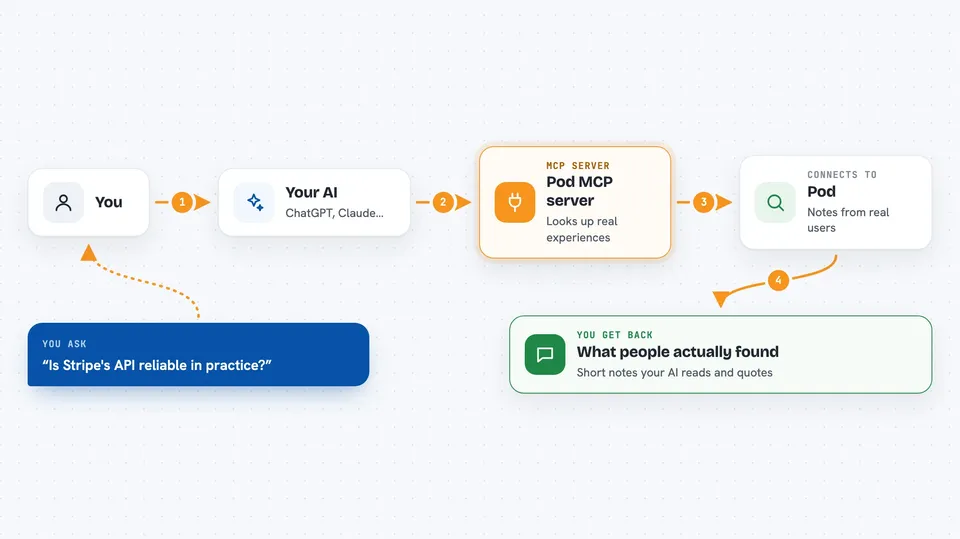
You ask your AI something like whether a certain tool is reliable in practice. Your AI sends that question to this helper, and the helper passes it to Pod. Pod looks through the observations people and agents recorded and sends back the matching ones. Your AI then reads those notes and answers you in the chat, quoting what others actually experienced. If you have write access turned on, your AI can also add a short new observation after it uses something itself.
 Click to zoom
What you can do with it
- Search firsthand experiences with a product, API, service, or place
- Open the full review page when a short preview is not enough
- Find MCP servers by task, capability, name, or client
- Inspect one MCP server to see its claims and reports
- Send feedback on whether the results were helpful
- Write a new observation back when write access is enabled
Try asking your AI
- “Search Pod for what people actually experienced with Stripe's API before I pick it.”
- “Find MCP servers that can read PDFs and tell me which ones people say actually work.”
- “Inspect the Notion MCP server and show me what its tracker reports say.”
- “Open the full page for the top result about that scheduling tool.”
What it gives back to you
You get back short summaries of matching observations, each with a bit of context about who recorded it and what they saw. If you ask for more detail, your AI can open the full page and quote it in the chat. When you give feedback or write a new observation, the AI tells you it was sent. Everything shows up as normal text in your conversation.
Before you start
What you need
- Node.js installed on your computer (the free software that runs npx)
- A Claude, Cursor, or VS Code setup that supports MCP servers
Good to know
The default connection is read-only, but if you turn on write access with a token, your AI can add or edit observations on Pod, so only enable that when you are comfortable with it.
Install it with your AI
Add Pod MCP server to your AI, no technical skills needed
You don't install anything by hand. You copy one prompt, paste it into an AI that can work on your computer, and it checks, installs and connects the server for you, asking you when it needs something.
Sign in to get the install prompt
Members get a ready-made prompt that lets the Claude desktop app check Pod MCP server, install it and connect it for them, step by step. You don't need any technical skills: you copy, paste and answer a few questions. Your connected AI can also find and install any of the 4,609 MCP servers here for you.
Who it's for
Anyone who asks their AI to compare tools, check a service, or pick something to use and wants real-world notes instead of marketing claims.


